How CareClinic: Symptom and medication tracker works
Careclinic Software Inc. · Health & Fitness
Android
What it does
CareClinic is a health journal for chronic conditions: symptoms with severity, medications with reminders, mood, factors, journal, sleep and care team sharing, with AI insights and reports gated behind a paid plan.
Who it is for: People with chronic conditions who want to track symptoms, medications, mood, and sleep and share them with their care team.
Key features
Long personalised onboarding
Carousel, birthday, gender, goal, pain points, conditions, symptoms, reminders, plan.
Medication tracking and reminders
Drug database search, dose, schedule reminders, adherence.
Paywalls and offers
Trial paywall, plan sheet, downsell modal, one-time offer.
Symptom tracking with severity
Severity cells and slider, time, notes, groups, reminders.
Journal, mood, factors and sounds
Other trackers and soundscapes.
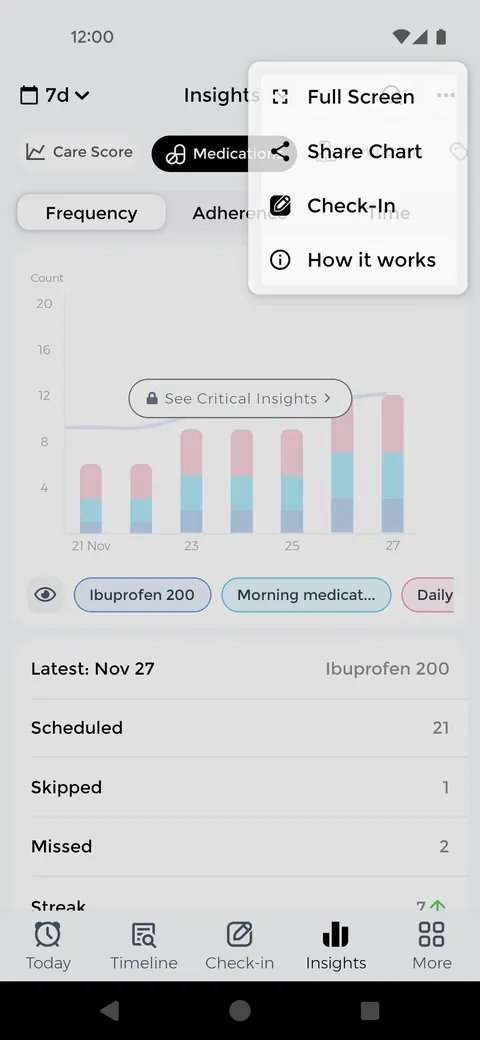
Insights and charts
Medication and symptom insights, mostly locked.
The main user flow
- Sign up, answer about 10 onboarding questions, pick condition and symptoms
- Check-in tab: choose tracker tile, log, Save Check-in, see streak sheet
- Add medication from a drug database with daily reminder
- Review timeline and insights (locked)
- Navigation
- Bottom tabs Today, Timeline, Check-in, Insights, More; floating assistant bubble.
- Onboarding
- Welcome carousel, notification pre-prompt, account creation (no email verification), birthday, gender, goal, pain points, condition, symptoms, reminders, plan build, trial paywall, downsell modal, Health Connect, referrer, invite, one-time offer.
- How it makes money
- Freemium with 3-day trial. Prices shown in local currency (redacted in maps). Paywall at nearly every step: trial paywall, downsell modal, one-time 60% off offer, locked insights, locked sounds, Upgrade Now banner.
Screenshots
10 of 63 screens, captured on a real phone with sample data.
Check-in tab Add symptoms Journal Birthday wheel Add medication search Today tab Paywall Settings Carousel: check-in Insights menu - +53 more screensFree with an account
Screenshots: © Careclinic Software Inc., shown for commentary.
See all 63 screens — create a free accountSee every screen
The full map has all 63 screens, every feature and where each one lives. It is free with an account.
What could be better
Our read of the map, the store listing and recent reviews.
Make the free trial cancellable before any charge, with a reminder before billingmedium
Users report being charged during a trial they thought was free and getting no answer on refunds. Show the renewal date and price on the trial screen, send a reminder before the first charge, and make cancellation and refunds self-serve in the app.
Save every log entry reliably and never drop data on sync or loginlarge
Users report saves that fail, entries that vanish from the timeline, and months of data missing. Write each check-in locally first, confirm the save, sync in the background, and keep an export that includes all records.
Show one paywall after the first useful entry and keep a usable free tiermedium
Users hit a paywall on nearly every step and get several popups in their first minutes, and the free tier caps symptoms and medications. Show one offer after the first saved check-in, keep a free tier that can log core symptoms and medications, and cut the repeat popups.
Cut onboarding to a few required questions and make account creation optionalmedium
Users stop because onboarding asks too many questions and forces sign-up before they see the app. Ask only for the condition and first symptoms, defer birthday, gender and referrer questions, and let people try the tracker before creating an account.
Make check-in one screen with a single save actionsmall fix
Logging a symptom takes several pages and many save steps, and the app can freeze or jump screens mid-entry. Put all trackers the user picked on one scrollable page with one Save button, and keep the list scroll position when moving to reminders.
Let users edit times, dates and conditions on existing entries and delete mistakessmall fix
Users cannot change the time of a logged entry, cannot delete a mis-timed entry, and get pushed to purchase when editing times. Allow free edit and delete for any logged entry and any added condition, with an undo window.
Sync with Health Connect and Google Fit so selected data stays enabledmedium
Users report integration toggles that stay on but do not sync, and missing permissions such as nutrition. Show each data type's sync status, re-check permissions on each launch, and warn when a permission was revoked.
Want an app like this, but better?
Tell us the idea. We research it, and build it for you.
Submit your idea