
How Daylio Journal - Mood Tracker works
Habitics s.r.o. · Health & Fitness
Android iOS
What it does
Daylio is a micro-journaling mood tracker: in two taps you log how you feel (five default moods) plus the activities you did, with an optional note, photo or voice memo and no writing required. Over time it turns those entries into statistics, charts, a mood calendar, streaks, goals, achievements and weekly reports.
Who it is for: People who want a quick way to log their mood and daily activities with two taps, optionally adding a note, photo, or voice memo, and see patterns over time.
Key features
Customization
Edit moods, activities, colours, font, light/dark theme and general preferences.
Mood logging
The core loop: pick one of five moods for a point in time and save it as a diary entry.
Goals & challenges
Build habits via guided challenges or custom activity goals with frequency and streaks.
Statistics & charts
Mood charts, streaks, mood/activity counts, averages, correlations and advanced (Premium) metrics.
Activity tracking
Tag each entry with activities (and custom groups/scales) to correlate behaviour with mood.
Premium / monetisation
Freemium model (ads + IAP): free-trial and sale paywalls, and Premium-gated stats and emoji.
The main user flow
- Onboarding (welcome -> ad-ID consent -> mood palette -> activities -> reminder -> notification permission -> free-trial paywall)
- Log an entry (pick mood -> select activities -> note/photo/voice -> save), including backdated entries via the FAB 'Other day'
- Review insights (Stats tab: mood chart, mood/activity counts, averages, correlations; Calendar; Weekly Reports)
- Build habits (Goals: guided challenges or custom activity goals with streaks) and earn Achievements
- Customize (edit moods, activities, colours, font, light/dark theme) and manage data (Google Drive backup, PDF/CSV export)
- Navigation
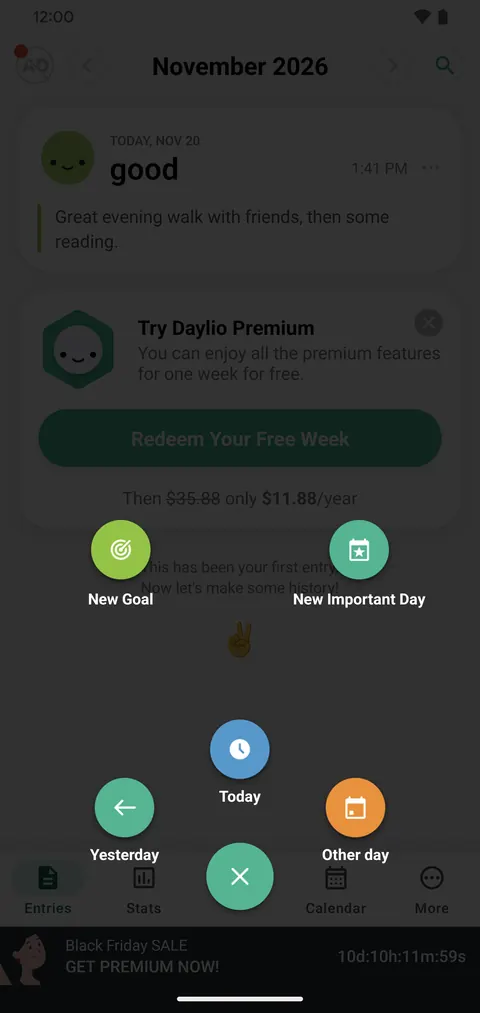
- A bottom tab bar with Entries, Stats, a central + FAB (expands to Today/Yesterday/Other day/New Goal/New Important Day), Calendar and More. 'More' is the hub for goals, weekly reports, important days, photo gallery, achievements, reminders, customization, settings, backup and export.
- Onboarding
- A five-step illustrated onboarding that also asks for ad-ID consent, lets you pick a mood palette, trims suggested activities, sets a default 8:00 PM reminder, requests notification permission, then presents a 7-day free-trial paywall (skippable). The app immediately drops you into logging your first entry.
- How it makes money
- Freemium: ads plus in-app purchases. Daylio Premium is sold as a 7-day free trial then an annual plan (seen at $23.88/yr and, in a Black Friday sale, $11.88/yr / $0.99 mo), a monthly plan ($2.99), or a lifetime purchase ($34.85). Premium gates advanced stats (e.g. Mood Stability), most mood emoji, and removes ads. A persistent sale banner and inline upsell cards recur through the free UI.
Screenshots
10 of 60 screens, captured on a real phone with sample data.
Home - first entry Achievements list Goal detail Edit entry Add entry - Activities & note Search results Paywall - Free trial Edit Activities Onboarding - Mood palette Add entry - FAB menu - +50 more screensFree with an account
Screenshots: © Habitics s.r.o., shown for commentary.
See all 60 screens — create a free accountSee every screen
The full map has all 60 screens, every feature and where each one lives. It is free with an account.
What could be better
Our read of the map, the store listing and recent reviews.
Offer a classic entry-card layout option alongside any redesignmedium
Users report the redesigned entry cards are hard to read and that the change broke long-held habits. Ship a layout switch in settings, keep the previous card density, and add a jump-to-notes control after the activities grid.
Show one paywall after the first saved entry, not during onboardingsmall fix
Onboarding currently shows a free-trial paywall and ad consent before any entry is logged, and the first save shows a second sale paywall. Remove the onboarding paywall and show a single dismissible offer after the first win.
Offer a one-time lifetime purchase and a working restore-purchases flowmedium
Users who bought a lifetime plan say it became a subscription or was revoked, and restore did not work. Keep a lifetime option beside any subscription, and make restore always show past purchases with a clear status.
Keep ads out of the paid experience and off health-related screensmedium
Paying users still see ads and promotions, including weight-loss and calorie-app pop-ups in a mood journal. Remove ads for paying users, and ban ads for unrelated health or weight products from the journal screens.
Add encrypted backup to a user-chosen destination and a re-importable exportlarge
Backup is Google Drive only, backups are not encrypted and store the PIN in plaintext, and exports cannot be re-imported. Offer encrypted backup to other destinations and an export format that restores entries.
Hide entry text on lock screens and in reminder notifications by defaultsmall fix
A notification exposed diary memories to anyone with access to the phone. Show only a generic prompt on the lock screen by default, and let users opt in to showing text.
Make reminders reliable, quiet-able and loggable from the notificationmedium
Users miss reminders, get duplicate prompts, cannot silence sound, and must confirm after picking a mood. Let the notification take a mood in one tap, respect a silent setting, and skip reminders after a recent entry.
Show full-length journal entries without truncation and export them intactsmall fix
Long entries are cut off until edit mode is opened, and long entries fail to export. Render the full note in the entry view with an expand control, and make export include every character.
Want an app like this, but better?
Tell us the idea. We research it, and build it for you.
Submit your idea