
How OpenTable works
OpenTable, Inc. · Food & Drink
Android
What it does
Restaurant reservation app with map discovery, menus, reviews and a loyalty programme.
Who it is for: People looking to find and book restaurant reservations, browse menus and reviews, and earn loyalty rewards.
Key features
Restaurant pages
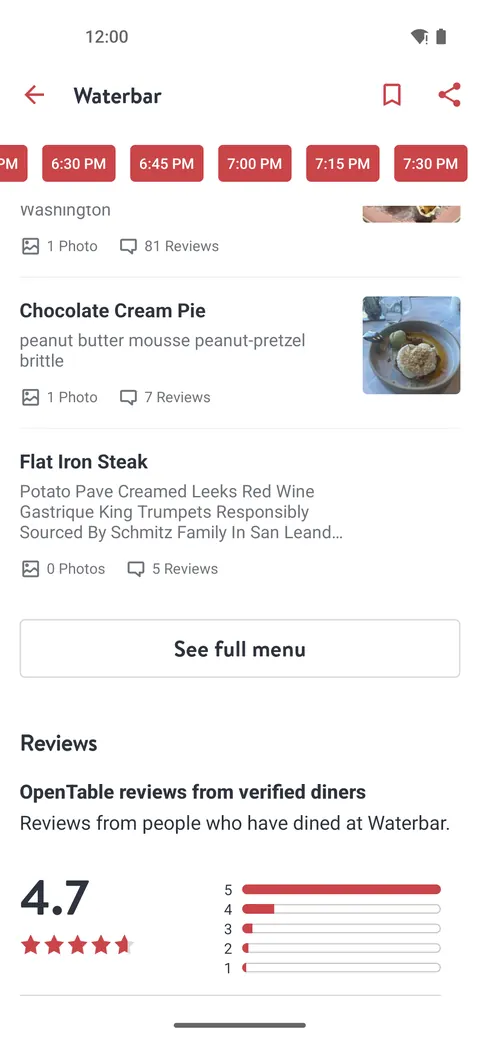
Details, menu, reviews, availability.
Reservation sign-in wall
Time slot leads to seating option then phone or email verification.
Discover restaurants
Map and list with time slots and search.
Rewards
Regulars loyalty programme.
The main user flow
- Find a restaurant on the map
- Pick a time slot
- Verify phone or email to reserve
- Navigation
- Four-tab bottom bar (Home, Search, Rewards, Profile).
- Onboarding
- Location rationale, then location and notification permissions; browsing needs no account.
- How it makes money
- Cover fees from restaurants, Regulars rewards, partner perks.
Screenshots
10 of 13 screens, captured on a real phone with sample data.
Map home Restaurant page Search Rewards hub Location rationale Seating option Phone sign-in Location permission Restaurant page (experiences) Restaurant page (menu and reviews) - +3 more screensFree with an account
Screenshots: © OpenTable, Inc., shown for commentary.
See all 13 screens — create a free accountSee every screen
The full map has all 13 screens, every feature and where each one lives. It is free with an account.
What could be better
Our read of the map, the store listing and recent reviews.
Let users browse and reserve without forcing phone or email sign-in firstmedium
Booking hits a sign-in wall after picking a time: seating sheet, then phone or email verification. Reviews say codes never arrive. Instead, collect contact details at the final confirm step and let people hold a time slot first.
Fix launch and loading failures with a retry path and an offline-safe start screenlarge
Many users report the app hanging on the logo or endless spinners, and reinstalling does not help. Build a launch that shows cached restaurant lists, times out with a clear retry, and reports load failures instead of spinning forever.
Add an in-app reservations list with view, change and cancel actionsmedium
Users cannot see or change bookings in the app; some say changes never connect and the list crashes. Put upcoming reservations on the main tabs with change time and cancel actions that work offline-tolerant and show the cancellation fee before confirming.
Show which card is charged and let users manage cards without leaving bookingmedium
Reservations require a credit card, card approval can take several tries, and cards cannot be removed or added mid-booking. Let users add or remove cards inside the booking flow and show what will be charged before submit.
Ask for a search city or destination before showing a mapsmall fix
Users get shown a map in the wrong city when location is off or they travel, and cannot search other cities easily. Show a city picker on first launch and let people set a destination area before the map loads.
Ask for confirmation before waitlist removal and date changessmall fix
A mis-tap removed a user from a waitlist with no confirmation, and a Thanksgiving booking was made for today. Require a confirm step with the date, time and party size shown before any booking or removal is saved.
Make notification permission optional and limit reminder messages to user choicesmall fix
Reminders never arrive for some users, while others get spam. Offer reminder settings with a per-type toggle, send only booked reminders, and avoid a notification prompt before the user needs one.
Show Rewards progress honestly and explain how points are earnedmedium
Users report points and perks not appearing after many reservations, and support is hard to reach. Show a per-reservation points ledger and the exact rule for each status tier, with a help link on the Rewards screen.
Want an app like this, but better?
Tell us the idea. We research it, and build it for you.
Submit your idea