How Home Workout - No Equipment works
Leap Health Fitness Limited · Health & Fitness
Android
What it does
Home Workout - No Equipment provides timed bodyweight workout routines that can be done at home without gym equipment. Each day's routine lists exercises with guided instructions, how-to videos, and music, and it adapts based on user feedback.
Who it is for: People who want timed bodyweight workouts they can do at home without gym equipment.
Key features
Workout music settings
Pick background music for workouts and stream audio from other apps.
Exercise guide
Per-exercise details: duration, step-by-step instructions and focus areas.
Reps or time mode
Choose whether exercises are counted by repetitions or by time.
Sound options
Toggle mute, voice guide, coach tips and sound effects.
Import local music
Import tracks from the device into the workout playing queue, needs audio permission.
Coach video choice
Choose between a real coach or an animated coach for workout videos.
The main user flow
- Open a daily workout plan, review the exercise list, and start the session
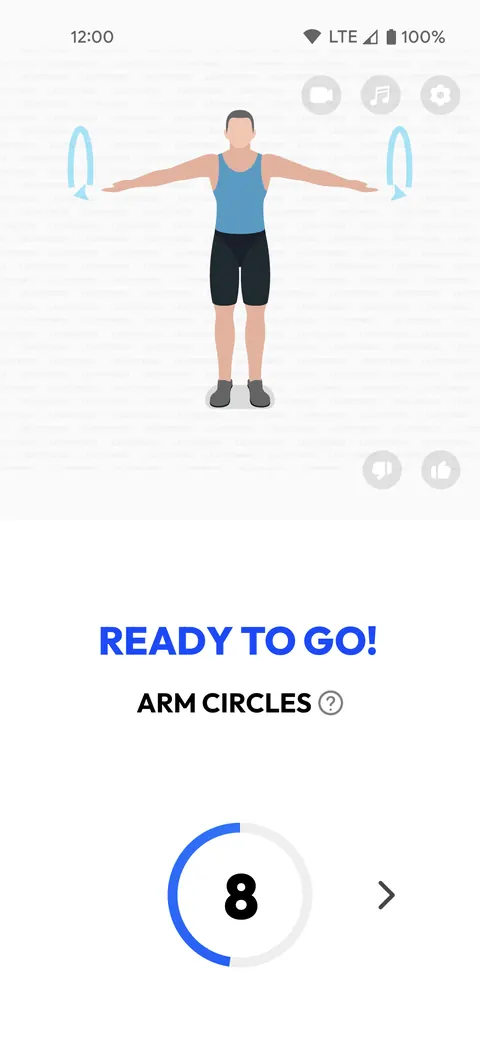
- Work through each exercise with a ready screen, timer, and optional how-to video or instructions
- Customise settings for coach video, music, sound, rest/prep timers, and reps/time mode
- Quit or exit mid-workout, then give feedback on difficulty
- Navigation
- Mostly a single-stack flow: plan list, then settings and exercise screens reached through buttons, with sheets and dialogs layered on top. Back actions and close buttons return to the plan list.
- Onboarding
- Not seen in these screens; the crawl starts from the workout list.
- How it makes money
- none seen
Screenshots
10 of 31 screens, captured on a real phone with sample data.
Day 1 workout overview Arm Circles exercise info Workout Settings Track options menu Choose coach video Splash Arm Circles - common mistakes (part 1) Music access permission Day 1 workout overview (after closing) Ready to go - Arm Circles - +21 more screensFree with an account
Screenshots: © Leap Health Fitness Limited, shown for commentary.
See all 31 screens — create a free accountSee every screen
The full map has all 31 screens, every feature and where each one lives. It is free with an account.
What could be better
Our read of the map, the store listing and recent reviews.
Let users dismiss every ad and keep the close button workingmedium
Users report ads they cannot skip or close, which blocks the way to the workout. Show skippable ads only between sessions, never before the first exercise, and make close always return to the plan list.
Show trial terms and require explicit consent before any first chargemedium
Users say a trial charged them at once and refunds were refused. Show the first charge date and amount on the paywall, require a separate tap to start paid access, and send a receipt after purchase.
Ask for a starting level and adjust intensity from each post-workout feedbackmedium
Users say beginner mode still gives hard moves and that feedback changes nothing. Ask for a starting level, then apply too hard or too easy by changing reps or time for the next session, and show the change.
Let users choose reps or timed mode per plan and show it on the plan listsmall fix
Users are confused when exercises switch to a fixed time instead of counts, and some want set-based routines back. Show the mode on each plan row and keep one mode per plan until the user changes it.
Keep a plan stable and offer a clear next plan after 28 daysmedium
Users report workouts changing day to day and no harder plan after a 28-day cycle. Keep a fixed plan order, show what changes and when, and offer a harder next plan at the end instead of a silent restart.
Label plan-screen buttons and show full instruction textsmall fix
The Edit and Exercises options have no labels and instructions are cut off on some screens. Add text labels to buttons, wrap instructions fully, and split long exercise info into short sections.
Keep a recent-workouts list and load full history without long waitsmedium
Users say the recent-workouts list was removed and full history loads slowly. Keep a short recent list on the plan screen and cache history so it opens without a long wait.
Want an app like this, but better?
Tell us the idea. We research it, and build it for you.
Submit your idea