How Step Counter - Pedometer works
Leap Health Fitness Limited · Health & Fitness
Android
What it does
A pedometer that automatically counts daily steps and shows distance, calories and active time against a daily goal. It also offers short guided home workouts, exercise reminders and a personalised walking plan setup.
Who it is for: For people who want to track their daily steps, distance, calories and active time against a goal, and do short home workouts.
Key features
Workout library
Browse categorised 2 to 7 minute workouts and reorder groups.
Exercise reminders
Schedule daily exercise reminder time and repeat days.
Guided workout sessions
Step-by-step exercise intros with video and start button.
In-app advertising
Banner ads shown on several screens.
Permission prompts
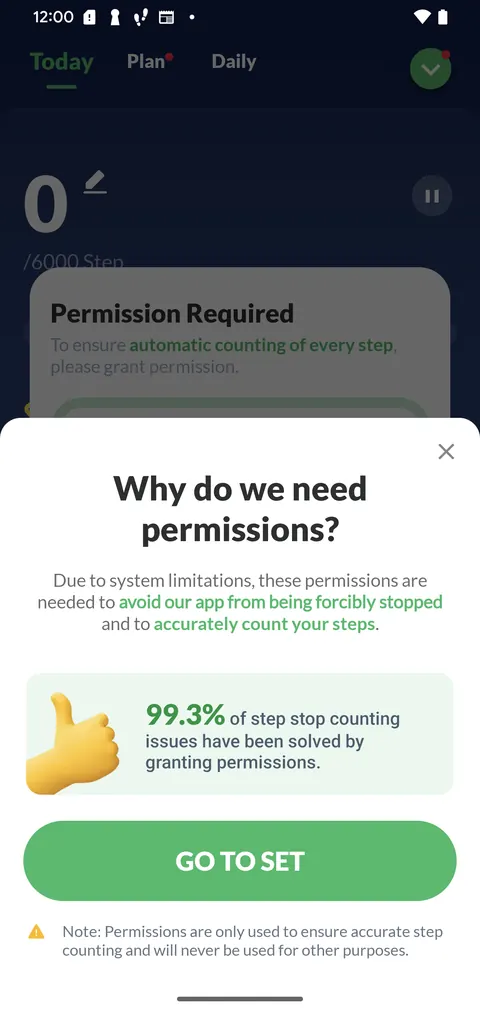
Requests notification and background-run permissions with explanations.
Add lost steps manually
Edit steps to add steps not captured when the phone was not carried.
The main user flow
- View today's steps and stats on the dashboard
- Add missed steps via Edit steps
- Browse and start 2 to 7 minute workouts
- Set a daily exercise reminder
- Choose a goal for a personalised plan
- Navigation
- Bottom navigation with Today, Plan, Daily, Report, Health, Set and More tabs; history and reminder screens open from the top of the dashboard.
- Onboarding
- Permission prompts for notifications and background running, plus a plan goal selection screen; the app pushes users to grant background protection.
- How it makes money
- Banner ads (inmobi) on several screens, and a 'Water tracker' promotion with an Unlock button; no prices or paywall seen.
Screenshots
10 of 28 screens, captured on a real phone with sample data.
Forcibly stopped warning Today dashboard Daily workouts tab Fat burning HIIT workout detail Reminder settings with ad Workout intro: squats Notification permission prompt Reminder time picker Permission required sheet Why permissions are needed - +18 more screensFree with an account
Screenshots: © Leap Health Fitness Limited, shown for commentary.
See all 28 screens — create a free accountSee every screen
The full map has all 28 screens, every feature and where each one lives. It is free with an account.
What could be better
Our read of the map, the store listing and recent reviews.
Keep ads out of the launch path and never cover controls or navigationmedium
Ads open on launch, sit where taps misfire, and block access to step data. Show ads only on non-blocking surfaces, never on launch or over navigation, and give every ad a visible close control.
Remove fake security alerts and ads that redirect to other sitesmedium
Reviewers report ads imitating malware warnings and redirecting taps to unknown sites. Ban fake system or antivirus alerts from ad inventory and vet ad sources before serving them in a fitness app.
Filter step counts while in vehicles and check counting accuracymedium
Reviewers say steps are over-counted in cars and buses and that counts drift after weeks. Use motion-type checks to ignore vehicle movement and offer a visible accuracy check on the dashboard.
Keep the system navigation bar visible on every screensmall fix
Reviewers say the nav bar disappears or is covered and that swiping up opens ads. Respect the OS navigation setting and never overlay ads on the gesture area.
Do not ask for a card at signup on a free appsmall fix
Reviewers were asked for card details on a free app and then saw a charge. Use a free tier with no payment step, and show charges only after an explicit purchase confirmation.
Offer a one-time ad-free unlock instead of a subscriptionsmall fix
Reviewers object to subscriptions for removing ads and say they would pay a small one-off fee. Sell a single low-price ad removal purchase, shown on the settings screen rather than in the dashboard.
Cut permission sheets to one clear request with a skip optionsmall fix
Users face stacked permission sheets, forced-stop warnings and background-protection pushes during onboarding. Ask once for the needed permission, explain it in one screen, and let users continue without granting everything.
Want an app like this, but better?
Tell us the idea. We research it, and build it for you.
Submit your idea