
How Period Calendar Period Tracker works
ABISHKKING LIMITED · Health & Fitness
Android
What it does
Period Calendar is a menstrual cycle tracker that predicts period dates, fertile windows and ovulation, and logs flow, symptoms, mood, notes and sexual activity. It also offers pregnancy and conception goal modes, cycle analysis, self-care content and a partner-pairing feature.
Who it is for: People who want to track their menstrual cycle, period dates, fertile windows and ovulation, with optional pregnancy or conception goals.
Key features
In-app advertising
Third-party banner and sponsored app-install ads on several screens, with an ad opt-out option.
Period tracking
Log period start and end dates and edit them on the calendar.
Daily notes
Free-text daily note with speech-to-text input option.
Self care content
Menstrual cramp relief content, foot massage, Kegel exercises and guided pain-relief poses.
Cycle analysis and reports
Average cycle and period length, and timelines for period, basal temperature and ovulation tests.
Partner mode
Pair with a partner via code to share cycle info; includes reconnect via recovery code.
The main user flow
- Onboarding setup: period length, cycle length and last period date to generate predictions
- Logging a day: pick date, set period start/end, flow, symptoms and notes
- Viewing predictions on the Today tab and the Calendar
- Reviewing cycle analysis and fertility timelines in the Analysis tab
- Browsing self-care content such as cramp relief poses and soundscapes
- Pairing with a partner via code or recovery code
- Navigation
- Bottom tab bar with Today, Calendar, Self Care and Analysis tabs, plus a persistent Add Note button. Settings and goals sit inside the Analysis tab menu.
- Onboarding
- Short four-step wizard collecting period length, cycle length and last period start, each with an 'I'm not sure' fallback, ending with a prompt to enable reminders. A new-member path and restore/partner options appear on the welcome screen.
- How it makes money
- Visible: third-party banner ads on several tabs and sponsored app-install ads inside the note and analysis screens; a Pro paywall with a 7-day free trial, monthly at $9.59 (58% off) and yearly at $29.99 (listed as $71.99 originally), plus restore purchase. Ad opt-out is present.
Screenshots
10 of 56 screens, captured on a real phone with sample data.
Today tab - next period 11 Dec Period pain relief - yoga poses Add note - daily entry form Partner pairing code entry Analysis - settings menu with ad Premium paywall - 7-day free trial Welcome - new user start Add note - blank redirect Today tab - period prompt (no ad) Today tab - period entry prompt - +46 more screensFree with an account
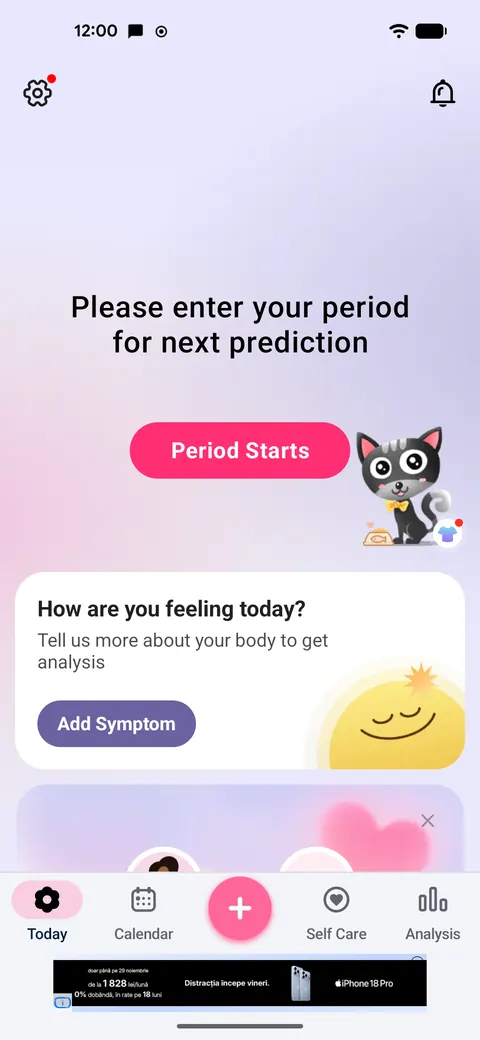
Screenshots: © ABISHKKING LIMITED, shown for commentary.
See all 56 screens — create a free accountSee every screen
The full map has all 56 screens, every feature and where each one lives. It is free with an account.
What could be better
Our read of the map, the store listing and recent reviews.
Keep ads out of the logging and note flowsmedium
Ads appear inside the note form, including an app-install ad during health logging, and reviews report full-screen ads on opening the app. Ship no ads on logging screens, limit ads to content tabs, and offer one clear opt-out.
Make the ad-free purchase work on every devicemedium
Reviewers say they paid to remove ads but ads returned after a reinstall or new device, and restore failed. Tie the ad-free entitlement to the account, restore it on sign-in, and show a plain price before any charge.
Make backups restore reliably across phone changeslarge
Users report data vanishing after phone changes or updates, even with backup turned on. Build a verified backup with a restore check and tell users which data was restored before they leave the restore screen.
Label predictions with accuracy basis and let users correct themmedium
Reviewers say predicted period dates were days off, and fertility chances appear with no accuracy note. Show how each prediction is calculated, add a visible accuracy disclaimer, and let users correct cycle length after irregular cycles.
Show a privacy choices page with a reject-all optionsmall fix
Users cannot find where to change privacy preferences after consenting, and one reports vendor consent needed many taps. Add a single reject-all control and a settings entry that stays reachable after consent.
Make quiz answers skippable and show a retry when it failssmall fix
Reviewers say quiz answers do not fit their situation and cannot be skipped, and the quiz fails to load with no working retry. Add a not-applicable option and skip, and show a clear retry state.
Allow pairing with more than one partner and no forced sign-inmedium
Partner mode allows only one partner and reviewers say sync is useless on the partner side and now requires sign-in. Support multiple partners and keep pairing with a code available without an account.
Want an app like this, but better?
Tell us the idea. We research it, and build it for you.
Submit your idea