
How Southwest Airlines works
Southwest Airlines Co. · Travel & Local
Android
What it does
Southwest Airlines app to book flights, check in, view trips and use Rapid Rewards.
Who it is for: People who book Southwest Airlines flights, check in online, view their trips, and use Rapid Rewards.
Key features
Flight booking flow
Search, results, fares, price, passengers.
Rapid Rewards enrollment
Three-step enrollment; phone mandatory.
Promotions
Modal and card offers.
Tabs
Home, trips, offers, more.
The main user flow
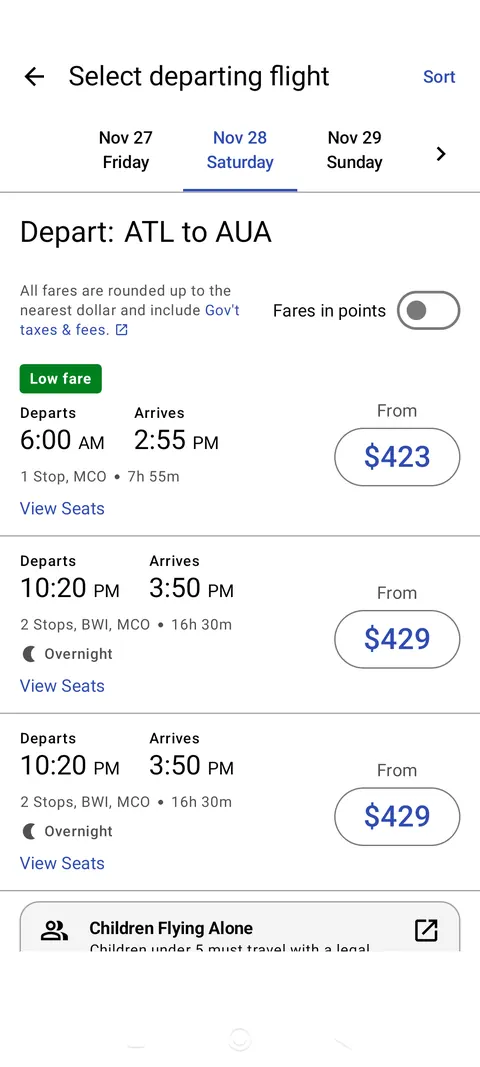
- Search ATL to AUA
- Pick fare
- Price review
- Passenger step (stopped)
- Navigation
- Bottom tabs Home, My trips, Offers, More; floating Book Flight button.
- Onboarding
- Notification permission, login screen with guest option, promo modal.
- How it makes money
- Fares by type, Getaways bundles, Chase card promotions.
Screenshots
10 of 26 screens, captured on a real phone with sample data.
Home Select departure airport Enrollment: personal My trips More Date of birth picker Contact validation Notification permission Log in Select departing flight - +16 more screensFree with an account
Screenshots: © Southwest Airlines Co., shown for commentary.
See all 26 screens — create a free accountSee every screen
The full map has all 26 screens, every feature and where each one lives. It is free with an account.
What could be better
Our read of the map, the store listing and recent reviews.
Keep the boarding pass on screen and saved after check-inmedium
Passes vanish or never appear after check-in, and the app offers no save, send or print option. Keep the pass cached, show it again near departure, and offer a saved copy the user can keep.
Make sign-in and account creation work on the first trymedium
Account creation and sign-in fail with long or generic errors, password reset loops, and sessions drop. Enrollment also requires a phone number. Show field-level errors, a working reset path, and sessions that stay signed in.
Cut startup hangs and crashes with a cached offline fallbacklarge
Users report stalls on startup, stuck reservation lookups, and crashes during check-in, sometimes after updates. Add request timeouts, cache trip data locally, and show a clear retry state instead of an endless spinner.
Save trips to the account so confirmation numbers are not re-enteredmedium
Trips booked by an agent cannot be added, and itineraries are forgotten between app opens. Let users add a trip once by confirmation number and keep it listed under My trips.
Move partner ads off the booking path before checkoutsmall fix
Partner ads and card promos sit between flight selection and confirmation, and a full-screen promo modal greets users on Home. Show offers on Home or the Offers tab, never as steps before checkout.
Honor notification and email opt-outs and cap push volumesmall fix
Users get incessant push alerts and booking emails after disabling email subscriptions. Respect saved preferences, split push types so users can turn each off, and limit marketing sends.
Make the Google Wallet pass link open the pass, not the websitesmall fix
Tapping Add to Wallet after check-in opens the website and asks for check-in again. Generate the wallet pass inside the app from the existing check-in record so no second check-in is needed.
Want an app like this, but better?
Tell us the idea. We research it, and build it for you.
Submit your idea