
How Dormi - Baby Monitor works
sleekbit s.r.o. · Parenting
Android
What it does
Turns two phones into a baby monitor: one 'Child device' streams audio (and optional video), the other 'Parent device' listens, talks back and alarms on noise or lost connection. No account needed.
Who it is for: Parents who want to use two phones as a baby monitor, with one phone in the child's room and the other with them.
Key features
Pairing devices
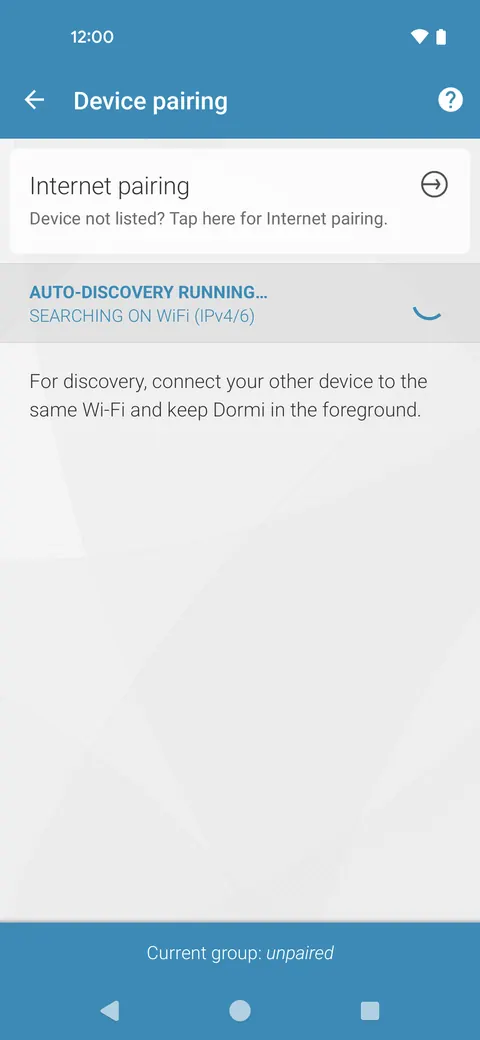
Same-LAN auto-discovery or Internet pairing with a one-time 5-digit password and an anti-tamper code.
Live audio/video monitoring
Slide-the-token start, info panel, end-to-end encryption.
Child or Parent role
One app, role chosen in the drawer.
Time-based billing
4 free hours monthly, subscription/lifetime, referral credits.
Noise sensitivity
Smart/manual sensitivity, beep/vibrate/wake on noise.
Connection-loss alarm
Timeout 15 s..5 min, alarm and auto reconnect.
The main user flow
- Accept terms
- Pair devices on the same Wi-Fi, or by Internet pairing with a 5-digit password plus an anti-tamper code
- Choose roles in the drawer
- Slide the token to start monitoring
- Parent listens/talks, gets noise alerts and a connection-lost alarm
- Navigation
- Drawer: role, Dormi2, sensitivity, pairing, settings, rewards and billing, pricing, privacy; toolbar video toggle and activity log.
- Onboarding
- Only a terms screen, then 'Device not paired'. Roles are not asked up front; battery-optimisation prompts appear twice.
- How it makes money
- Freemium by monitoring time: 4 free hours a month (renewing), referral credits, then $2/month (7-day trial), $10/year or $19.47 lifetime. Paywall sits in Rewards & Billing, not shown at start.
Screenshots
10 of 43 screens, captured on a real phone with sample data.
Child device, monitoring stopped Activity log Rewards Billing tab Settings, parent mode Internet pairing options Drawer on the camera phone Viewer: info panel Pricing web page Device pairing - +33 more screensFree with an account
Screenshots: © sleekbit s.r.o., shown for commentary.
See all 43 screens — create a free accountSee every screen
The full map has all 43 screens, every feature and where each one lives. It is free with an account.
What could be better
Our read of the map, the store listing and recent reviews.
Make pairing work across different networks and explain failureslarge
Phones on different Wi-Fi never find each other and pairing breaks when Internet pairing is not used. Build pairing that works over mobile data and Wi-Fi, and show a clear reason and retry when pairing fails.
Keep the video stream running without holding a buttonmedium
Users must press and hold a toggle to see the baby and the stream stops after seconds. Keep video running once started, with a single toggle that stays on until the parent turns it off.
Stream reliably over mobile data, not only Wi-Fimedium
Several users report the app works only on Wi-Fi and fails on mobile data when they need it. Test and support mobile-data links as a first-class path and show which network is in use.
Make the noise alert catch sounds the parent needs to hearmedium
Users report missed events and no sound-based detection that works on common noise. Tune detection with visible feedback on what triggered the alert and let users test sensitivity against real sound.
Show remaining free time and honour paid access in billingmedium
Users say the free allowance is only 4 hours a month and that paid or lifetime access stops working. Show remaining time in the main view and let each purchase state its entitlement and status clearly.
Staff a support channel that replies to paying userssmall fix
Many low ratings say support does not reply after purchase or failure. Commit to a reply window, show ticket status in the app, and give a support path that does not depend on email alone.
Keep the connection through brief drops and warn before the alarmmedium
Users report frequent disconnects and streams that appear and vanish. Retry silently for a short window, then show the connection-loss timer and alarm with clear reconnection status.
Ask for the role at setup and show the battery prompt oncesmall fix
Role choice is hidden in the drawer and the battery-optimisation prompt appears twice. Ask for the role on first launch and show the battery prompt a single time with a reason.
Want an app like this, but better?
Tell us the idea. We research it, and build it for you.
Submit your idea