How French - English offline dict. works
Petr Wagner · Books & Reference
Android
What it does
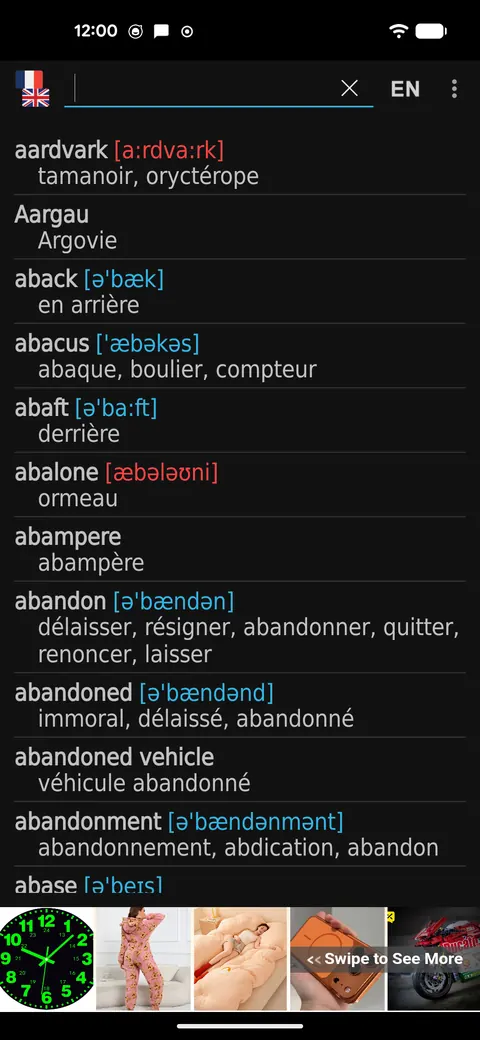
An offline French-English and English-French dictionary with pronunciations and around 61,000 translations. Users look up words in either direction and can copy or re-search results.
Who it is for: People who want to look up French and English word translations in an offline dictionary app.
Key features
Search history
Records looked-up words and lets you clear them.
Word search
Type a word in the search field to look up its translation.
Bilingual translations
Shows French and English equivalents with phonetic pronunciations for each entry.
Copy and search from word
Long press a word to copy it or search it.
Language direction switch
Toggle between English-to-French and French-to-English lookup.
Search selected word
Use a selected word to start a new search.
The main user flow
- Type a word and read its translations
- Switch between English-to-French and French-to-English lookup
- Long-press a word to copy or search it
- Review and clear search history
- Adjust interface language, font size and background in preferences
- Navigation
- A single main word-list screen with an overflow menu for language switch, history, rating and preferences; preferences open a settings list with pop-up pickers.
- Onboarding
- None seen.
- How it makes money
- Banner advertisements (including a Temu ad) appear on word list screens; no paywall or prices seen.
Screenshots
10 of 37 screens, captured on a real phone with sample data.
Dictionary - English to French search Search results for 'sample' (English mode) Preferences - main settings More options menu Word context menu (helped) Clear history confirmation Dictionary - French to English search Dictionary - English to French (after language switch) Dictionary - French to English (after language switch) Dictionary - English to French (on relaunch) - +27 more screensFree with an account
Screenshots: © Petr Wagner, shown for commentary.
See all 37 screens — create a free accountSee every screen
The full map has all 37 screens, every feature and where each one lives. It is free with an account.
What could be better
Our read of the map, the store listing and recent reviews.
Add audio playback for headwords and example phrasesmedium
Reviewers say the app does not speak and lacks pronunciation, while the map shows only phonetic text on two result screens. Add tap-to-hear audio on each headword and translation, with a slow playback option.
Show grammatical gender on French noun entriesmedium
Users say French nouns lack gender, which makes the app useless to them. Show le/la/les or m/f/pl beside each French noun in both lookup directions, and mark gender in English-to-French results.
Keep ads off the word list and offer a clearly priced ad-free optionmedium
Ads sit on the main reading screen and users say they drive uninstalls. Keep banners off search and result screens, and offer a visible one-time ad-free purchase with a trial, so the choice is honest.
Expand headword coverage with food and everyday vocabularylarge
Users report missing words and thin vocabulary, including food terms. Add a coverage audit for common categories and ship database updates, with a visible date or version so users know what changed.
Pin the best match above the list and group related sensesmedium
Users must scroll a long alphabetical list to find a meaning. Show the exact match first, then group senses and related entries under it, so the answer is visible without scrolling.
Add English-to-French equivalent suggestions for translation taskslarge
Reviewers say the app does not help translating because the two dictionaries are not linked. Link English and French senses so English lookups show French equivalents with the matching context.
Normalise headword casing in search resultssmall fix
Headwords appear in mixed lowercase and uppercase, which looks unfinished. Store one canonical case per headword and apply it consistently in lists, results and history.
Want an app like this, but better?
Tell us the idea. We research it, and build it for you.
Submit your idea