How Google Translate works
Google LLC · Tools
Android
What it does
Google Translate is a free universal translator: type, paste, speak, hand-write or point the camera to translate between 100+ languages, online or offline, on a Pixel 4 XL (Android 13). The current build has shifted to a generative-AI result (tone labels, usage explanations, alternative-tone translations and an 'Ask anything' follow-up) and added a Beta 'Practice' tab for AI language learning.
Who it is for: People who need to translate text, speech, camera images or conversations across many languages, and some who want to practice a language.
Key features
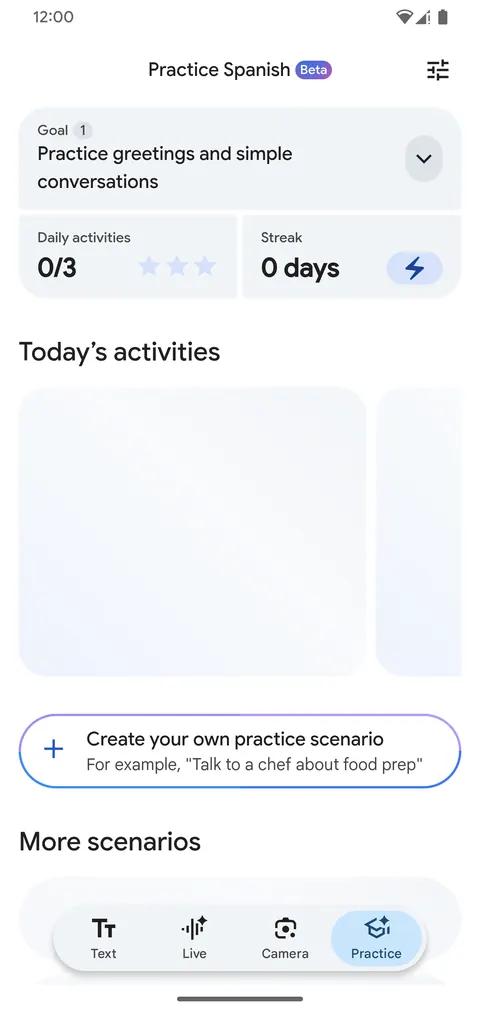
Practice (Beta)
AI language-learning: pick a language, level and goal, then do personalised daily activities with streaks and scenarios.
Text translation
Type or paste text and translate between any of 100+ language pairs, with listen, copy and save.
Account & settings
Google account menu and app settings (Tap to Translate, data usage, keyboard, voice, practice).
Offline translation
Download language packs to translate without a connection; managed from Downloaded languages and Data usage.
AI tones & explanations
Gemini-powered results label the register (Standard/Conversational/polite), explain usage, offer alternative-tone translations and let the user 'Ask anything' as a follow-up.
Language selection
Pick source/target languages, auto-detect the source, with recent languages surfaced first.
The main user flow
- Type/paste text → AI result with tone + explanation + follow-ups
- Pick or auto-detect languages
- Live two-way conversation translation
- Camera translation via Google Lens
- Practice: pick language/level/goal → daily personalised activities
- Download languages for offline use
- Review history / save phrases
- Navigation
- Four bottom tabs (Text, Live, Camera, Practice). A hamburger menu opens Your activity (Saves, Transcripts, history); the account avatar opens the account menu and Settings. Language chips and the swap control sit in the top bar on most screens.
- Onboarding
- No sign-in wall — launches straight into the Text home (already signed in with a Google account). Per-feature permission prompts (microphone for voice/Live, camera for Camera). Practice has its own multi-step onboarding (language → level → goal).
- How it makes money
- Free, no ads, no in-app purchases in the app itself; Practice is a free Beta ('early and unlimited access'). The account menu promotes 'Get a Google AI plan' (Google One AI), a cross-product upsell rather than a Translate paywall.
Screenshots
10 of 19 screens, captured on a real phone with sample data.
Text home — Translate anything Your activity (history) AI translation result with tone + explanation Text input with recent suggestions Practice — choose language Translate from — language picker Settings — Data usage Practice — intro (Beta) Saves — empty state Practice dashboard - +9 more screensFree with an account
Screenshots: © Google LLC, shown for commentary.
See all 19 screens — create a free accountSee every screen
The full map has all 19 screens, every feature and where each one lives. It is free with an account.
What could be better
Our read of the map, the store listing and recent reviews.
Offer a classic instant translation mode next to the AI resultmedium
The AI result adds latency and a caveat, and users who wanted the old instant translation lost the option to choose it. Keep a classic mode and let users switch per session.
Make downloaded language packs work offline and show their true statusmedium
Users download packs but translation still fails offline and downloads loop. Verify each pack after download and show a clear ready or failed state.
Keep live conversation translation running and recover from stallsmedium
Live sessions stop mid-translation and conversation mode speaks unprompted. Add automatic reconnect, a visible listening state, and a text-only fallback when speech fails.
Keep camera translation inside the app instead of handing off to Lenslarge
Camera translate leaves the app, photo gallery selection is hard, and some results take minutes. Build in-app capture and gallery picking with a visible processing state.
Save a translation with one tap from the result screensmall fix
Saving takes extra steps and nothing saves automatically. Put a save action on the result screen and keep the phrasebook entry without a separate flow.
Add in-app theme and voice gender options to Settingssmall fix
Dark mode only follows the system setting and voice gender cannot be changed. Add in-app theme and voice options on the Settings screen.
Make all Practice levels available at launch and speed up activity loadingmedium
Some levels show as unavailable and activity cards load slowly, so the Beta feels limited. Open every level in onboarding and cache daily activities.
Want an app like this, but better?
Tell us the idea. We research it, and build it for you.
Submit your idea