How QR & Barcode Scanner works
Gamma Play Limited · Tools
Android
What it does
A QR code and barcode scanner that reads codes through the camera or from gallery images, and can also generate QR codes for URLs, text, contacts and Wi-Fi. It keeps favorites and history of scanned items.
Who it is for: For people who want to scan QR codes and barcodes with their camera or gallery images, and create QR codes for links, text, contacts, or Wi-Fi.
Key features
Favorites
Lists saved scan results marked as favorites; can be cleared all at once.
Create QR
Generates QR codes from URL, text, contact, email, SMS, geo, phone, calendar or Wi-Fi input.
History
Lists previously scanned codes.
My QR contact card
Enter personal contact details to generate a shareable contact QR code.
Our apps
Promotes the developer's other apps.
Remove ads
Option to purchase removal of advertisements.
The main user flow
- Grant camera permission, then scan a code with the camera
- Scan a code from an image in the gallery
- Create a QR code from a chosen type and content
- Save a contact card in My QR and share it
- Review and clear favorites and history
- Navigation
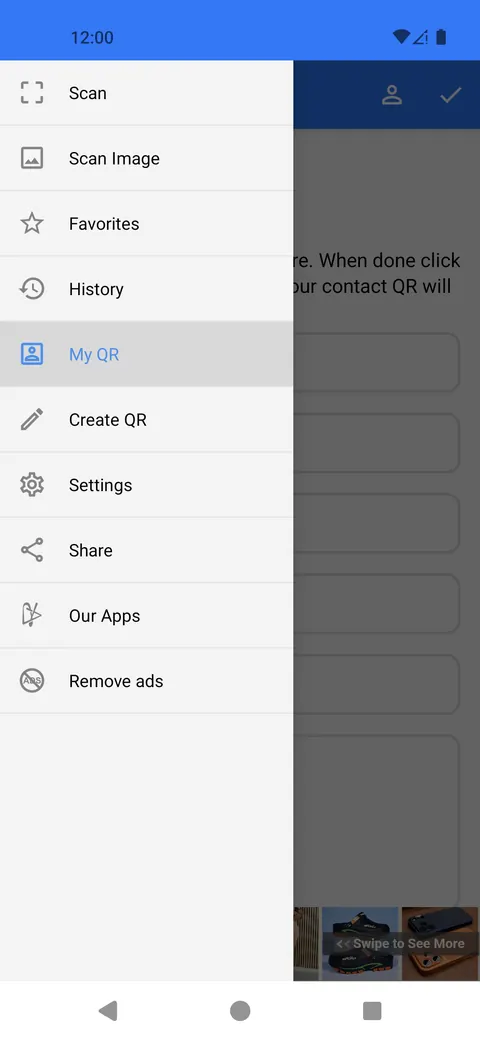
- A side menu offers Scan, Scan Image, Favorites, History, My QR, Create QR, Settings, Share, Our Apps and Remove ads.
- Onboarding
- Camera permission prompt appears on launch; denying it leaves a dialog that blocks scanning.
- How it makes money
- Banner advertisement for Temu visible on screens, a 'Remove ads' menu item, and 'Our apps' promotion; no prices seen.
Screenshots
10 of 22 screens, captured on a real phone with sample data.
Home after cancelling permission Favorites context menu with suggested apps My QR contact form with menu open Main menu with ads and sidebar Favorites empty state with menu open Camera permission prompt Camera permission required dialog Home with ad banner Create QR type picker My QR contact form with menu and ad - +12 more screensFree with an account
Screenshots: © Gamma Play Limited, shown for commentary.
See all 22 screens — create a free accountSee every screen
The full map has all 22 screens, every feature and where each one lives. It is free with an account.
What could be better
Our read of the map, the store listing and recent reviews.
Keep ads visually separate from the decoded scan resultmedium
Ads sit close to scanned URLs and are easy to tap by mistake, so users believe they opened the scanned link. Show the decoded content with a separate Open action and a confirm step, and keep ads out of the result area.
Make scanning reliable for barcodes and multiple codes on one pagemedium
Users report scans that fail, slow loads, and crashes, and the scanner grabs unwanted codes. Add a clear choice of target code when several are visible and a faster camera start, and test against common barcodes.
Do not require a card or sign-up before free scanning workssmall fix
Users are asked for card details or registration before the free scanning they expected, and some see a paid service after sign-up. Let scanning and generation work with no payment or account step and show any paid option only when chosen.
Explain camera permission denial instead of a blank home screensmall fix
After cancelling permission the user sees only the app name with no scanning and no path forward beyond a blocking dialog. Show a screen that says what scanning needs, offers a settings link, and still allows Scan Image and Create QR.
Show the ad-removal price in the menu before any purchase stepsmall fix
Users hit an unexpected ad-removal cost and uninstall. Show the Remove ads price in the side menu item itself, and offer a free path to view all non-ad features first.
Honor the app's notification-off setting and do not push notificationssmall fix
Users who turned notifications off still receive them, and the system toggle is greyed out. Respect the off state, do not send promotional notifications, and show a clear notification control in Settings.
Remove the home screen hijack and make uninstall cleansmall fix
Users report the app takes over the default home app, removes icons, and is hard to remove. Do not change launcher settings, and leave no pop-ups or leftover components after uninstall.
Back up scan history and favorites so they restore on a new devicemedium
A user who reset their phone lost all history. Offer an explicit export or account-linked backup of history and favorites, with the restore status shown on first launch.
Want an app like this, but better?
Tell us the idea. We research it, and build it for you.
Submit your idea