How Simple Calculator works
DEEP SPARK LTD · Tools
Android
What it does
Simple Calculator is a basic arithmetic calculator with a dark-theme-capable keypad, a unit converter for length, area, volume, mass, temperature and time, and colour customisation. It also offers calculation history and a share/feedback flow.
Who it is for: A basic calculator and unit converter for everyday users, with colour customisation and calculation history.
Key features
Unit converter
Converts values between units in length, area, volume, mass, temperature and time.
Advertisement banners
Third-party ads shown at the bottom of several screens.
Settings
Screen with general options, support, sharing and legal links.
Basic calculator
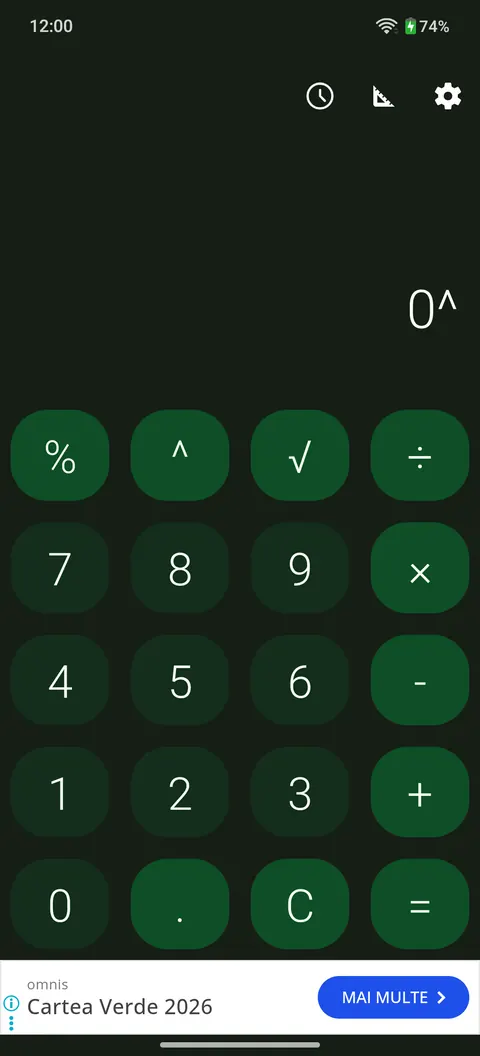
Keypad with digits, arithmetic operators, percent, power, root, clear and equals.
Customer support
Form to describe an issue to support, minimum 20 characters.
Ad removal
Option to remove advertisements, included with premium or as a settings item.
The main user flow
- Perform calculations on the home keypad
- Convert units by choosing a category, picking units and entering values
- Change colours and other options from Settings
- Contact support or share and rate the app
- Navigation
- Home keypad links to History, Unit converter and Settings. Unit converter goes category list -> converter screen with a unit picker dialog. Settings lists sub-screens and external links.
- Onboarding
- None seen; the app opens directly to the calculator, with a paywall and rating/feedback dialogs appearing during use.
- How it makes money
- Paywall offering a 3-day free trial then $14.99/week for Premium (unit converter, multipurpose calculator, colour customisation, ad removal); advertisement banners on several screens and a Remove Ads option in Settings.
Screenshots
10 of 22 screens, captured on a real phone with sample data.
Home - calculator keypad Unit converter - categories Unit converter - Area after swap Customer Support form Unlock All Features - Premium trial Settings Rate app dialog Home - calculator (returned) Home - calculator with ad Home - calculator power operator - +12 more screensFree with an account
Screenshots: © DEEP SPARK LTD, shown for commentary.
See all 22 screens — create a free accountSee every screen
The full map has all 22 screens, every feature and where each one lives. It is free with an account.
What could be better
Our read of the map, the store listing and recent reviews.
Offer a one-time or annual unlock priced below the weekly subscriptionmedium
Premium costs $14.99 per week, and reviewers call weekly and monthly charges outrageous. Offer a one-time unlock for ad removal and colours, plus an annual option, and show the full price before purchase.
Keep banners off the keypad and buttons, and cap ads on the convertermedium
Banners sit on the home keypad, settings and converter screens, and reviewers say ads block buttons and play on every tap. Keep ads off interactive controls and limit them to one static slot on secondary screens.
Load straight to the keypad with no splash screen or startup ad requestmedium
The app opens to the calculator, but reviewers report long loads, a splash screen and a wait before startup. Skip splash screens and defer ad and billing checks until after the first screen renders.
Show the paywall after a first completed task, not on launchsmall fix
The paywall appears on launch and reviewers say it keeps asking them to subscribe. Let users calculate freely first, then show a dismissible offer tied to a feature they tried, such as the converter.
Request only the permissions the calculator needs and publish the listsmall fix
Reviewers question permissions added to a calculator and suspect data collection. Request only permissions needed for core features, list each one in the store listing, and remove third-party ad SDKs that need extra access.
Place the unit converter inline on the keypad screenmedium
Converting units takes three screens: category list, converter, then unit picker dialog. Add a converter mode on the keypad with category and unit selectors on the same screen, so users can convert without leaving it.
Apply standard operator precedence to multi-operator expressionsmedium
The keypad calculates left to right, so 1 + 2 x 3 gives 9 instead of 7. Parse the full expression with operator precedence and show the entered expression before evaluating.
Want an app like this, but better?
Tell us the idea. We research it, and build it for you.
Submit your idea