
How Magnifier 4U Pro works
김백운 · Tools
Android
What it does
Paid-upfront (no ads, no IAP, no account) digital magnifier from HANTORM, the maker of the top paid magnifier 'Magnifier & Microscope+ [Cozy]'. Camera preview with zoom, exposure, 8 colour/high-contrast filters, freeze with timer, flashlight, a built-in gallery and share.
Who it is for: People who want a paid, ad-free digital magnifier with zoom, colour filters, freeze, flashlight, and a built-in gallery.
Key features
Built-in gallery
Browse, rotate, adjust, share and delete the saved pictures.
Colour filters
8 filters incl. negative, monochrome and two-tone high-contrast text (blue/yellow).
Freeze + timer
Freeze the frame into an editable image; long press = 3 s timer; sharpen, exposure, contrast and effects on the still.
Help & privacy
One-page control help, privacy policy and licences.
Live camera magnifier
Camera preview as a digital magnifying glass with the last zoom remembered.
Settings
Long-press action, button bar colour, volume-key actions.
The main user flow
- launch → camera pre-prompt → system permission → gesture help → magnifier
- colour filter → high-contrast text reading
- freeze (or 3 s timer) → adjust → save/share
- gallery → view/rotate/adjust/delete
- Navigation
- Single camera screen with a bottom bar and a top toolbar that auto-hides; dialogs/popups for settings, filters and help; one separate gallery activity.
- Onboarding
- Own camera pre-prompt, then a one-time gesture help card. No account, no tour.
- How it makes money
- Paid upfront ($2.49 US; $2.58 in Moldova, tax included). No ads, no in-app purchases; a LIKE! button asks for a 5-star review.
Screenshots
10 of 35 screens, captured on a real phone with sample data.
Live magnifier Built-in gallery Gallery — another picture Frozen frame Settings First-run gesture help Top toolbar (more features) Help Camera pre-prompt Colour filters picker - +25 more screensFree with an account
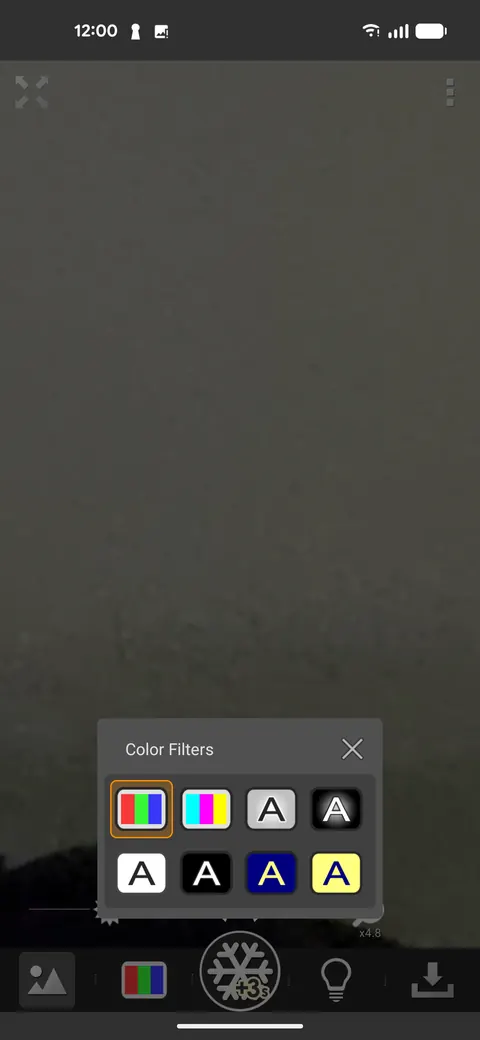
Screenshots: © 김백운, shown for commentary.
See all 35 screens — create a free accountSee every screen
The full map has all 35 screens, every feature and where each one lives. It is free with an account.
What could be better
Our read of the map, the store listing and recent reviews.
Keep the top toolbar visible or let users pin itsmall fix
The more-features toolbar hides after about 3 s, which is hard for older hands. Keep it visible by default, or add a pin toggle and a longer, adjustable hide delay.
Return to the live view when backing out of freeze or full screensmall fix
Back from freeze or full screen closes the app. Make back step through the states: full screen to controls, freeze to live view, live view to exit.
Replace cycling settings buttons with a visible option listsmall fix
Settings values change on each tap with no visible list or confirmation. Show each setting as a list or radio group with the current choice marked.
Add text labels to icon-only controlssmall fix
Many small icon-only controls have no labels, so users must guess what each one does. Add visible text labels or a long-press tooltip to the bottom bar and toolbar.
Recover from camera open failure with a clear retry pathmedium
When the camera fails to open, the user is told to reboot and get no further help. Show a retry button, a check for other apps holding the camera, and a support contact in the app.
Cap camera load while magnifying to reduce overheatingmedium
Users report the phone overheats while using the live camera magnifier. Offer a lower-load preview mode and stop the preview when the app is idle or in the background.
Save zoom and filter presets per use casemedium
Zoom and text size are not remembered per use case. Let users save named presets (zoom, filter, exposure, button colour) and recall them in one tap.
Want an app like this, but better?
Tell us the idea. We research it, and build it for you.
Submit your idea