
How Audio Editor & Music Editor works
BetterApp Tech Co., Limited · Music & Audio
Android
What it does
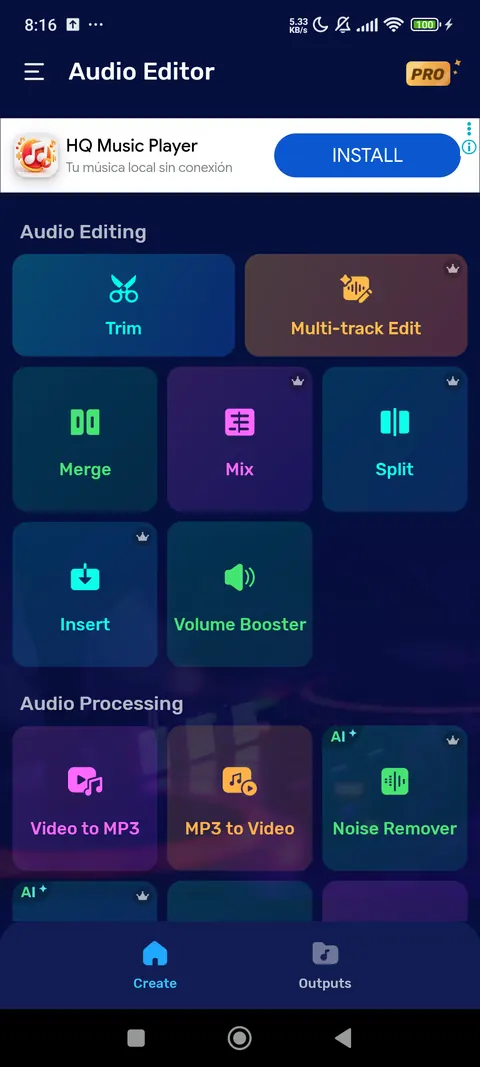
Audio Editor is a music and audio editing app offering trimming, merging, mixing, splitting, inserting and volume boosting of audio, plus tools to extract MP3 from video, convert MP3 to video, and remove noise. Edited files are kept in an Outputs library split into My Audio and My Video.
Who it is for: People who want to trim, merge, mix, split, or convert audio and video files on their phone.
Key features
Outputs library
Tab listing saved My Audio and My Video outputs.
Audio file permission
Requests access to music and audio files on the device to import and save.
Video file permission
Requests access to videos on the device to import and save.
Audio trim
Cut and trim audio files from the home editing tools.
Insert audio
Insert audio segments into a track.
Merge audio
Join several audio files into one.
The main user flow
- Pick an editing tool from the Create home list (trim, merge, mix, etc.)
- Grant audio or video file permission to import and save files
- Review saved results in the Outputs tab
- Start a free trial or upgrade to Pro from the drawer or paywall
- Navigation
- Single main screen with Create and Outputs tabs, a navigation drawer for Pro upgrade, sharing, rating, feedback, More Apps and Settings, and a Pro/VIP icon leading to a small menu and FAQ.
- Onboarding
- Storage permission prompts appear when opening Outputs; a Pro free-trial dialog appears from the VIP entry point.
- How it makes money
- Pro subscription with 3-day free trial then $5.99/year, a paywall dialog, an 'Upgrade to PRO' drawer card, restore purchase, and promoted third-party app banners with INSTALL buttons (including 'More Apps' and an AD label).
Screenshots
10 of 26 screens, captured on a real phone with sample data.
Home - Audio Editor main Outputs tab - promoted music player banner Paywall - 3-day free trial Pro menu - restore, FAQ, feedback Navigation drawer with Settings FAQ screen Outputs tab - audio permission required Home - editing tools list Home - promoted app banner (Tuni) Home - promoted app banner (HQ Music Player) - +16 more screensFree with an account
Screenshots: © BetterApp Tech Co., Limited, shown for commentary.
See all 26 screens — create a free accountSee every screen
The full map has all 26 screens, every feature and where each one lives. It is free with an account.
What could be better
Our read of the map, the store listing and recent reviews.
Remove interstitial ads from the edit and save path and cap promo bannersmedium
Ads and cross-promoted app banners sit in the home and outputs lists and interrupt saving. Reviewers say ads block the work. Instead, keep ads out of the save and export flow and limit promoted banners to one slot.
Show trial terms, yearly price and cancel steps before the trial startssmall fix
Users report being charged after a free trial and not finding how to cancel. Pricing appears only at the paywall. Instead, show the yearly price, the charge date and a cancel path before the user starts the trial, and send a confirmation after.
Keep basic editing and export free and put Pro behind a clear upgrade pointmedium
Reviewers say basic trim, export and splitting are locked behind payment, so saving fails for free users. Instead, let free users finish and export a basic edit, and offer Pro only for advanced tools after a completed edit.
Make saving and exporting reliable and show clear retry and failure statesmedium
Users report exports stuck at 95 percent and files that never save after import. Edited files go to the Outputs library, so a failed save loses the result. Instead, show progress with a retry and keep the source edit until the export is confirmed.
Add per-channel stereo editing and FLAC import and exportlarge
Users say stereo channels cannot be edited separately and FLAC is not supported. Editing tools are only listed as text. Instead, add channel-level selection for each tool and support lossless import and export formats.
Delay the rating prompt until after a completed savesmall fix
The app asks for a five-star rating early, before any clip is made or saved. Instead, show the rating prompt only after a successful export and never before the first save.
Show a sample or preview in Outputs before storage access is grantedsmall fix
The Outputs tab is blocked by a permission prompt with no preview or sample content, and the prompt repeats on several screens. Instead, show an empty-state preview of the library and ask for access once, when the user first saves.
Want an app like this, but better?
Tell us the idea. We research it, and build it for you.
Submit your idea