
How YouVersion Bible App + Audio works
Life Covenant Church, Inc. · Books & Reference
Android
What it does
YouVersion Bible App is a free Bible reader offering many translations, audio Bibles, reading plans, devotionals, verse search and short Bible videos, with a social layer for sharing and community. It works in many languages and can be used signed out, with an optional free account to unlock more.
Who it is for: People who want to read the Bible for free, with many translations, audio, reading plans, devotionals, and an optional free account.
Key features
Search
Search verses, topics, plans and videos.
Videos
Watch Bible teaching videos with playback and Picture-in-Picture.
Language settings
Change the app interface, Bible text and plan language.
Reading plans
Browse, search and save multi-day reading plans.
Share
Share content with others.
Bible reader
Reads Bible chapters with verse numbers and headings.
The main user flow
- Open Verse of the Day from Home, then like, comment or share it
- Read the Bible by book and chapter, with footnotes and version switching
- Search verses, plans and videos, then filter results
- Browse Discover topics and trending plans, then open or save a plan
- Watch a Bible video, with Picture-in-Picture and sharing
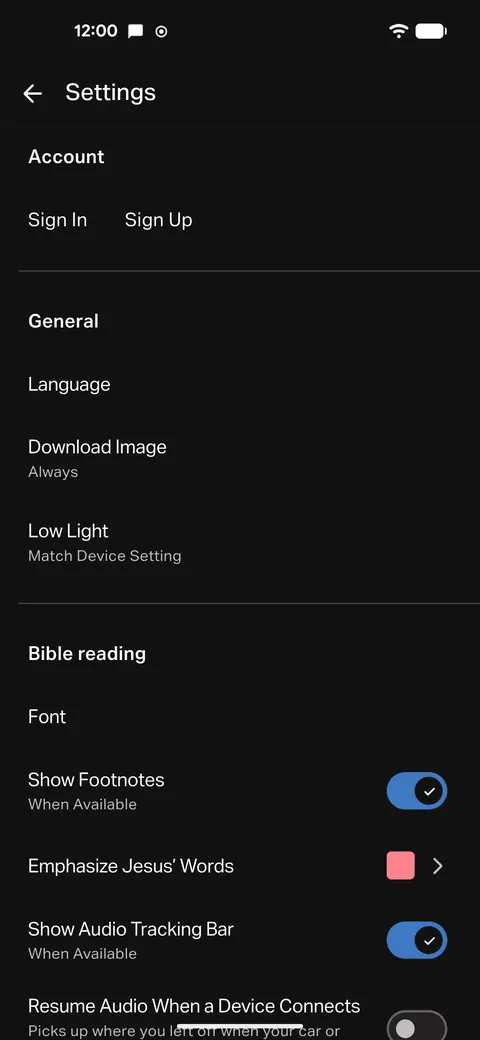
- Change interface, Bible or plan language in Settings
- Create an account from the You tab to unlock more features
- Navigation
- Five-tab bottom navigation (Home, Bible, Plans, Discover, You), with search and audio controls in the top bar and settings reached from the You tab.
- Onboarding
- A notification permission prompt appears on first launch, with the option to decline. The app is usable immediately without an account, with sign-up prompted when a feature needs one.
- How it makes money
- Some Bible translations appear behind a Subscribe prompt in the version dialog, indicating paid tiers. No ads or prices are visible in the captured screens.
Screenshots
10 of 39 screens, captured on a real phone with sample data.
Video player - more options Video share Home - Verse of the Day Discover - browse topics and plans Bible reader - John 1 Language search Search results - Holy Spirit (all) Language filter list You - signed-out profile Settings - main - +29 more screensFree with an account
Screenshots: © Life Covenant Church, Inc., shown for commentary.
See all 39 screens — create a free accountSee every screen
The full map has all 39 screens, every feature and where each one lives. It is free with an account.
What could be better
Our read of the map, the store listing and recent reviews.
Page through chapters with horizontal turns and tap targets, not vertical scrollmedium
Reader text now scrolls vertically with no next control, so users miss text at page ends and report scrolling past what they were reading. Offer tap or swipe page turns with a visible next button.
Let readers jump to any verse from the chapter viewsmall fix
Verse picking and in-chapter search were removed, so users must scroll to find a verse and search now opens a separate window. Restore book, chapter and verse selection with in-chapter search.
Advance plan days with a clear next-day control and saved progressmedium
Plan readers cannot move to the next chapter reliably, and completion marks revert. Keep a visible next control on each plan day and store progress so completed days stay checked.
Make audio optional in plans with speed and version controls on the same screenmedium
Plans push audio and bury playback speed and version controls, which users report as forced and hard to select. Keep text-first reading and place audio controls where they are easy to reach.
Keep reading free of pop-ups, rating prompts and forced emailsmall fix
Pop-ups cover text while reading and a five-star prompt returns at each launch. Show prompts only after a completed task, never over the reader, and never as a condition of use.
Make daily verse and plan reminders reliable, each separately optionalmedium
Daily verse and plan notifications stop arriving or fail, and one user says sign-in required accepting notifications. Let each reminder be turned on or off separately and never tie account use to notification consent.
Let users copy, highlight and share verses without losing textmedium
Copying text, custom highlight colours and verse image sharing fail or drop words. Keep full verse text in shares, allow copy of reader text, and offer custom highlight colours that persist.
Localise plan titles and open each Bible version at its correct start bookmedium
Plan titles mix languages, and some vernacular versions open at the wrong book. Translate all labels when the interface language changes and set each version's default start to its canonical first book.
Want an app like this, but better?
Tell us the idea. We research it, and build it for you.
Submit your idea