
How Firefox Fast & Private Browser works
Mozilla Corporation · Communication
Android
What it does
Firefox for Android is a privacy-focused mobile web browser. It blocks trackers and cookies by default, offers private tabs, tab management with groups and auto-close, search across several engines, Google Lens image search, and sync across devices via a Firefox account.
Who it is for: People who want a privacy-focused mobile web browser on Android that blocks trackers and cookies, with private tabs and sync across devices.
Key features
Tab manager
View, search, switch and close private and normal tabs.
Search bar
Address and search field with voice search.
News feed
Curated news stories shown on the new tab page and in a list.
Search engines
Choose and customise default and alternative search engines.
Tab settings
Tab layout, auto-close and inactive tab options.
Browsing history
View and search past browsing history.
The main user flow
- Set Firefox as default browser during onboarding
- Browse from the new tab page and news feed
- Open, search, group and close tabs in the tab manager
- Change default search engine or add a custom one
- Sign in to sync tabs across devices
- Review blocked trackers on the privacy dashboard
- Navigation
- A new tab page is the home screen. A tab manager is reached through the tabs button, with an overflow menu for select, recently closed tabs, settings and account. Settings and search options sit in nested screens with back navigation.
- Onboarding
- A short sheet promotes built-in privacy and offers to set Firefox as default browser, with a Not now option. Tab group tips appear as inline tooltips.
- How it makes money
- None seen. No ads, paywall, prices or pro features appear in these screens, though news stories shown on the new tab page are sponsored-style content from third parties.
Screenshots
10 of 34 screens, captured on a real phone with sample data.
New tab page with eight tabs open Tab multiselect mode News article view Add custom search engine form Google search scope with trending Tab manager with seven tabs and auto-close notice Settings - search Onboarding - privacy and default browser Open tabs menu Privacy dashboard - trackers blocked - +24 more screensFree with an account
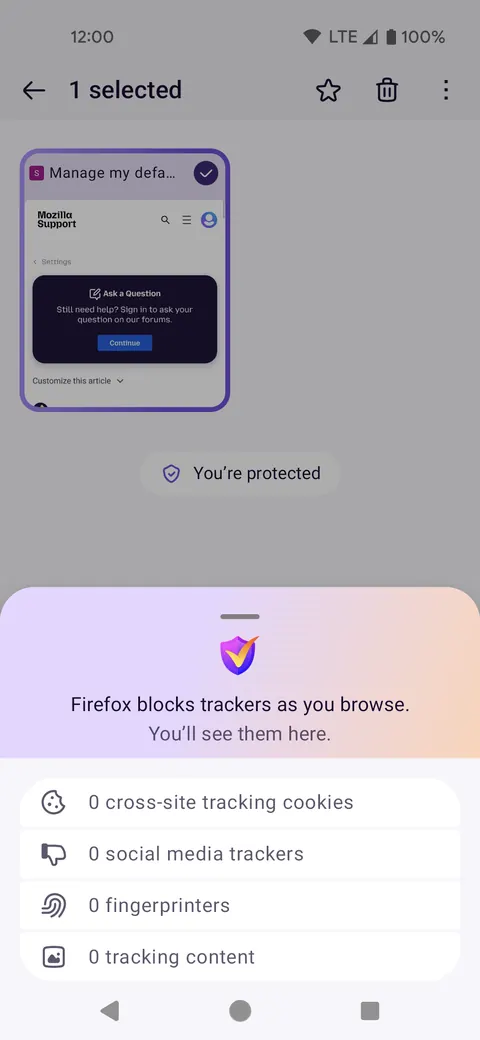
Screenshots: © Mozilla Corporation, shown for commentary.
See all 34 screens — create a free accountSee every screen
The full map has all 34 screens, every feature and where each one lives. It is free with an account.
What could be better
Our read of the map, the store listing and recent reviews.
Fix crash and freeze regressions before shipping updateslarge
Reviewers report repeated crashes and freezes after updates, so the browser fails during ordinary tasks. Ship a crash-free baseline with release gating and session recovery after a force close.
Add close-tabs-on-exit and per-session auto-close optionsmedium
Users say tabs stay open after exit and the only auto-close choice is a day, week or month schedule. Offer a close-on-exit option and session-based cleanup alongside the schedule.
Require confirmation before Close all or Quit from the tabs menusmall fix
A Quit button sits where taps land in the menu, and one accidental tap wipes every open tab with no recovery. Add a confirm step and an undo window for close-all actions.
Add a page zoom control with a reset to 100 percentmedium
Reviewers say pinch zoom resets badly and pages lack zoom controls like desktop browsers. Provide zoom buttons, a zoom level indicator and a one-tap reset to 100 percent.
Give per-site control over background audio and media playbackmedium
Audio cuts out after several seconds when the app is in the background, and some users cannot turn off background playback. Add a per-site playback setting and a clear pause when leaving the app.
Let users hide history and shortcuts on the new tab pagesmall fix
Recent history is forced into shortcuts with no way to disable it, and the new tab page packs shortcuts, news and search together. Add toggles for each new tab section.
Open links in the current tab or a new tab by user settingsmall fix
Taps on links often replace the current page or open a new tab for every click, which adds clutter. Add a setting for link target and a warning when tab counts climb.
Restore tabs, bookmarks and settings on a new device after sign-inlarge
Reviewers signed in on a new device and found nothing restored, and bookmarks cannot be exported without an account. Add a restore check after sign-in and a plain bookmark export file.
Want an app like this, but better?
Tell us the idea. We research it, and build it for you.
Submit your idea