
How Opera Mini: Fast Web Browser works
Opera Norway AS · Communication
Android
What it does
Opera Mini is a lightweight mobile web browser with ad blocking, data savings, a speed dial home, live football scores, news and a built-in Opera AI chat assistant that can answer questions and generate images. It also offers private browsing and PIN-locked mode.
Who it is for: Opera Mini is for people who want a lightweight mobile web browser with ad blocking, data savings, and an AI chat assistant.
Key features
Opera AI chat
Built-in AI chat assistant for asking questions, getting advice and generating content, with suggested prompts.
AI chat history
Stores and lists previous Opera AI conversations, with options to start new chats.
Live football scores
Shows live and upcoming football match scores on the home screen and via a Football button.
Settings
App and Opera AI settings including suggestions and shortcut options.
Ad blocking
Blocks ads for faster, cleaner browsing, toggled during onboarding.
AI image generation
Generates images from text prompts within Opera AI chat.
The main user flow
- Onboarding: enable ad blocking, data savings, set as default browser, allow notifications
- Browse the web via the address bar and Quick Access shortcuts
- Check live football scores from the home screen or Football button
- Chat with Opera AI, manage chat history, and generate images
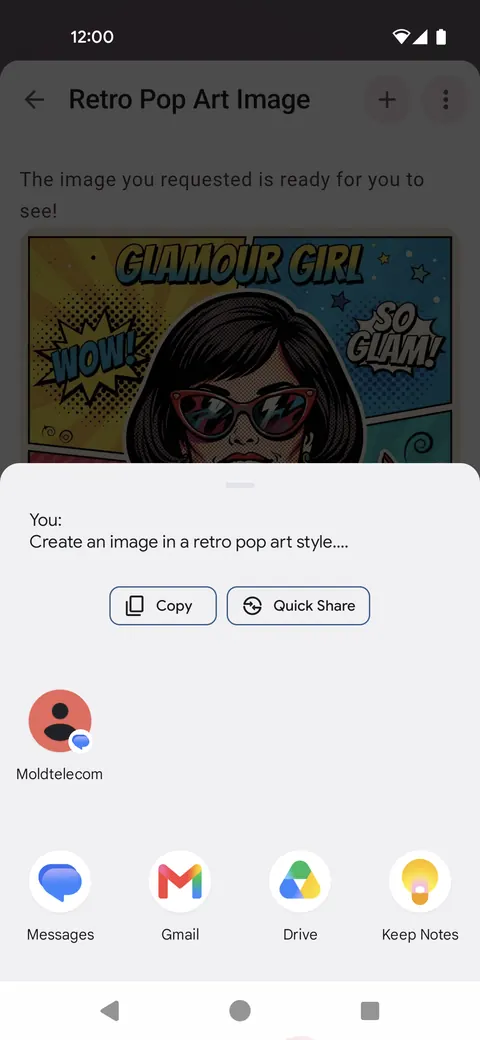
- Share AI responses via the system share sheet
- Navigation
- Home screen with address bar and speed dial; bottom toolbar with Back, Forward, Home, Football, Tabs and More; Opera AI accessed from home and via chat history and settings menus.
- Onboarding
- Multi-step setup with Continue/Skip: ad blocking, data savings, set as default browser, then notification permission.
- How it makes money
- Ads are visible on the home screen (an AD label appears next to a feed item); mention of 'free data' available in select markets. No paywall or prices seen.
Screenshots
10 of 25 screens, captured on a real phone with sample data.
Home - speed dial, live scores, news Chat history list with image chat Opera AI - image generation result Opera AI - chat with history visible Browser - page view with bottom toolbar Onboarding - block annoying ads Opera AI chat options menu Opera AI - chat history drawer Attachment sheet - images and camera Share sheet - AI response - +15 more screensFree with an account
Screenshots: © Opera Norway AS, shown for commentary.
See all 25 screens — create a free accountSee every screen
The full map has all 25 screens, every feature and where each one lives. It is free with an account.
What could be better
Our read of the map, the store listing and recent reviews.
Make ad blocking verifiable and keep ads out of the home feedmedium
Users report ads still appear while ad blocking is on, and the home feed shows an AD label that conflicts with the ad-blocking promise. Show per-site blocked counts and keep feed ads out when blocking is on.
Ship releases with a lag and crash regression check before rolloutmedium
Several low reviews describe lag, spinning loaders and crashes that began after an update. Run a startup and scroll performance check on the home feed and page load before each release, and roll out in stages.
Make the live football feed opt-in and keep it out of the default homesmall fix
Users say football pop-ups and scores were added to a browser and cannot be switched off. Offer football scores as an opt-in module with a visible off switch and no pop-ups, placed in settings.
Cap full-screen ads per session and add a clear close controlsmall fix
Users report more full-screen ads over time and close buttons that are hard to find. Limit full-screen ads per session, and place a visible close control in a fixed position on every ad.
Make sign-in and bookmark saving reliable across app restartsmedium
Users report they cannot sign in to an account, that login details are not saved, and that bookmarks cannot be saved after a reinstall. Add a sync status indicator and a retry path with a clear error when sign-in or sync fails.
Ask for personalised ad consent as a separate, optional stepsmall fix
A reviewer reports that setup asks to monitor them for personalised ads with only an approve option. Offer a separate consent screen with a clear decline choice and explain what is shared.
Show the microphone prompt only when the user taps voice inputsmall fix
The microphone-denied dialog interrupts the Opera AI start flow without a clear need. Ask for microphone access only when the user taps the voice button, and let the chat continue if it is declined.
Let users save, print or export offline pages and downloadsmedium
Users cannot save a page as PDF or print it, and report problems with downloads and the download folder. Add save-as-PDF and print actions to the page menu, and let users pick the download folder.
Want an app like this, but better?
Tell us the idea. We research it, and build it for you.
Submit your idea