
How Opera: Private Web Browser works
Opera Norway AS · Communication
Android
What it does
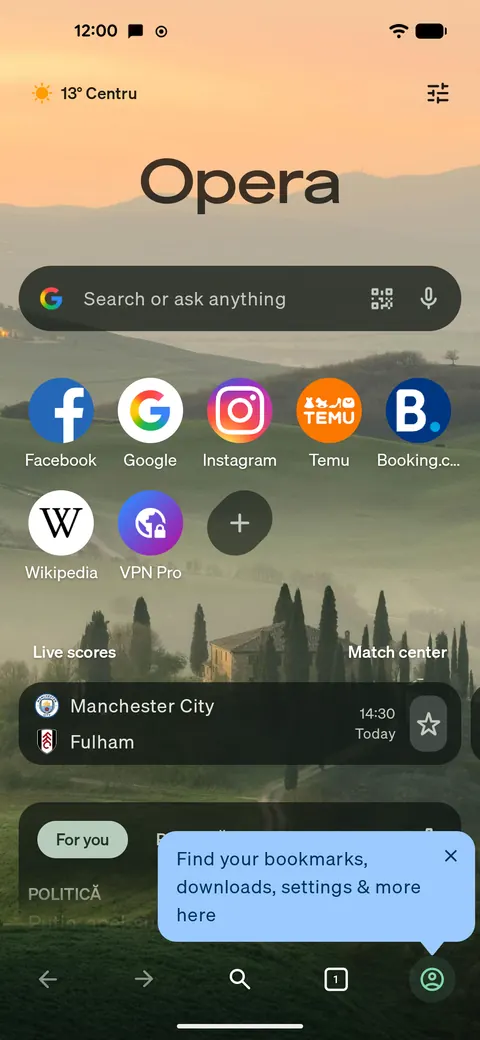
Opera is a mobile web browser that combines standard browsing with an integrated AI assistant, live sports scores, a news feed and private tabs. The start page leads with news and match data alongside search.
Who it is for: People who want a mobile web browser with a built-in AI assistant, live sports scores, a news feed and private tabs.
Key features
Search and address bar
Unified search and address field with QR scan and voice search.
Opera AI assistant
Built-in AI assistant with Ask AI shortcuts, search view integration and context menu access.
Live scores
Shows match scores and lets users follow matches for goal alerts.
News feed
Category-based news feed with settings and per-article menus.
Voice search
Lets users search by speaking.
Default search engine
Choose the search provider used for queries.
The main user flow
- Onboarding: set as default browser, notifications, data consent, interests
- Browse from the start page via the search/address bar
- Check live scores and follow matches for alerts
- Manage tabs (normal and private) and tab layouts
- Configure search engine, Opera AI and voice settings
- Navigation
- Start page is the hub; the search bar, tab switcher and a bottom bar with a menu provide access to tabs and settings.
- Onboarding
- Multi-step setup asking for default browser status, notification permission, data and ad-personalisation consent, then a wallpaper and interest selection.
- How it makes money
- Ad personalisation consent and news feed with ad-choices icon are visible; no paywall or prices seen. Ads are present in the feed.
Screenshots
10 of 29 screens, captured on a real phone with sample data.
Start page with news and live scores Search bar with Ask AI and Private shortcuts Private tabs gallery Search settings Set Opera as default browser Tab menu Default search engine picker Set as default browser dialog Opera account portal Start page after relaunch - +19 more screensFree with an account
Screenshots: © Opera Norway AS, shown for commentary.
See all 29 screens — create a free accountSee every screen
The full map has all 29 screens, every feature and where each one lives. It is free with an account.
What could be better
Our read of the map, the store listing and recent reviews.
Make the built-in ad blocker work on pages and the news feedmedium
Reviews say the blocker stopped working and ads still appear in the news feed. The start page mixes news and ads with browsing. Ship a blocker that covers both pages and feed cards, and show per-site status.
Fix keyboard input so text fields accept typing on web pagesmedium
Users report that they cannot type into web text boxes and search boxes, even though the keyboard appears. Test common web inputs on each engine update and fall back to a native input path when a field stops accepting keys.
Stop search queries from triggering repeated captcha challengesmedium
Users say every search now shows a captcha, and some say the app flags bot checks on each query. Reduce request fingerprinting from the app, tell users when a challenge is caused by the app, and avoid repeat prompts within a session.
Keep user wallpaper and start-page layout after app updatessmall fix
Users report that updates reset the wallpaper and wipe customisation. A new app should store the start-page layout and wallpaper in a restorable profile and never replace them without an explicit choice.
Cut setup to one screen and move privacy claims out of the first promptsmall fix
Setup runs through several consent and default-browser screens before first use. Ask for default-browser status and notifications later, and show the ad blocker and VPN claims in settings, not as setup promises.
Make downloads finish completely and report failures honestlymedium
Users report downloads stopping partway while the app says they completed, and some say any download crashes the app. Verify file size against the server header, retry partial transfers, and show failure states instead of false completion.
Offer an ad-free paid tier with prices shown before any purchase flowsmall fix
The app is free with ads and in-app purchases priced from $7.99 to $39.99, but no paywall or prices were seen in setup. Show the ad-free option with its price in settings, and keep billing terms visible before purchase.
Want an app like this, but better?
Tell us the idea. We research it, and build it for you.
Submit your idea