
How Flightradar24 Flight Tracker works
Flightradar24 AB · Travel & Local
Android
What it does
Flightradar24 is a live flight tracker that shows aircraft moving worldwide on a detailed map. Users can search flights and airports, point the device at aircraft to identify them, and view flight status and history.
Who it is for: People who want to track live aircraft on a map, search flights and airports, and check flight status and history.
Key features
Time and units
Time zone, time format and measurement units.
Language
Choose app language, with restart required.
Map settings
Map type, labels, data sources and display options.
Flight and airport search
Search by flight number, airport or route, with shortcut searches.
Live flight map
Real-time map of aircraft worldwide with selectable map styles.
Aircraft data sources
Choose which receiver and satellite sources feed tracking.
The main user flow
- Browse the live map and tap aircraft or airports for details
- Search for a flight, airport or route
- Adjust map, data source, language and unit settings
- Upgrade to access flight history and premium features
- Navigation
- Single full-screen live map with a toolbar of shortcuts (AR, search, login, location, weather, filters, alerts, playback) and a More/Settings menu; settings are tabbed into Map, Visibility and Misc.
- Onboarding
- A permission prompt for notifications followed by a what's-new overlay introducing the airport panel.
- How it makes money
- A persistent 'Unlock 60+ features' promo on the map, plus a paywall for airport flight history offering a 14-day free trial then $39.99/year for Gold. Some features are marked as upgrade-only.
Screenshots
10 of 25 screens, captured on a real phone with sample data.
Home - live map Search Airport flight history upsell Settings - misc What's new - airport panel Language selection menu Restart to apply language dialog Notification permission prompt Home - live map (German) Settings - misc (German) - +15 more screensFree with an account
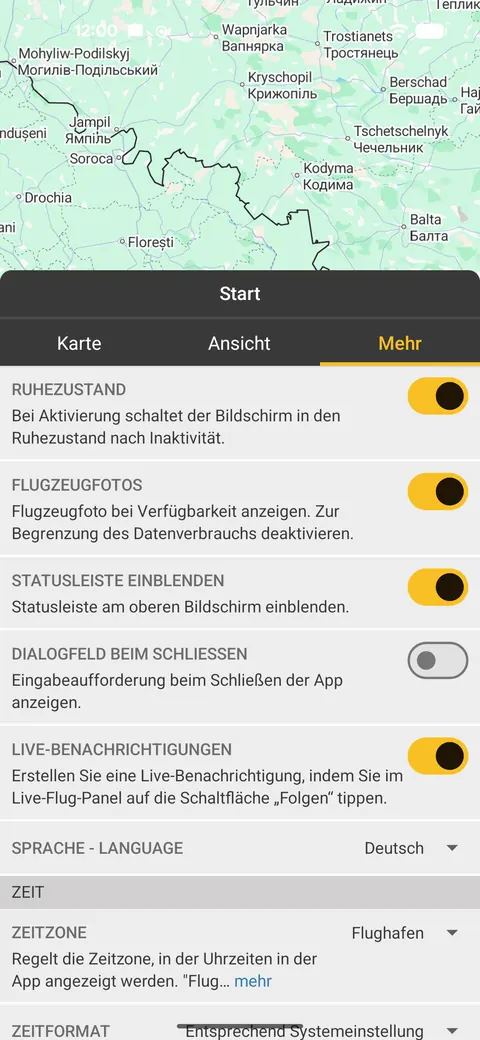
Screenshots: © Flightradar24 AB, shown for commentary.
See all 25 screens — create a free accountSee every screen
The full map has all 25 screens, every feature and where each one lives. It is free with an account.
What could be better
Our read of the map, the store listing and recent reviews.
Apply language changes instantly without a restart dialogmedium
Changing language forces an app restart behind a dialog. Switch the UI language in place and refresh open screens, so the user never has to restart to apply it.
Finish localisation so no English labels remain in translated screensmedium
Some English labels stay on German screens, so translated screens look half-finished. Ship complete string coverage per language and test each language's screens before release.
Show the upgrade prompt after a completed task, not on the map and searchsmall fix
The premium promo sits on the main map and appears in search, which may feel intrusive. Limit upsells to moments after a finished action, such as viewing a flight, and keep the map clear.
Hide technical data sources behind an advanced settings sectionsmall fix
Settings expose many receiver and satellite source options to casual users. Show a simple default source choice, and move the full ADS-B, MLAT and radar list into a separate advanced screen.
Offer a lower-priced tier or single-airport pass for flight historymedium
Flight history is gated behind an annual Gold plan at 39.99 USD with a 14-day trial, while in-app purchases range widely. Add a cheaper monthly or per-airport option so casual users can try history.
Show trial end date and cancel path on the paywall before purchasesmall fix
The paywall offers a free trial of an annual plan with a link to all subscriptions. State the trial end date, renewal price and cancel steps on the same screen before the user confirms.
Ask for analytics and ad consent before any data collection startssmall fix
Analytics opt-in and ad preferences sit deep in settings, while the app contains ads. Ask for consent at first launch and record each choice, so users see what they agreed to.
Want an app like this, but better?
Tell us the idea. We research it, and build it for you.
Submit your idea