
How Google Fit: Activity Tracking works
Google LLC · Health & Fitness
Android
What it does
Google Fit: activity, steps and Heart Points tracking with a journal.
Who it is for: For people who want to track activity, steps, Heart Points and daily journal entries in Google Fit.
Key features
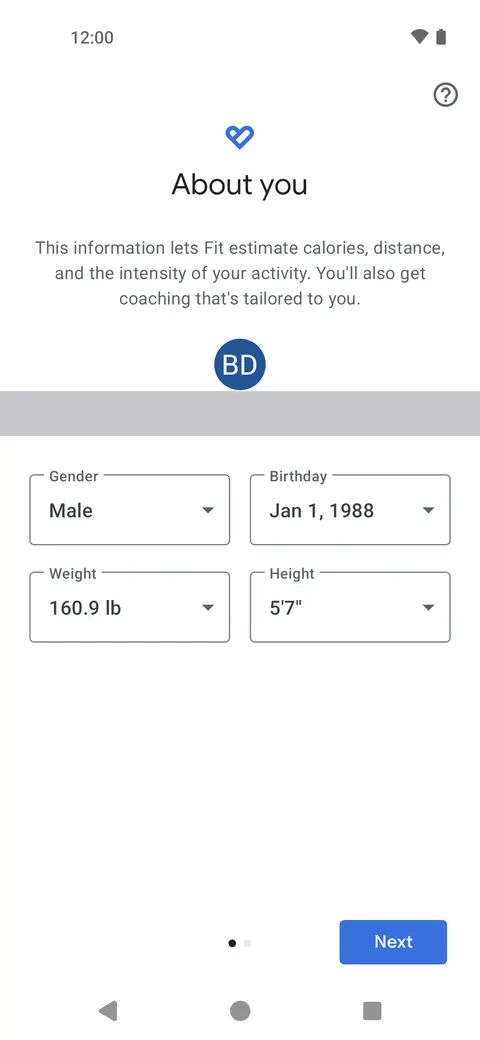
Onboarding
Permissions, body data, goals.
Manual logging
Add weight, blood pressure, activity.
Goals
Heart Points and steps goals.
Settings
Units, tracking, display.
The main user flow
- Set goals
- Log activity
- Review journal
- Navigation
- Bottom tabs Home, Journal, Browse, Profile; FAB for adding data; avatar top right.
- Onboarding
- Google sign-in, permissions, body data, activity tracking opt-in, goals tutorial.
- How it makes money
- Free, no ads.
Screenshots
10 of 24 screens, captured on a real phone with sample data.
Home Journal About you Browse Profile Settings: units Track your activities Add data menu Choose your daily goals About you filled - +14 more screensFree with an account
Screenshots: © Google LLC, shown for commentary.
See all 24 screens — create a free accountSee every screen
The full map has all 24 screens, every feature and where each one lives. It is free with an account.
What could be better
Our read of the map, the store listing and recent reviews.
Calibrate step and distance per device; flag low-confidence totalsmedium
Users report steps and distance well below their own counts, and sometimes above. Run a calibration walk to set stride length, and mark totals as estimated when sensor confidence is low.
Require sustained motion before counting steps; drop idle spikesmedium
Reviews describe steps rising while seated, lying down, or with the phone on a desk. Count steps only after sustained cadence, and skip sensor spikes during sleep or stillness.
Add a pause control and let users fix auto-detected activity typesmedium
Auto-detection logs bike commutes as walks, misses bike rides, and starts while driving, with no pause button. Offer pause, and let users relabel or delete an auto-detected session.
Keep awarded Heart Points stable and show the minutes behind each scoremedium
Heart Points drop after being awarded and differ for the same effort. Lock points once earned, reconcile on sync, and show the activity minutes behind each total.
Sync Health Connect in the background with a visible last-sync timemedium
Users must force-close and reopen to see data, and totals stop updating during the day. Sync on a schedule, show last-sync time, and queue retries instead of dropping data.
Make Body Sensors optional and show one clear sign-in pathsmall fix
A Body Sensors dialog blocks onboarding, and a duplicate Google Play services chooser confused users. Let users skip sensor access and keep one labelled sign-in choice.
Show one pricing statement and keep ads out of tracking screenssmall fix
Reviews mention ads and subscription prompts while the listing says free with no ads. State what is free and what is paid, and never insert ads into tracking screens.
Want an app like this, but better?
Tell us the idea. We research it, and build it for you.
Submit your idea