
How Investing.com: Stock Market works
FUSION AGENCY SPAIN SL. · Finance
Android
What it does
Investing.com is a market data and news app covering stocks, indices, commodities, crypto and funds. It shows live prices, financial news, AI-picked stock lists, technical analysis and a watchlist.
Who it is for: Investors and traders who want market prices, financial news, stock lists and watchlists for stocks, indices, commodities, crypto and funds.
Key features
Watchlists
Create and view watchlists of favourite instruments with live prices.
Account sign up and sign in
Create an account or sign in with Google, Facebook or email to unlock watchlists, portfolios and alerts.
Instrument detail page
Price, overview, news, technicals and analysis for a stock, index or crypto.
Edit watchlist
Rename watchlists, reorder and remove symbols, and add new symbols.
Instrument search
Search stocks, funds and ETFs with popular suggestions and recent items.
Language and edition selector
Choose the app language and regional edition.
The main user flow
- Browse popular markets on Home and open an instrument
- Read breaking and popular financial news and search for news
- Create a watchlist, add instruments, and sign in to receive alerts
- Review technical analysis and historical data for an instrument
- Choose a market or exchange and view crypto perpetual contracts
- Navigation
- Bottom tab bar with Markets, News, Ideas, Watchlist and More, with a search button on the top bar and a language and edition selector.
- Onboarding
- Browsing is open without an account; watchlist and alerts prompt a sign-up or sign-in with Google, Facebook or email, with a later option.
- How it makes money
- Ad-free Version is offered from the More menu; ads are implied by the ad-free option. No prices shown in captured screens.
Screenshots
10 of 35 screens, captured on a real phone with sample data.
Home - Popular markets Watchlist - with items Instrument detail - Anthropic overview Edit watchlist Search - suggestions after back (German) More - menu Watchlist - empty state with suggestions Dialog - sign in to use watchlist Sign in options Markets - Popular instruments (German) - +25 more screensFree with an account
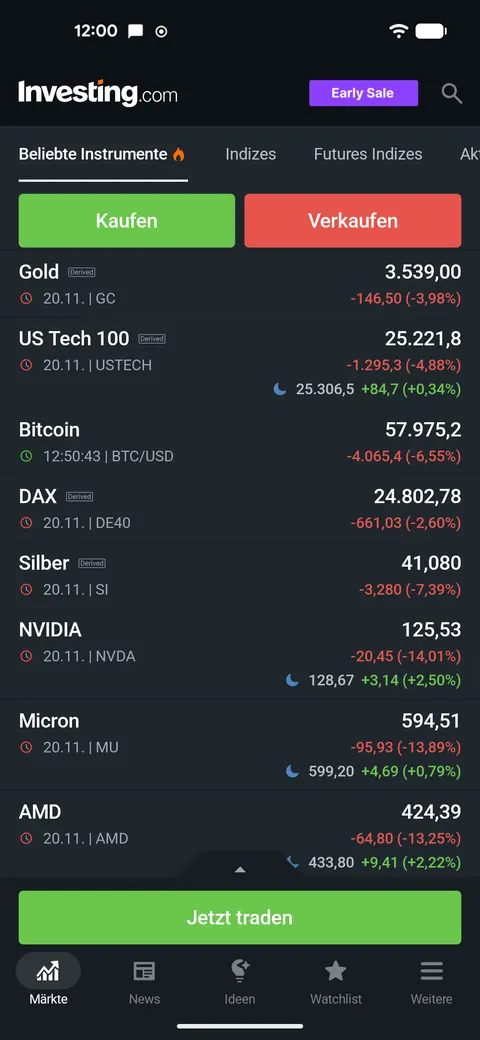
Screenshots: © FUSION AGENCY SPAIN SL., shown for commentary.
See all 35 screens — create a free accountSee every screen
The full map has all 35 screens, every feature and where each one lives. It is free with an account.
What could be better
Our read of the map, the store listing and recent reviews.
Unlock paid features immediately after purchase and show the active plan in-appmedium
Reviews say Pro payments did not unlock features, and support did not resolve it. Verify the store purchase, unlock entitlements automatically, and show the active plan name and renewal date in the account screen.
Show a plan comparison with each feature's required tier before checkoutsmall fix
Buyers say key features sit behind a higher tier they were not told about. List every feature with the tier it needs and the price of each tier before the user confirms payment.
Offer in-app cancel, refund request and a visible support contactmedium
Users report no way to stop auto-renewal, refusals of refunds, and no phone or email to reach. Add a cancel-renewal control in account settings, a refund request form, and a listed support contact.
Cap ad frequency and show the ad-free price beside adsmedium
Reviews call ads persistent and unskippable. Limit interstitials per session, keep ads off data-heavy screens, and show the ad-free option with its price where ads appear.
Stamp every quote with its source and last-update timemedium
Users report wrong or missing prices and data not loading. Show the exchange, delay and timestamp on each quote, and mark stale data instead of presenting it as live.
Give charts a portrait layout and keep the chart theme in sync with the appmedium
Charts are hard to use in portrait, forcing repeated rotation to landscape. Provide a readable portrait layout with timeframe controls visible, and apply the selected dark or light theme to the chart too.
Let users build a watchlist before any sign-in prompt appearsmedium
Sign-in prompts appear on core actions like adding to a watchlist. Keep a local watchlist without an account, and ask for sign-in only when the user wants sync or alerts.
Want an app like this, but better?
Tell us the idea. We research it, and build it for you.
Submit your idea