
How Splid – Split group bills works
Nicolas Jersch · Finance
Android iOS
What it does
Splits group bills: create a group, add people, log expenses in any currency, see who owes whom and settle with suggested payments; share a code to collaborate online.
Who it is for: For people who split group bills, like trip costs with friends, by logging expenses in any currency and settling up.
Key features
Expense groups
Create groups with persons and a base currency; join by code.
Expense tracking
Add expenses with category, payer, equal or custom split, date and per-expense currency.
Multi-currency
Expenses in other currencies converted with exchange rates.
Settle up
Suggested minimal payments and recording them.
Summary and export
PDF/Excel summary and share.
Invite by code
Share group code so others join online.
The main user flow
- Create group -> add persons
- Add expense (title, amount, payer, split, date, category)
- Settle up via suggested payments
- Export PDF/Excel summary
- Invite via code
- Navigation
- Single group screen with Overview / Expenses tabs, FAB speed dial, drawer for groups and About.
- Onboarding
- None: opens straight to New group / Join group; no account needed.
- How it makes money
- Freemium: free with in-app purchase (about $3.49) for Pro features; no ads shown during mapping.
Screenshots
10 of 59 screens, captured on a real phone with sample data.
Per-expense currency Join group by code Currency picker menu Navigation drawer Share summary PDF About Splid Welcome / no groups yet New group: name required Add category Group overview - +49 more screensFree with an account
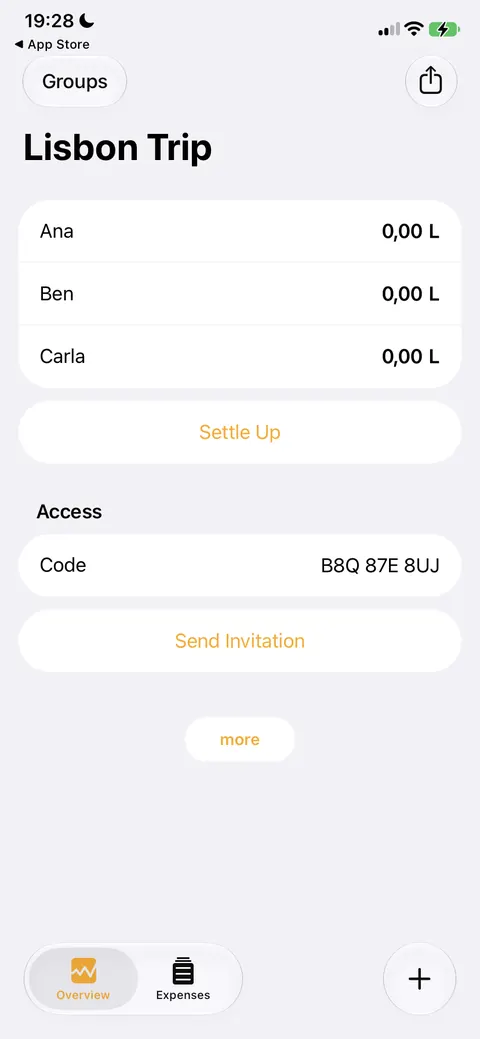
Screenshots: © Nicolas Jersch, shown for commentary.
See all 59 screens — create a free accountSee every screen
The full map has all 59 screens, every feature and where each one lives. It is free with an account.
What could be better
Our read of the map, the store listing and recent reviews.
Verify settle-up netting with a worked check before showing suggested paymentsmedium
Reviewers report the suggested payments are wrong, with one saying the payments go to the wrong person. Settle-up is a core flow (screens 34-37). Test netting against many cases and show each payment's source expenses so users can check it.
Keep PDF and Excel export reachable and clearly tied to the paid tiersmall fix
Reviewers paid for export and found no export option, or saw it disappear after an update. The summary screen offers PDF and Excel, but the purchase is priced at about $3.49. Show what each tier includes before purchase and keep paid export working.
Offer a clear group limit on free tier and keep groups restorable on a new phonemedium
Reviewers hit a two-group limit on free, could not restore groups after changing phones, and were asked to pay when opening a new group. Show the limit before a user creates a group, and let existing groups restore by code without a new charge.
Add an activity log that records who added, edited or deleted each expensemedium
Reviewers want to see who changed what, and say edits and deletions leave no trace. Expenses can be edited (screens 26, 27) and deleted after a confirm dialog (screens 30, 31). Record each change with the editor and time, and show it in the expense detail.
Allow custom amounts and percentages per person in the expense splitmedium
Users want to assign different amounts to each person and split by amount or decimal shares. Today the split sheet only shows equal portions per person. Add an unequal split mode with amounts or shares that must total the expense.
Let a person added mid-trip be included in earlier expenses without re-entrysmall fix
Reviewers say adding someone after expenses exist forces them to delete and retype everything. Persons are added from the group screens (screens 8, 9). Let a new person join the split of existing expenses, with a choice of which ones to include.
Add a dark theme that follows the system night mode settingsmall fix
Reviewers mention no dark theme and say the app is hard to read at night. The app ignores system night mode and has no in-app dark setting, so add a theme option that follows the system setting and lets users override it.
Turn off online group sharing by default and ask before a group goes onlinesmall fix
Share online is on by default when creating a group (screen 3), so group data may be shared without a clear choice. Default the switch to off, and show what sharing means before turning it on.
Want an app like this, but better?
Tell us the idea. We research it, and build it for you.
Submit your idea