
How Money Manager Expense & Budget works
(주)리얼바이트 · Finance
Android iOS
What it does
Personal finance tracker: log income, expenses and transfers across accounts, view by day/calendar/month, charts, budgets, backups.
Who it is for: A personal finance tracker for people who want to log income, expenses, and transfers across their accounts and review them by day, month, or chart.
Key features
Daily/Calendar/Monthly/Total/Note views
Five ways to review transactions.
Income/expense/transfer entry
One form for three types with built-in number pad, calculator, categories, accounts, notes, tags, repeat/installments.
Accounts
Asset/liability accounts in groups with balances.
Backup and export
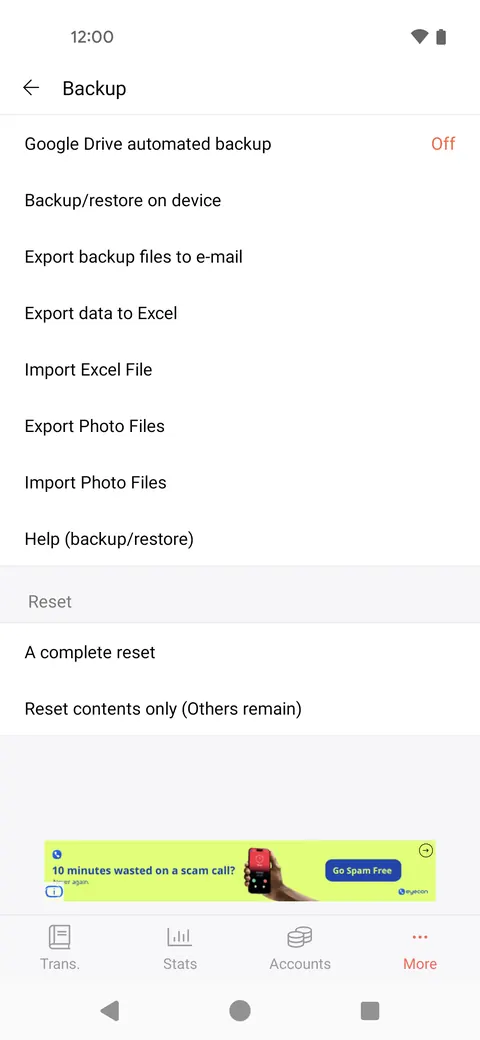
Google Drive, device, e-mail backup and Excel export.
Statistics
Pie charts and category rankings by week/month/year/period.
Budgets
Per-category budgets tracked on the Total tab.
The main user flow
- Add expense/income/transfer
- Review in Daily/Calendar/Monthly/Total
- Stats by category
- Manage accounts
- Set a budget
- Export/backup
- Navigation
- Bottom nav Trans./Stats/Accounts/More; top tabs Daily/Calendar/Monthly/Total/Note; FAB to add.
- Onboarding
- A permission info card then notification permission; coachmarks the first time each form opens. No account required.
- How it makes money
- Free with banner and native ads (some open in-app browsers or Play); Premium Upgrade (no ads, unlimited accounts, PC Manager); referral points.
Screenshots
10 of 77 screens, captured on a real phone with sample data.
Daily list (filled) Budget list Category detail Edit transaction Add expense form Search Calendar (filled) Home filter Premium Upgrade Backup - +67 more screensFree with an account
Screenshots: © (주)리얼바이트, shown for commentary.
See all 77 screens — create a free accountSee every screen
The full map has all 77 screens, every feature and where each one lives. It is free with an account.
What could be better
Our read of the map, the store listing and recent reviews.
Limit ads to one banner on list screens and remove unskippable full-screen adssmall fix
Native ads sit inside Settings and Accounts, and ad taps often leave the app. Keep ads to a single banner on list screens, keep them out of Settings and form flows, and give every interstitial a visible close control.
Restore paid entitlement on any Google account and device without re-chargingmedium
Paid users report premium reverting, ads returning and being asked to pay again after a device or account change. Tie the entitlement to a verified account, restore it on install, and show the current plan state in Settings.
Make backup restore verifiable and report success or failure after each restorelarge
Users lost years of records after restoring backups, and some restores showed no data or only part of the data. Show the backup contents before restore, confirm the item count restored, and keep a backup history the user can pick from.
Reconcile totals so the same figure appears in every viewmedium
Users see different amounts for the same period across tabs, and an added amount can show a wrong total. Derive every summary (Daily, Monthly, Stats, Total) from one calculation and show a check that flags mismatches.
Let users set a repeating entry that saves and appears on the calendarmedium
Repeat settings are reported as not saving, and recurring entries do not appear on the calendar. Save the rule once, generate the entries on the calendar, and show each generated entry for editing.
Add annual and rollover-aware budgets alongside monthly budgetsmedium
Budgets are set per category and tracked on the Total tab, but users want yearly budgets and a clear rule for unspent money. Offer a yearly budget period and show each category's rollover separately.
Cut app launch and add-button delay by loading lazily and skipping network workmedium
Launch takes long enough to reach the passcode screen, and the add button lags. Show the passcode screen without waiting on the network, load the transaction list in pages, and open the entry form without waiting on ads.
Let users swipe between period tabs and choose which tabs appearsmall fix
Users cannot swipe left or right between the top tabs, and they want a weekly view they cannot find on the main tab bar. Add swipe paging and let users reorder or hide tabs, including a weekly option.
Want an app like this, but better?
Tell us the idea. We research it, and build it for you.
Submit your idea