
How Monefy: Money & Budget App works
Reflective Technologies ApS · Finance
Android
What it does
Monefy is a fast, calculator-style personal expense and budget tracker. You add expenses and income in a few taps, see spending as a donut chart by category, manage multiple accounts and currencies, and track a monthly budget. A premium subscription unlocks custom categories, recurring records, multi-device sync, dark theme and passcode lock.
Who it is for: People who want a quick, calculator-style way to track personal expenses, income, and monthly budgets across accounts and currencies.
Key features
Accounts
Multiple accounts (Cash, Payment card, custom) each with an icon, currency and initial balance; include/exclude from balance.
Settings
Language, main currency, first day of week/month, dark theme, passcode protection and more.
Onboarding carousel
Four-step intro introducing the finance tracker, saving, reminders and goals before first use.
Categories
Built-in expense and income categories; creating custom categories is a premium feature.
CSV export
Export records to a CSV file (charset/decimal/delimiter options) via the Android share sheet.
Expense entry
Calculator-style amount entry with arithmetic, an optional note and a category picker.
The main user flow
- Onboarding (4 slides) -> notification opt-in -> welcome paywall -> home
- Add expense: EXPENSE -> keypad amount + note -> Choose Category
- Add income: INCOME -> amount -> income category (Salary/Deposits/Savings)
- Quick add: tap a category on the wheel -> amount -> add
- Review: donut chart <-> category records list -> expand -> edit/backdate/delete
- Accounts & transfer; CSV export via share sheet; backup/sync in settings
- Budget mode: set monthly budget -> home shows remaining vs spent
- Navigation
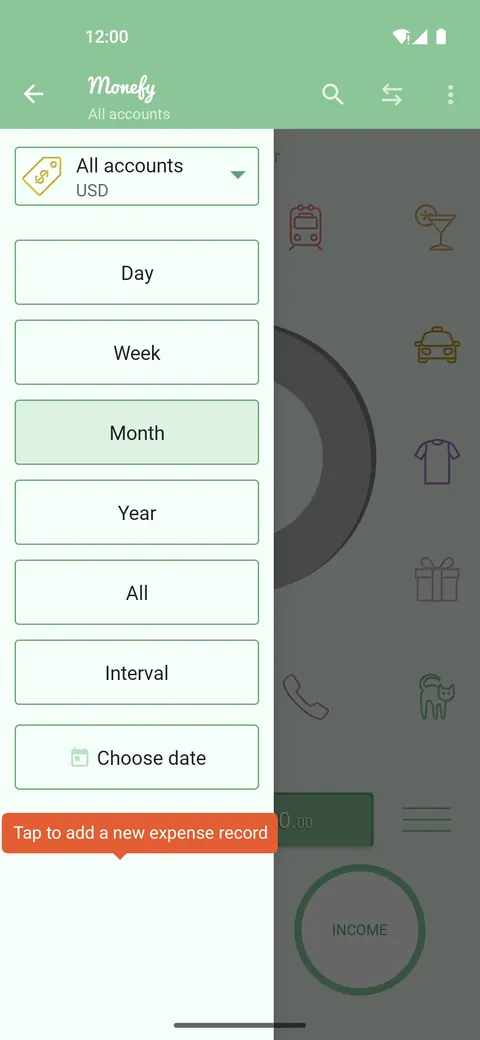
- Single main screen toggling between a donut chart and a category records list via the Balance bar. A left drawer holds the account + period filter; a right menu holds Categories, Accounts, Currencies and Settings. Add flows and editors are full-screen activities reached from the Expense/Income buttons, the category wheel, or record rows.
- Onboarding
- A 4-slide carousel (welcome, saving, reminders, goals) that asks for notification permission mid-way and ends on a one-time premium welcome offer before the empty home.
- How it makes money
- Free with a premium subscription ($27.90/year, 7-day trial; a timed 93%-off first-year offer). Premium gates custom categories, recurring records, multi-currency, multi-device sync, dark theme and passcode protection. Paywalls appear on first run, on a timer, and whenever a locked feature is tapped. Also 'In-app purchases' per the Play listing.
Screenshots
10 of 36 screens, captured on a real phone with sample data.
Home — budget mode Categories list Edit account Quick add — category bound Currency picker Welcome offer paywall Settings — data & sync Onboarding — reminders Expense category picker Filter drawer - +26 more screensFree with an account
Screenshots: © Reflective Technologies ApS, shown for commentary.
See all 36 screens — create a free accountSee every screen
The full map has all 36 screens, every feature and where each one lives. It is free with an account.
What could be better
Our read of the map, the store listing and recent reviews.
Restore paid access from the store account after a reinstall or new phonemedium
Users who paid for Pro or lifetime access report it vanishing after reinstall, and Restore Purchase failing. Verify entitlements against the store account and offer a working restore button.
Make local and cloud backups restorable, with visible sync statusmedium
Backups fail to restore and Dropbox sync stops without warning. CSV export is not a backup. Ship a restore that verifies the file, and show last sync time and errors.
Show full renewal price, renewal date and cancel path before any chargesmall fix
Users report unexpected charges and renewal prices they could not find. Show the renewal price and date on the paywall, a cancel link in settings, and a clear refund path.
Show one paywall after the first saved record, not on every locked tapmedium
Paywalls fire on first run, on a timer and on each locked tap, interrupting core flows. Show one welcome offer after a first saved record and use a non-blocking note for other gated features.
Keep dark theme and passcode lock free for every usersmall fix
Dark theme and passcode are paywalled, so free users get no low-light or privacy option. Ship both free and keep sync and recurring records as the paid features.
Keep both accounts on transfers and stop edits from resetting themmedium
Transfers default both sides to the same account, and editing one resets the source and destination. Store both accounts on the transfer record and keep them intact on edit.
Stop freezes and crashes in note entry, category expand and balance viewmedium
Users report freezes while writing notes, categories that will not expand, and crashes. Profile the note field and expandable rows, and fix slow balance rendering before adding features.
Block empty or zero saves with an inline message on the amount stepsmall fix
Saving a zero or empty amount silently does nothing, and the Choose Category button gives no feedback. Show an inline amount error and keep the entry open.
Want an app like this, but better?
Tell us the idea. We research it, and build it for you.
Submit your idea