
How Mastodon works
Mastodon GmbH · Social
Android
What it does
Official Android client for Mastodon, the federated social network: post, follow, boost, favorite, lists and notifications on any server (mapped on mastodon.social).
Who it is for: People who want to use the Mastodon federated social network on Android to post, follow, and read posts across servers.
Key features
Profile and settings
Profile editing, app and account settings
Home feed and lists
Home timeline, lists, followed hashtags
Server-based sign-up and OAuth login
Pick a server, accept rules, create account or log in via browser OAuth
Compose posts
Text, polls, visibility, content warnings, media, language
Explore and search
Trending posts, hashtags, news, suggested accounts, search
Notifications
Everything/mentions with filters
The main user flow
- Pick server, sign up, confirm email, authorise
- Browse Explore and open hashtags
- Compose a post with visibility and optional poll
- Manage lists
- Edit profile and account settings
- Navigation
- Bottom tabs Home, Explore, Notifications, Profile (with account switcher); gear for settings; FAB for new post.
- Onboarding
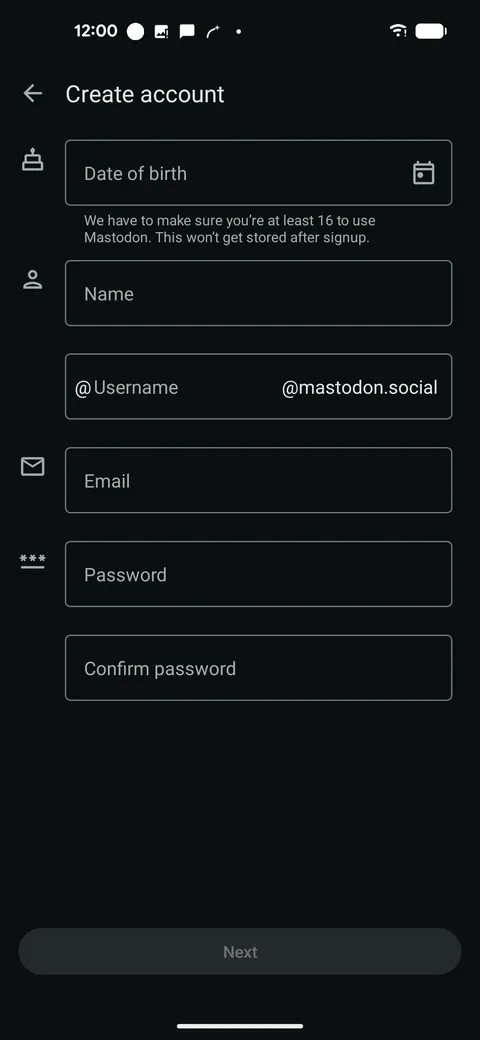
- Welcome, server rules, privacy, sign-up form with date of birth, email confirmation; login via Custom Tab OAuth then notification permission.
- How it makes money
- Free, no ads, no IAP (nonprofit).
Screenshots
10 of 49 screens, captured on a real phone with sample data.
Home timeline (empty) Manage lists Hashtag page Compose post Profile Settings Home feed menu About Mastodon Manage list members Create account (empty) - +39 more screensFree with an account
Screenshots: © Mastodon GmbH, shown for commentary.
See all 49 screens — create a free accountSee every screen
The full map has all 49 screens, every feature and where each one lives. It is free with an account.
What could be better
Our read of the map, the store listing and recent reviews.
Validate sign-up fields inline and name the exact field that blocks account creationmedium
Sign-up fails with vague errors such as forbidden, a time zone rule that is never explained, and a date of birth field that some users cannot find. Check each field as it is filled and show the rule that failed.
Show each login step with its status, a retry action and a specific failure messagemedium
Login stalls at Authorize or reports that a valid server is not Mastodon, with no hint which step failed. Show server check, browser authorisation and token exchange as separate steps, each with retry.
Make media loading, uploads and crash recovery reliable before adding featureslarge
Users report crashes on every relaunch, images that never load past a few, and uploads that show 100% then fail. Retry failed uploads, load media lazily and restore the feed position after a restart.
Let logged-out users browse public server timelines and Explore before any sign-up promptlarge
Users must create an account before seeing any content, and public timelines are not reachable in the app. Offer read-only public timelines, hashtags and Explore first, then ask for sign-up when the user wants to post.
Offer follow suggestions and a starter feed on the empty Home screenmedium
New accounts land on an empty Home with no onboarding follow suggestions in the app. Suggested accounts exist only under Explore. Show suggestions and a first-run checklist directly on Home.
Add an in-app help route and recovery options for users who cannot log insmall fix
Locked-out users find no help button and cannot reach support. Add a help entry on the welcome and login screens, with resend and recovery steps for the confirmation email.
Shrink the Home header and tab bar so posts fill more of the screensmall fix
Users say the Home header and tabs take about a quarter of the screen and the UI is too busy. Offer a compact header and hide the tab bar while scrolling.
Want an app like this, but better?
Tell us the idea. We research it, and build it for you.
Submit your idea