
How Tumblr works
Automattic Inc. · Social
Android
What it does
Social blogging and fandom platform: follow blogs and tags, reblog and post text, photos and video, join communities.
Who it is for: People who blog, follow tags and communities, and share text, photos, and video with fandoms on Tumblr.
Key features
Settings
Preferences, notifications, account, privacy, labs.
Dashboard feed
Algorithmic For you feed, Following, Tumblr TV and followed tags.
Explore and search
Trending topics and search across posts, communities, tags, blogs.
Post composer
Rich post editor with media, tags, scheduling, queue, drafts.
Communities
Topic communities to join and post in.
Tumblr Premium
Ad-free subscription with perks; also TumblrMart store.
The main user flow
- Sign up by email
- Browse the For you dashboard
- Explore trending tags
- Compose and queue a post
- Find a community
- Navigation
- Bottom nav of five tabs: Dashboard, Explore, Communities, Activity, Account; top tabs on the dashboard.
- Onboarding
- Email-first: the same field logs in or signs up, then a consent webview and notification permission.
- How it makes money
- Free with ads; Tumblr Premium (yearly $83.99 or monthly) removes ads; TumblrMart in-app items and Blaze post promotion.
Screenshots
10 of 30 screens, captured on a real phone with sample data.
Dashboard: For you Browse communities Post detail Compose post Search results Dashboard: Following Blog profile Tumblr Premium paywall Settings hub Post options - +20 more screensFree with an account
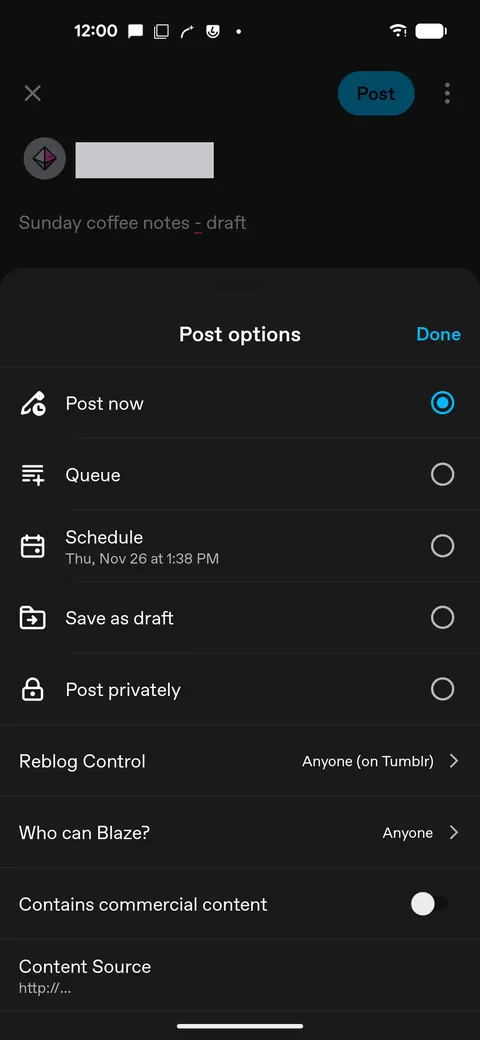
Screenshots: © Automattic Inc., shown for commentary.
See all 30 screens — create a free accountSee every screen
The full map has all 30 screens, every feature and where each one lives. It is free with an account.
What could be better
Our read of the map, the store listing and recent reviews.
Remove full-screen interstitials from blog and profile visits; keep ads in feed slotsmedium
Users report full-screen, unskippable ads when opening a blog or profile, which interrupts a simple tap-through. Limit ads to feed slots and ad-free Premium, and never block a profile view behind an ad.
Give every ad a visible close control and a working back gesturesmall fix
Reviewers say ads cannot be exited, the close target is hard to tap, and the back button opens the ad's link. Show a clear close button at a fixed position and let the system back action dismiss the ad.
Show a populated Following tab for new accountsmedium
A new account lands on an empty Following tab, so the first session has little content. Seed the tab with suggested blogs and tags the user can follow during onboarding.
Cut the consent flow before the first screen to one stepsmall fix
Consent webview, cookie preferences and notification prompts all appear before the feed. Combine consent into one screen with Agree and Decline, and defer the notification prompt until after the first useful action.
Make the verification banner dismissible and show it once per sessionsmall fix
A verification banner stays on every tab, which is persistent noise. Show it once, allow dismissal, and surface it only in account settings after dismissal.
Show ad-free pricing on the Premium paywall before any ad gatingsmall fix
The paywall lists yearly and monthly options, while in-app items span a wide price range. Show the monthly and yearly prices and what each includes on the same screen before the user is asked to pay.
Add an ad report flow that tells users what changed after a reportmedium
Reviewers report unmoderated ads and repeated flags after reporting. Add a per-ad report action with a visible result, and expose report abuse in account settings.
Want an app like this, but better?
Tell us the idea. We research it, and build it for you.
Submit your idea