
How Collage Maker works
SHANTANU PTE. LIMITED · Photography
Android
What it does
Collage Maker lets users combine several photos into layouts using templates, freestyle or multi-fit modes, then decorate them with filters, stickers and text. The store also offers a photo enhancer and 3D pop-out effects, which the captured screens do not show.
Who it is for: People who want to combine several photos into collage layouts and decorate them with filters, stickers and text.
Key features
Collage creation
Create photo collages by selecting several photos and applying a layout.
Subscription paywall
Subscription offer showing yearly and monthly prices with a countdown and sale banner.
Photo selection
Choose photos from the device gallery to use in a project.
Storage permission
Prompt to grant storage access so the app can read photos.
Drafts
Save and reopen unfinished projects.
Photo editing
Edit selected photos inside the collage editor with tools and export.
The main user flow
- Select photos from the gallery, choose a layout or template, edit, and save
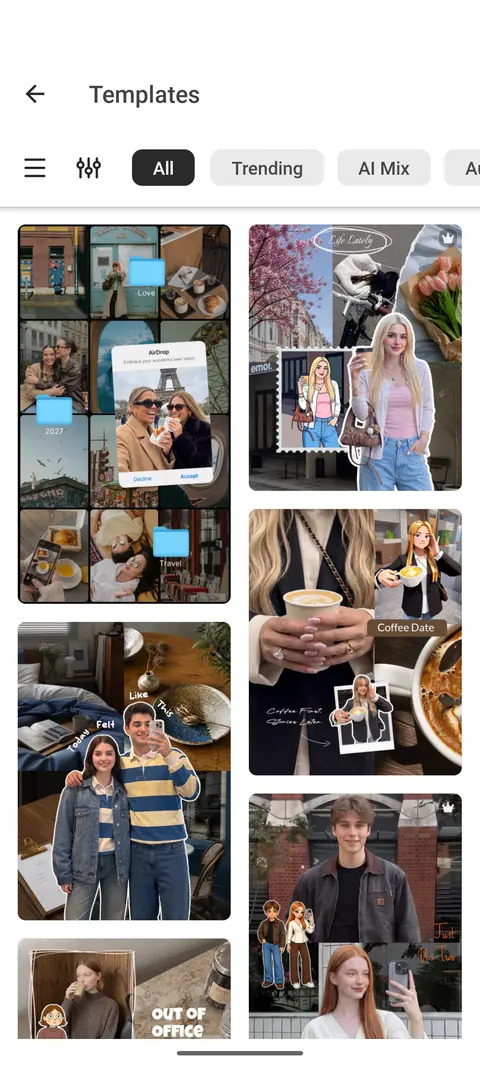
- Browse the template store by category, then filter by photo count and ratio
- Open settings to adjust export resolution and quality, language and theme
- Navigation
- A home screen with tiles for Collage, Edit, Freestyle, Multi-fit, Templates and Drafts; a settings entry; and a store reached from the home screen with tabs and a filter panel.
- Onboarding
- Storage permission is requested in the photo picker, and a notification opt-in dialog appears early. Location permission is requested by the system.
- How it makes money
- Visible subscription paywall with a 12-day countdown, a first-year price of $8.74 then $12.48/year, and a $2.99/month option. A BIG SALE banner promises no ads and all features. Settings has a Remove Ads entry. Install ads for an unrelated app (Evoto) appear in the photo picker.
Screenshots
10 of 23 screens, captured on a real phone with sample data.
Home with sale banner Store - category list Image editor with save and tools Photo picker for Collage (select 1-100) Home with subscription paywall and promo Settings Home filter sheet - photo count and ratio Photo picker - storage permission needed Enable notifications prompt Home with Templates and sale banner - +13 more screensFree with an account
Screenshots: © SHANTANU PTE. LIMITED, shown for commentary.
See all 23 screens — create a free accountSee every screen
The full map has all 23 screens, every feature and where each one lives. It is free with an account.
What could be better
Our read of the map, the store listing and recent reviews.
Keep the create-collage flow free of full-screen interstitial adsmedium
Ads cover the photo picker and editor and cannot be skipped, so users cannot finish a collage. Show ads only on the home or store screens, never between picking photos and saving.
Never style ads or pop-ups as system or security warningssmall fix
Ads claiming viruses or suspended accounts look like device alerts and push cleaner downloads. Ban fake alert designs in ad placements and review advertiser creatives before they ship.
Require explicit confirmation before any ad-triggered app installsmall fix
Single taps on ads start installs of games and cleaners users did not intend. Show the app name and a confirm step before opening any store page or download from an ad.
Show the subscription price and renewal terms before any trial sign-upmedium
Users report accidental purchases and trial charges they did not expect. Show the renewal date and price on the same screen as the buy button, with a clear no-charge path, and show the paywall once per session instead of on every home or store visit.
Allow a collage to be made from a single photosmall fix
Users cannot start a collage with only one photo, even though the picker accepts one. Let the single-photo case use the same layouts with a clear minimum of 1 photo.
Let users place photos at full size and stack them as a backdropmedium
Users cannot add photos at 100% size or stack one photo behind others, and placement feels imprecise. Add a full-size insert option and a layer order control in the freestyle editor.
Make draft deletion work from the Drafts listsmall fix
Users report that the delete options do not appear when they try to remove drafts. Add a visible delete action on each draft card with a confirmation step.
Add Turkish language support in settingssmall fix
Users say Turkish characters are not supported and ask for Turkish alongside Vietnamese and Arabic. Add Turkish to the language list and check text rendering for its characters.
Want an app like this, but better?
Tell us the idea. We research it, and build it for you.
Submit your idea