
How Offline Music Mp3 Player- Muso works
BEABLE TECHNOLOGY PTE. LTD. · Music & Audio
Android
What it does
Muso is an offline music player that plays local MP3 and other audio files, with playlists, lyrics support and premium audio effects. Its store listing promises volume boost, a cool visual mode and an equaliser.
Who it is for: Muso is for people who want to play local MP3 and other audio files offline, with playlists and lyrics support.
Key features
In-app advertisements
Banner and card ads, mostly promoting other installable apps.
Playlist management
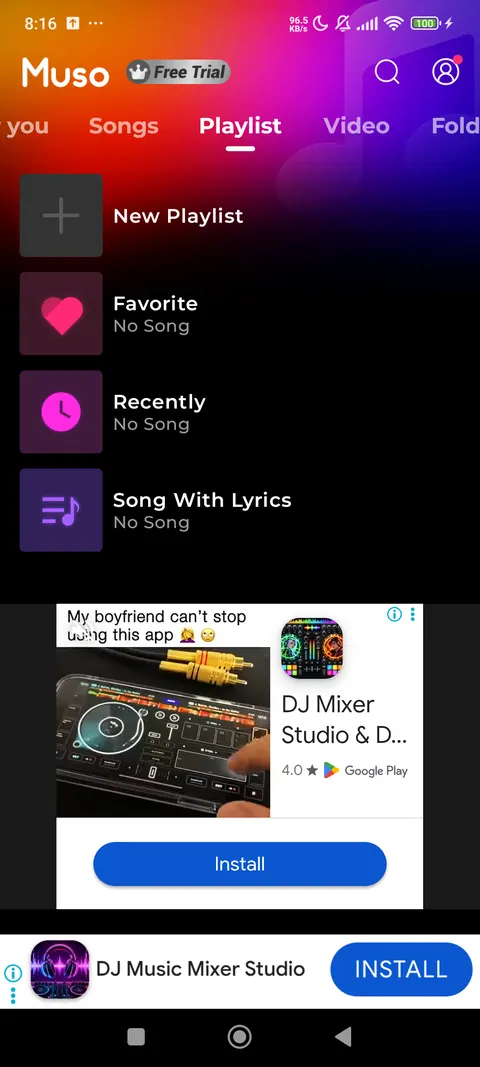
Create playlists and browse filters such as Folder, Favorite, Recently and Song With Lyrics.
Restore purchase
Restores earlier subscription purchases.
Subscription paywall
Yearly (USD 8.39, 3-day trial) and monthly (USD 2.39) plans for the ad-free and premium features.
Ad-free upsell banner
Banner promoting the free trial and ad-free experience on the For you tab.
News feed
Editorial news article cards shown on the For you tab.
The main user flow
- Grant music and storage permission so the local library is scanned
- Browse songs and create playlists from the Playlist tab
- Read news on the For you tab
- Subscribe via the paywall to remove ads or unlock premium features
- Navigation
- Four bottom tabs (For you, Songs, Playlist, Video) with a Set entry point; dialogs and paywalls open as separate screens.
- Onboarding
- Permission prompts for music, audio and storage appear on first launch and on the For you tab; no multi-step tutorial was seen.
- How it makes money
- Subscriptions: yearly USD 8.39 with a 3-day free trial, monthly USD 2.39, with Restore, Terms and Privacy links. Ads are shown on the For you and Playlist tabs, mostly for other installable apps; a banner promotes the ad-free experience.
Screenshots
10 of 19 screens, captured on a real phone with sample data.
Home - music permission prompt For you - news feed with ad Subscribe - Personalized Skin feature New playlist name dialog Home - permission prompt with DJ mixer ad For you - news feed with Music Player ad For you - news feed Playlist tab - empty library Playlist tab - app install promo Playlist tab - DJ mixer ad - +9 more screensFree with an account
Screenshots: © BEABLE TECHNOLOGY PTE. LTD., shown for commentary.
See all 19 screens — create a free accountSee every screen
The full map has all 19 screens, every feature and where each one lives. It is free with an account.
What could be better
Our read of the map, the store listing and recent reviews.
Cap ad frequency and keep ads off the library and playlist screensmedium
Ads crowd the Playlist tab, mostly for unrelated installable apps, and reviews say ads appear every few taps. Show fewer, quieter ads and keep library and playlist screens ad-free.
Never pause playback to show an ad; show ads only between listening sessionsmedium
Ads interrupt or block playback: users must watch an ad to keep music playing or to start a song. Keep the player running during listening and place ads on browse-only moments.
Skip ad requests when offline so local playback works without a networksmall fix
Ads appear with no network and the app is hard to use on mobile data. Detect connectivity, skip ad requests offline and keep local MP3 playback fully working without a connection.
Fix playback stalls and background crashes with a stability passmedium
Users report the app closing, freezing or stopping during playback, and songs failing to load. Profile the playback service, background behaviour and list loading before adding new features.
Offer a one-time lifetime purchase next to the subscriptionsmall fix
Some users left after the switch from one-time purchase to subscription and want a permanent option. Offer a lifetime unlock beside the yearly and monthly plans, with clear terms on each.
Show a guided empty library with scan status and steps to add musicsmall fix
The empty library shows only No Song, with no guidance on adding music, and some users expect built-in songs. Show scan progress, folder picks and how to add files.
Show paywalls only after the user has content, using one varied layout per featuresmall fix
Premium teasers appear before any songs exist, and paywalls share near-identical layouts across features. Show one paywall after a first listening win and vary the layout by feature.
Want an app like this, but better?
Tell us the idea. We research it, and build it for you.
Submit your idea