
How Voice Recorder works
SMART MOBI TOOLS JAKUB BARTUŚ · Music & Audio
Android
What it does
Voice Recorder is an Android audio recorder for voice memos, talks, lectures, podcasts and music. Recordings are saved to a library that can be organised into categories, searched and sorted, and shared to other apps.
Who it is for: People who want to record voice memos, talks, lectures, podcasts and music on Android, then organise, search and share them.
Key features
Recording categories
Built-in views (All, Favourites, Recordings, Recently Deleted) and user-created categories to organise recordings.
Sort recordings
Sort by name, date or duration in ascending or descending order, with option to pin favourites.
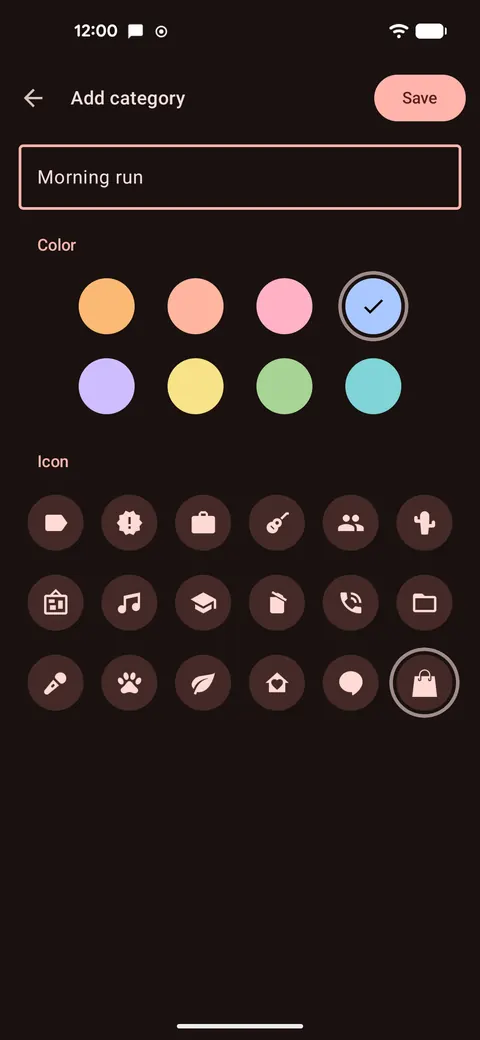
Category colour and icon
Choose a colour and an icon when creating a category.
Search recordings
Search field to find recordings by name.
Cloud sync
Premium feature that uploads recordings to the cloud and syncs them across devices after signing in.
Premium access
Prompts and menu entry promoting the premium upgrade for extra features.
The main user flow
- Tap Record, accept microphone permission, record audio
- Browse and search the recordings library, sort by name, date or duration
- Create a custom category with name, colour and icon from the navigation drawer
- Review and restore items in Recently Deleted (kept 30 days)
- Sign in to enable cloud sync across devices
- Navigation
- Home screen with a navigation drawer (menu icon) holding categories, cloud sync, settings, premium, transcription, import, WiFi transfer and help; floating Record button on home.
- Onboarding
- No full onboarding carousel seen; the first recording triggers a permissions sheet (Microphone required, Notifications optional). Cloud sync sign-in is offered optionally.
- How it makes money
- Premium Access entry in the drawer, and a Premium badge on the cloud sync / Remote Recordings feature; the app is labelled 'Basic' in the version line. Prices are not visible in the captured text.
Screenshots
10 of 11 screens, captured on a real phone with sample data.
Home - empty recordings list Add category form Search recordings - active Navigation drawer Permissions sheet before recording Recently Deleted - empty Cloud sync sign-in / Premium pitch Sort options dialog Add category form - icon selected Add category form - filled in - +1 more screenFree with an account
Screenshots: © SMART MOBI TOOLS JAKUB BARTUŚ, shown for commentary.
See all 11 screens — create a free accountSee every screen
The full map has all 11 screens, every feature and where each one lives. It is free with an account.
Want an app like this, but better?
Tell us the idea. We research it, and build it for you.
Submit your idea