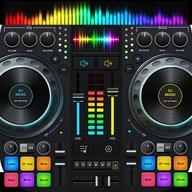
How DJ Music mixer - DJ Mix Studio works
DIGITALCRAFTERS TECHNOLOGY PTE. LTD. · Music & Audio
Android
What it does
DJ Mix Studio is a virtual DJ app with a main deck offering pitch, EQ, bass boost, loops, hot cues, a sampler, BPM tools and sync. Users can mix and remix tracks with sound effects and sample packs.
Who it is for: Hobbyist and aspiring DJs who want to mix and remix tracks using effects, loops, and sample packs.
Key features
Sample store
Browse and get sample packs by category.
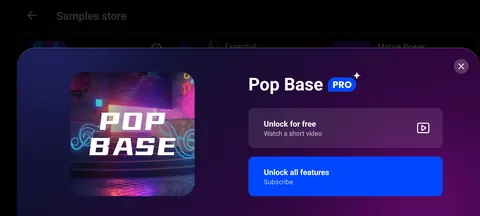
Paywall and unlock
Packs unlock by watching a video, a full unlock, or subscription.
Sampler
Four sample pads triggered from the deck, controlled by the crossfader.
BPM setting
Set tempo by tapping, halving, doubling or resetting.
Hot cues
Hot cue pads A to F with clear; extra pads need unlocking.
Pitch control
Adjust playback pitch with OK and reset.
The main user flow
- Mix on the main deck using pitch, EQ and loop controls
- Set BPM by tapping or doubling and halving
- Trigger samples from the sampler pads
- Browse the sample store and import custom samples
- Navigation
- Single main deck screen with overlay dialogs for each control; the sample store is opened from the sampler and browsed by category.
- Onboarding
- None seen; a media and audio permission prompt appears at launch.
- How it makes money
- Sample packs are locked behind paywalls offering unlock by watching a short video, unlock all features, or subscribe. Hot cue pads E and F also show an Unlock option.
Screenshots
10 of 38 screens, captured on a real phone with sample data.
Main deck - mixer Samples store - categories Unlock Motive Power pack Sampler dialog Media and audio access permission Samples store - categories (after close) Samples store - more categories Unlock Pop Beats pack Unlock Trap Kits pack Unlock Pop Base pack - +28 more screensFree with an account
Screenshots: © DIGITALCRAFTERS TECHNOLOGY PTE. LTD., shown for commentary.
See all 38 screens — create a free accountSee every screen
The full map has all 38 screens, every feature and where each one lives. It is free with an account.
What could be better
Our read of the map, the store listing and recent reviews.
Make tempo sync and loop timing keep the deck on beatlarge
Reviews say sync fails and loops land off beat. The deck has a sync button and a tap-tempo BPM dialog, but users report misalignment. Fix beat-grid alignment and test loop timing before adding features.
Let users load tracks from the device music library into the deckmedium
Users say they cannot pick songs from their phone and that their music list is not integrated. The map shows no feature that loads a device track. Add a library browser that loads tracks onto each deck.
Keep the deck playing when opening the sample store from the samplersmall fix
Tapping get more samples stops the music and disrupts the recording. Open the store as an overlay that leaves the playing deck running and the recording unbroken.
Make recording capture the mix and the voice reliablylarge
Recordings miss the voice, capture only the music, or come out noisy. Build a recording path that captures the master mix and microphone input, then check the file before saving.
Keep playback and mixing stable through long sessionsmedium
Users report hangs, failures while mixing and playback errors. Add crash reporting and stress-test multi-deck mixing before each release.
Offer one unlock choice per pack and no pop-ups before the first mixsmall fix
Nearly every sample pack is gated and users report pop-ups before reaching the deck. Show one unlock choice per pack and let users mix before any prompt.
Add a first-run guided tour of the deck controlsmedium
The only launch step is a permission prompt, and users say the app has no explanations and is hard to use. Add a short tour that highlights pitch, loop and sampler controls on first launch.
Want an app like this, but better?
Tell us the idea. We research it, and build it for you.
Submit your idea