How Lark Player:Music Player & MP3 works
Wegital HK Limited · Music & Audio
Android
What it does
Lark Player is a free offline music and video player for Android. Store copy claims support for major audio and video formats, a equalizer, lyrics, themes, playlists and on-device file management.
Who it is for: Lark Player is a free offline music and video player for Android users who want to play and manage audio and video files on their device.
Key features
Music and audio access permission
Requests access to device music and audio; playback is blocked without it.
App language selection
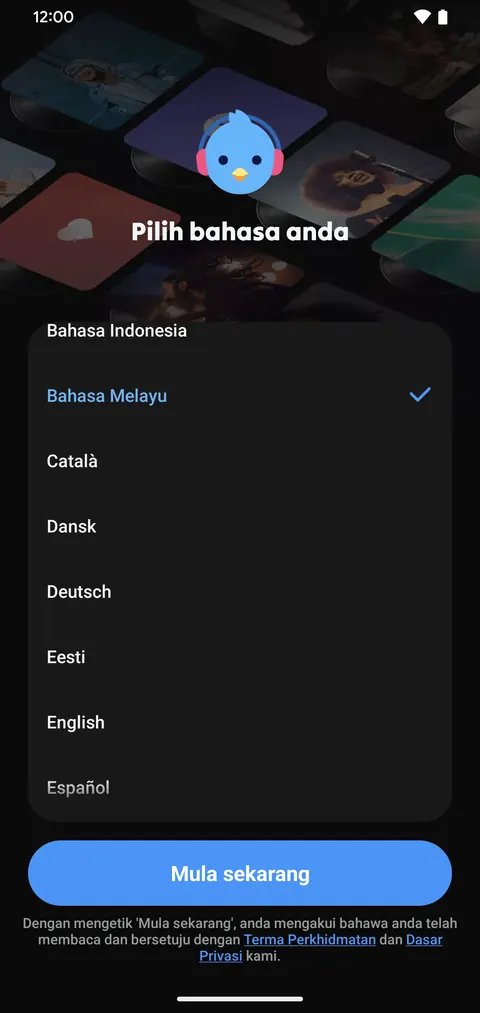
Lets the user pick the interface language from a long list at first launch.
The main user flow
- Choose language
- Grant music and audio access
- Start playback (blocked until access is granted)
- Navigation
- Not visible in the captured screens; the crawler never reached the main library or player UI.
- Onboarding
- Language picker, then a Get started screen with Terms and Privacy acknowledgement, then a system permission prompt for music access.
- How it makes money
- none seen
Screenshots
10 of 26 screens, captured on a real phone with sample data.
Choose your language - list on relaunch Welcome - grant music access Allow music and audio access Unable to play audio - access needed Language picker in Romanian Language picker in Afrikaans Language picker in Danish Language picker scrolled, Indonesian visible Language picker in Indonesian Language picker in Malay - +16 more screensFree with an account
Screenshots: © Wegital HK Limited, shown for commentary.
See all 26 screens — create a free accountSee every screen
The full map has all 26 screens, every feature and where each one lives. It is free with an account.
What could be better
Our read of the map, the store listing and recent reviews.
Cap ads to list banners and never interrupt playback or track changesmedium
Reviews widely say ads are intrusive and hard to close, and users are leaving. Keep ads to song-list banners, and show no full-screen or between-track ads during playback.
Fix playback that stops mid-track and cannot restartmedium
Users report music stopping and then failing to restart after an update. Make playback state recover reliably after a stop, and test updates against stop and restart before release.
Honor one-time purchases on new devices with a restore stepmedium
A user who bought a lifetime upgrade was asked to buy a subscription on a new device. Add a restore-purchases flow tied to the account, and never show a new charge for an owned one-time purchase.
Show one access explanation, and keep the user in the library after denialsmall fix
Each language repeats a near-identical access sheet and error dialog, and denial sends the user to home abruptly. Use one localised explanation and return the user to the library with a retry option.
Make the sleep timer stop playback at the set timesmall fix
Users say the sleep timer does not work and music keeps playing. Make the timer pause playback at the set time, show a visible countdown, and test it across app restarts.
Stop playback from restarting itself in the background after the app closesmedium
A user reports the app keeps running after closing and reappears in the background list even with notifications off. Stop background work when the user closes the app and on user-initiated stop.
Stop shuffle from replaying songs that were just skippedsmall fix
Users report that after skipping, shuffle plays the skipped songs again. Build the shuffle queue so each track plays once per cycle and skipped tracks are not repeated next.
Want an app like this, but better?
Tell us the idea. We research it, and build it for you.
Submit your idea