
How Car Scanner ELM OBD2 works
CAR SCANNER LLC · Auto & Vehicles
Android
What it does
Car Scanner ELM OBD2 is a car diagnostic and trip-computer app that connects to an ELM327 OBD-II adapter (Wi-Fi/Bluetooth/BLE/USB) to read live engine sensors, diagnostic trouble codes, freeze-frame, readiness monitors and emission tests, with customisable gauge dashboards, charts, acceleration tests and trip statistics. A built-in Demo mode simulates a connected car so the full feature set works with no adapter.
Who it is for: Car owners and DIY drivers who want to read OBD-II diagnostic data from their car using an ELM327 adapter or a built-in Demo mode.
Key features
Setup wizard
First-launch wizard: language, EULA, adapter info, interface/theme, units, car brand + connection profile and fuel setup.
Demo mode
Built-in demo car that simulates a connected ECU (VIN, live sensor values, DTCs) with no adapter.
Adapter connection
Connect to an ELM327 OBD-II adapter over Wi-Fi/Bluetooth/BLE/USB; device and connection-profile selection.
Settings
App settings: adapter, profile, interface, units, dashboard, vehicle options, sensors.
Car profiles
Manage multiple saved car profiles.
Dashboard gauges
Customisable gauge dashboard with multiple pages, HUD mode and themes.
The main user flow
- First-launch setup wizard (language, EULA, adapter info, theme, units, car brand + connection profile, fuel)
- Connect to an OBD2 adapter OR enter Demo mode
- Dashboard gauges and live-data charts
- Read/clear diagnostic trouble codes
- All-sensors list, readiness/emission monitors, ECU identifiers
- Acceleration tests and trip statistics
- Manage car profiles and settings
- Upgrade to Car Scanner Pro
- Navigation
- A central grid 'main menu' home screen links to every feature; most features are a single level deep with an in-app back arrow. A persistent CONNECT/Demo bar sits at the bottom showing ELM/ECU connection status.
- Onboarding
- A 7-step wizard (language, EULA with explicit agree/exit, adapter explainer, interface+theme, units, car brand then per-brand connection profile, fuel settings). No account or sign-in is required at any point.
- How it makes money
- Freemium: a free tier with ads (banner + interstitial-style store ads) and feature limits, and Car Scanner Pro removing ads/limits via auto-renewing subscriptions ($2.99/3mo, $4.69/yr) or a one-time purchase ($5.49 forever). In-app purchases $1.49-$4.39 per the store listing.
Screenshots
10 of 39 screens, captured on a real phone with sample data.
Home - main menu (disconnected) All sensors Diagnostic trouble codes - intro Connection setup (no adapter) Car Scanner Pro paywall Settings - Dashboard theme Onboarding - choose connection profile Freeze frame - unsupported/empty Dashboard - demo gauges Apply selected profile dialog - +29 more screensFree with an account
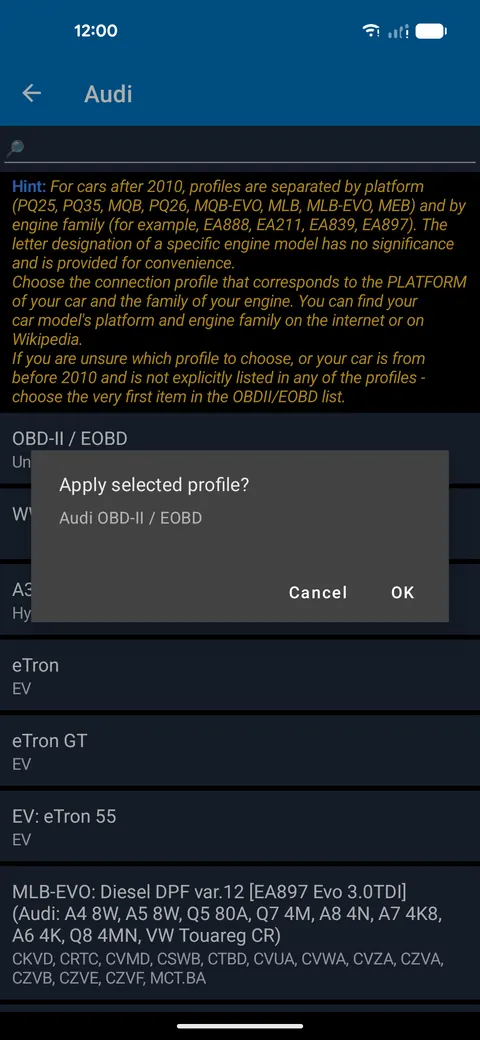
Screenshots: © CAR SCANNER LLC, shown for commentary.
See all 39 screens — create a free accountSee every screen
The full map has all 39 screens, every feature and where each one lives. It is free with an account.
What could be better
Our read of the map, the store listing and recent reviews.
Keep core live data free and show one paywall after the first working readsmall fix
Reviews say features that worked before now sit behind Pro, with lines like "every feature is behind a paywall now" and "[Available in Car Scanner Pro]". Keep basic live data and DTC reads free, and show one upgrade prompt after the user's first successful read.
Fix adapter pairing with a retry flow and a per-model compatibility listmedium
Users report Bluetooth adapters found but not connected, and some models showing no protocol. Show which adapters and car models are verified, and add a step-by-step retry and reset path instead of a silent failure.
Make data recording reliable and show clear recording statusmedium
Logs stopped at engine start or recorded idling, and users got no confirmation that a session was being saved. Show a visible recording indicator, a saved-session summary, and automatic CSV export.
Show ads only on the home menu and never over live data screenssmall fix
Ads sit on nearly every free screen, including banners over data views, and users call the free tier annoying. Limit ads to the home menu and non-data screens, and keep gauges and charts clear.
Make Pro purchases restorable across devices and answer billing supportmedium
Users report a charge that did not match the price, a paid unlock that stopped working, and a Pro upgrade not honoured on a new phone, with no support reply. Add cross-device restore and a visible receipt and refund path.
Keep the app stable across updates and persist saved settings and dashboardsmedium
After updates, users report lag, settings resetting, dashboards deleted, and the app closing on its own. Test updates against saved-settings migration and add a crash-free check before release.
Let demo mode open without Bluetooth or battery permission promptssmall fix
Demo mode routes through Nearby-devices and battery-optimization prompts before any data shows, which slows the try-before-connect path. Defer permission requests until the user chooses a real adapter.
Add a short guided first-connection checklist in place of dense intro textsmall fix
Users say the instructions are missing or hard to follow, and the EULA and DTC intro screens are text-heavy. Replace long text with a short checklist: adapter, car, ignition on, connect.
Want an app like this, but better?
Tell us the idea. We research it, and build it for you.
Submit your idea