
How Notally - Minimalist Notes works
Om Ajay Godse · Productivity
Android
What it does
Notally is a minimalist, open-source notes app: free, no ads, no account and fully offline. It keeps two note kinds - rich-text notes and checklists - organised with labels, pins, colours, reminders, archive and a recoverable trash, with search, light/dark themes, list/grid layouts and export to PDF/TXT/JSON/HTML plus full backup.
Who it is for: People who want a simple, offline notes app for writing rich-text notes and checklists.
Key features
Text notes
Create and edit rich-text notes with a title, body and automatic date.
Labels
Organise notes with user-created labels and filter by them.
Reminders
Date/time reminders with optional repeat, delivered as notifications.
Settings
Appearance, content density, backup and about options.
Themes
Light, Dark or Follow-system theme.
Checklist notes
To-do style notes with checkable, reorderable items.
The main user flow
- Take note / Make list via the two FABs, edit inline, auto-saved on back
- Organise: add labels, pin, colour, set a reminder, archive or delete
- Find: search notes (scoped to live/trash/archive) or filter by a label
- Manage: multi-select for bulk label/export/colour/copy/delete/archive
- Data: export a note to PDF/TXT/JSON/HTML, or back up/restore the database
- Navigation
- A single Activity with a left navigation drawer of five destinations (Notes, Labels, Deleted, Archived, Settings); notes open into their own editor Activity. No bottom bar, no tabs.
- Onboarding
- None - the app opens directly to the notes list with no sign-in, account, or tutorial.
- How it makes money
- None. Free and open source (GPL), no ads, no in-app purchases, no subscriptions.
Screenshots
10 of 41 screens, captured on a real phone with sample data.
Text note with a label Search - empty Settings - Appearance Navigation drawer Export action sheet Open-source libraries Home - empty (first launch) Theme chooser Notifications permission Home - grid layout - +31 more screensFree with an account
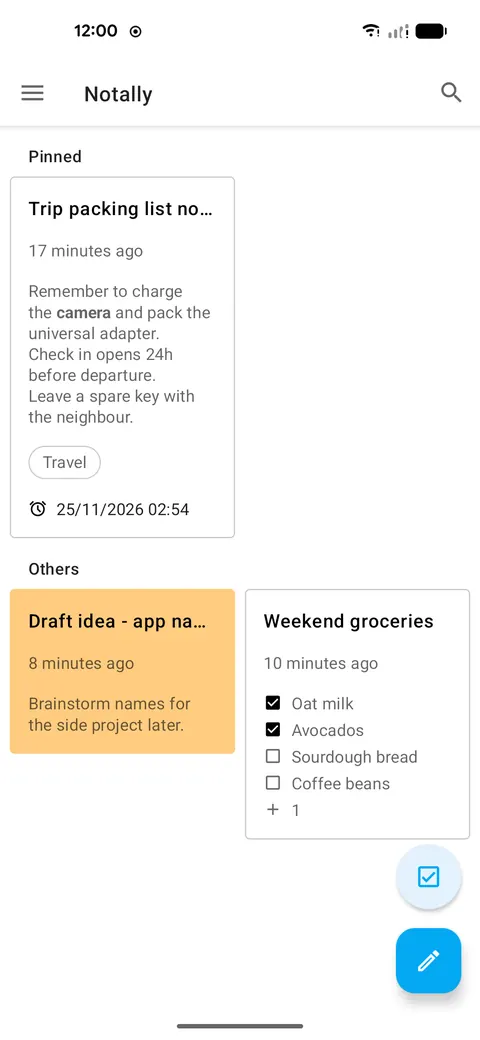
Screenshots: © Om Ajay Godse, shown for commentary.
See all 41 screens — create a free accountSee every screen
The full map has all 41 screens, every feature and where each one lives. It is free with an account.
What could be better
Our read of the map, the store listing and recent reviews.
Add undo for delete and note edits, not only a trash binmedium
Deleting moves a note to trash with no undo snackbar, and typing has no discard option. Show an Undo snackbar after delete and offer a discard that restores the last saved state.
Make backup and restore reliable and give restore a clear pathmedium
Users report restore is missing, old backups cannot be selected, and backup crashes the app. Validate backup files on export, accept them on import, and show a clear success or failure result.
Autosave while typing, not only when leaving the editorsmall fix
Auto-save runs on back, so closing the app mid-edit can lose text. Save after pauses in typing and when the app goes to background, so no explicit save step is needed.
Request reminder permissions in one guided stepsmall fix
Reminders need two system permissions plus an extra rationale dialog, and users call the permissions excessive. Explain both in one screen, request them in sequence, and show what still works if alarm access is declined.
Move checked checklist items to the bottom automaticallysmall fix
Checked items stay in place among open ones, so users must reorder by hand. Add a per-list option that sorts checked items below open ones.
Support markdown syntax in note bodiesmedium
Body formatting is limited to a toolbar that appears after selecting text. Let users type common markdown such as bold and lists and render it in the note.
Add a short first-run guide to note types and the drawersmall fix
The app opens to an empty list with no tutorial, and users say it is hard to use. Show a short first-run card that explains Take note, Make list and the drawer destinations.
Want an app like this, but better?
Tell us the idea. We research it, and build it for you.
Submit your idea