
How Todoist: To Do List & Calendar works
Todoist Inc. · Productivity
Android
What it does
Todoist is a freemium cross-platform to-do list and lightweight project manager. You capture tasks with natural language (dates, priorities, labels and projects parsed as you type), organise them into projects with list/board/calendar layouts, and track them through Inbox, Today and Upcoming views. It layers reminders, filters, collaboration and a gamified productivity/Karma system on top.
Who it is for: People who want to capture, organize and track to-do tasks, projects, and reminders across devices.
Key features
Guided setup
Multi-step setup: name, usage, survey, quick-add teaser, notifications and intro video.
Projects
Create projects with colour/icon, nesting, favourites and list/board/calendar layouts.
Tasks
Create, schedule, prioritise, label, complete and sub-task.
Settings
Account, general, subscription, calendar, personalization and productivity settings.
Inbox
Default capture list for new tasks.
Labels
Create-on-type labels applied to tasks and browsable in Filters & Labels.
The main user flow
- Sign in (Google/email/Facebook) and a short guided setup
- Quick-add a task with natural-language date/priority parsing
- Open a task to add date, priority, labels, sub-tasks and comments
- Create a project, pick an icon/colour and switch between list and board layouts
- Plan via Today and Upcoming, complete tasks (with confetti + undo)
- Review productivity: daily goal, streak and Karma level
- Navigation
- Four-tab bottom bar (Inbox, Today, Upcoming, Browse). Browse is the hub for projects, search, filters/labels, settings and productivity. A persistent red quick-add FAB sits on every list.
- Onboarding
- Account-first (Google one-tap, no password), then a 6-step guided setup: name, usage, a task-management survey, a quick-add teaser, a notifications pre-prompt (before the OS permission) and a 3-minute intro video. Several coach-marks appear on first visits to each tab.
- How it makes money
- Freemium. A 7-day Pro free-trial is surfaced via a 'Try Pro for free' banner and an upsell sheet; Pro features (Deadlines, Calendar layout, Reminders) are marked with PRO badges inline. In-app purchases $0.99–$149.99.
Screenshots
10 of 43 screens, captured on a real phone with sample data.
Inbox (filled) Task detail Quick add (parsing) Search (recent) Upcoming Theme (light) Date scheduler Notifications Inbox (empty) Task completed (confetti + undo) - +33 more screensFree with an account
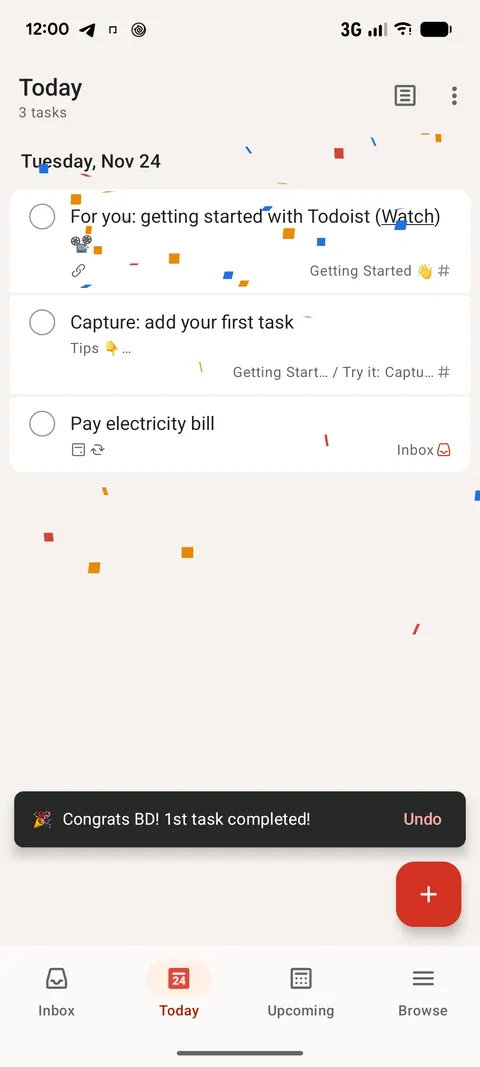
Screenshots: © Todoist Inc., shown for commentary.
See all 43 screens — create a free accountSee every screen
The full map has all 43 screens, every feature and where each one lives. It is free with an account.
What could be better
Our read of the map, the store listing and recent reviews.
Let users delete their account without setting a passwordsmall fix
Google sign-ups are asked to create a password before deletion, and the delete path is hard to reach. Allow deletion with the signed-in provider and surface the Delete account action in Account settings.
Make account creation succeed on the first try with clear recovery stepsmedium
Sign-up fails with captcha or verification errors and users get stuck in retry loops. Keep one reliable sign-in path and show a clear next step when verification fails.
Make reminders fire reliably on every plan before any upsellmedium
Reminders and notifications were reported to miss tasks, while reminders sit behind Pro. Ship a tested notification path and keep basic reminders in the free tier.
Keep quick add to one step with all fields and no lost wordsmedium
Quick add drops fields and words: removed fields add taps and parsed text can vanish. Keep title, date and priority on the first screen and never strip typed words.
Keep completed tasks reversible and recoverable from a visible listmedium
Users cannot uncheck accidental completions or find deleted tasks, and there is no trash. Add an uncheck action on completed items and a recoverable trash for a set period.
Show plan limits and one-tap cancel before any purchasesmall fix
Limits are unclear and cancelling is hard, so users hit a paywall unprepared. Show the limit that applies, a plain tier comparison and a cancel action on the subscription screen.
Let users reach the home view before sign-up and cut setup stepsmedium
Users must sign up before touring the app and face six setup steps, coach-marks and upsells first. Let users try quick add locally and move setup and upsells to after the first task.
Want an app like this, but better?
Tell us the idea. We research it, and build it for you.
Submit your idea