
How AnkiDroid Flashcards works
RAOUL NICOLAS PIERIG · Education
Android
What it does
AnkiDroid is a flashcard app implementing spaced repetition, scheduling reviews just before a card would be forgotten. It syncs with AnkiWeb and is compatible with the desktop Anki software. Users create or download decks and study them over time.
Who it is for: People who want to study flashcards with spaced repetition, sync decks with AnkiWeb, and use them alongside desktop Anki.
Key features
Settings search
Search across all settings.
Add cards
Create new flashcards via the Add button on the deck screen or card browser.
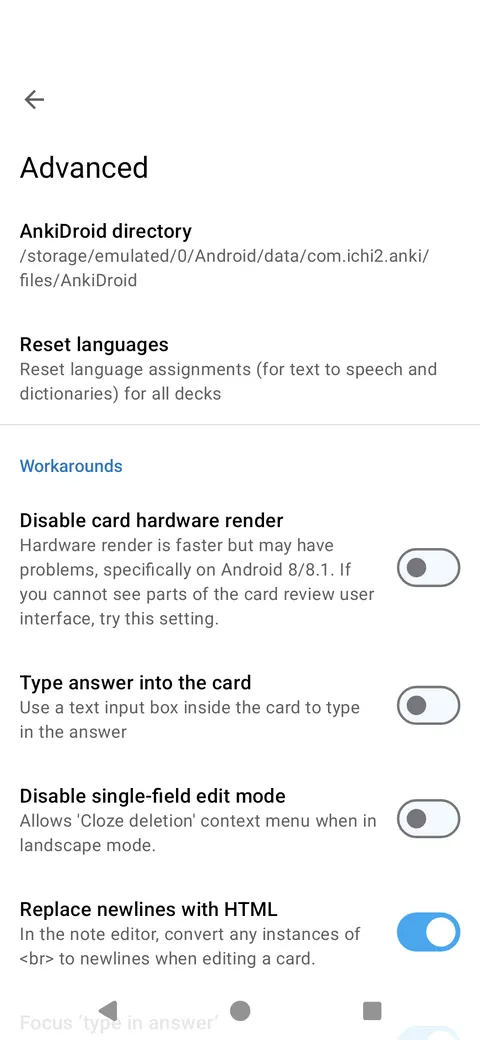
Advanced settings
Storage directory, language reset, plugins and workarounds.
Scheduling settings
Configure start of next day, learn-ahead limit and timebox limit.
AnkiDroid storage directory
Set the folder where AnkiDroid stores its data.
Card browser
Browse and manage all cards in the collection.
The main user flow
- Create cards from the deck screen or card browser via the Add button
- Browse, search, sort and filter cards in the card browser
- View deck statistics and export them as PDF
- Sync the collection with AnkiWeb
- Adjust scheduling, appearance, controls and accessibility in settings
- Navigation
- A navigation drawer (opened by the menu icon or a right swipe when enabled) links Decks, Card browser, Statistics, Settings, Help and Support AnkiDroid. Settings uses a categorised list with a search field.
- Onboarding
- None seen. The app opens directly to an empty deck screen with the hint 'Start adding cards using the + icon.'
- How it makes money
- None seen in these screens. A 'Support AnkiDroid' entry appears in the drawer, but no paywall, ads or prices are visible.
Screenshots
10 of 21 screens, captured on a real phone with sample data.
Card browser - Default deck Settings - main menu Settings - More menu Decks - navigation drawer open Decks - empty collection Statistics - Default deck Default deck for new cards - dialog Microphone permission request Settings - General Advanced - Workarounds and plugins - +11 more screensFree with an account
Screenshots: © RAOUL NICOLAS PIERIG, shown for commentary.
See all 21 screens — create a free accountSee every screen
The full map has all 21 screens, every feature and where each one lives. It is free with an account.
Want an app like this, but better?
Tell us the idea. We research it, and build it for you.
Submit your idea