How Loop Habit Tracker works
Alinson Santos Xavier · Productivity
Android Android Android
What it does
Loop Habit Tracker is a free, open-source habit tracker. You create Yes/No or measurable habits, mark them each day, and it shows streaks, scores and charts of your progress. Fully offline, no account, no ads, no in-app purchases.
Who it is for: For people who want to create, track and review their daily habits with a free, open-source, offline tracker.
Key features
Habit list / dashboard
Main screen listing habits with a per-day checkmark/value grid.
Statistics & charts
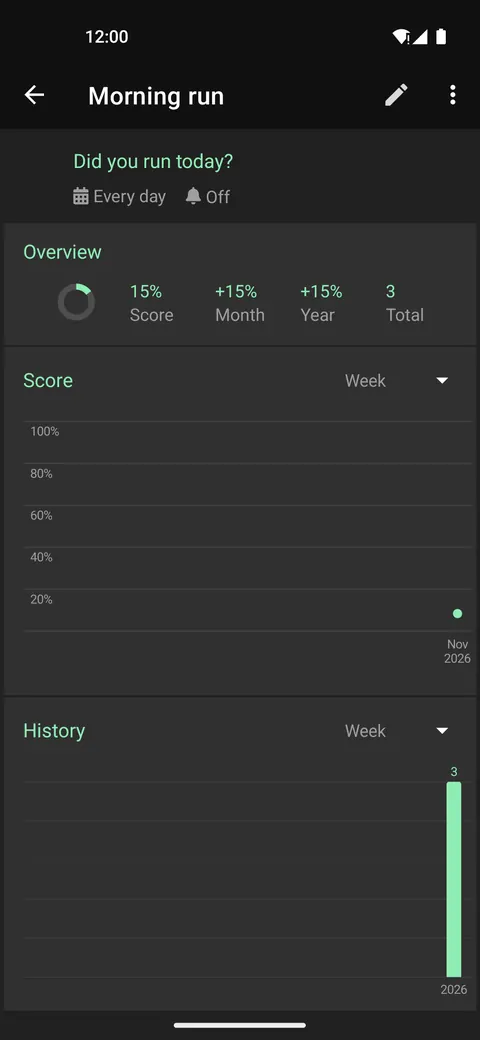
Score, history heatmap, calendar, best streaks, frequency and value bar charts.
Create habit
Add a Yes/No or Measurable habit via a form.
Archive
Archive habits to hide them while keeping their data.
Reminders
Daily reminder time per habit with notification options.
Settings
App-wide interface, reminder, database and troubleshooting options.
The main user flow
- Onboarding -> add first habit
- Create habit (choose type, name, colour, frequency, reminder)
- Log each day via the checkmark/value grid or entry dialog
- Review progress in the habit detail (score, calendar, streaks, charts)
- Manage habits (edit, archive, delete, filter, sort)
- Export/import backups in Settings
- Navigation
- Single bottom-less layout: a habit list with a toolbar (Add, Filter, overflow). Tapping a habit opens a scrolling detail; overflow reaches Settings/About; long-press enters multi-select for edit/colour/archive/delete.
- Onboarding
- 3-page intro carousel (Welcome, Create habits, Track progress) with Skip; no account or permissions requested up front.
- How it makes money
- None. Open-source (GPL), free, no ads and no in-app purchases; an optional donation/source link lives in About. No paywall to read.
Screenshots
10 of 51 screens, captured on a real phone with sample data.
Home - filled with data Home - showing archived Edit habit - prefilled Create habit (Yes/No) - empty form Settings - Reminders Onboarding 1 - Welcome Home - overflow menu Export backup - system share sheet Home - empty state Habit detail - dark theme - +41 more screensFree with an account
Screenshots: © Alinson Santos Xavier, shown for commentary.
See all 51 screens — create a free accountSee every screen
The full map has all 51 screens, every feature and where each one lives. It is free with an account.
What could be better
Our read of the map, the store listing and recent reviews.
Add automatic encrypted backup with restore on a new phonelarge
Backup is a manual file export and there is no sync or account, so a broken phone loses history. Offer scheduled backups and a restore flow that works on a new device.
Make reminders fire reliably and sync check-offs from the notificationmedium
Reminders can fail to appear, and checking off from a notification does not update the app. Test scheduled delivery and write the notification action back to the habit log.
Allow several completions per day and count-based goalsmedium
Habits are limited to one check per day and results are shown as percentages, not counts. Let users log multiple times a day and set goals like X times in a period, including habits to limit.
Show an undo option after deleting a habitsmall fix
Delete is permanent and only a confirm dialog guards it. Keep the deleted habit recoverable for a short time with an undo snackbar before purging its data.
Keep the note field visible above the on-screen keyboardsmall fix
When typing a note in the log dialog, the keyboard covers the field being edited. Scroll or lift the dialog so the active input stays visible while typing.
Explain the habit score in plain language beside the chartssmall fix
Stats screens are dense and the score formula is not explained, so casual users find it technical. Add a plain summary and a short note on how the score is computed.
Ship a home-screen widget that lists today's habits and stays drawnlarge
Widgets have shown drawing errors, a dark grey colour with no choice, and no clickable list of due habits. Build a widget that renders reliably, lists today's habits and lets users check them off.
Want an app like this, but better?
Tell us the idea. We research it, and build it for you.
Submit your idea