How Simple Time Tracker works
Антон Разиньков · Productivity
Android
What it does
A free, open-source, no-ads time tracker. You define activities (with colour, icon, goal, note) and tap a tile to start/stop a running timer; it builds records, statistics and goal progress. Supports manual records, a calendar day-view, categories and record tags, a built-in Pomodoro timer, CSV export and full backup/restore, and deep display/notification customization.
Who it is for: People who want a free, ad-free, open-source app to track time spent on activities and review their statistics and goals.
Key features
Activity management
Create, edit, archive, delete and preset activities with colour, icon, goal, note and default duration.
Records
Manual and tracked records, list and calendar day-view, filter, edit, split and delete with undo.
Customization
Extensive notification, display and additional settings to tailor the app.
Statistics
Donut and detailed charts, per-activity breakdowns, selectable ranges and goal progress.
Goals
Per-activity goals by duration or count over day/week/month with notification and progress.
Theming and language
Light/dark/system theme and in-app language selection across many locales.
The main user flow
- Create an activity (name, colour, icon, goal, note) -> tap it to start/stop tracking
- Add or edit records manually with precise start/end times and adjustment chips
- Review the Records list or calendar day-view; filter by activity/category/tag
- Open Statistics for the donut breakdown and per-activity detailed charts over a chosen range
- Set per-activity goals and watch progress on the timer card and statistics
- Back up/restore the database or export records to CSV; share statistics as an image
- Navigation
- Bottom tab bar with four tabs (Timers, Records, Statistics, Settings). Sub-screens open as full screens or bottom sheets; most forms use inline expanding fields and a custom numeric keypad. Back closes modals; a second Back on the Timers tab exits to the launcher.
- Onboarding
- None beyond an empty-state hint and the Default preset picker to seed activities; no account or sign-in required.
- How it makes money
- Free with no ads and no paywall; an optional 'Support development' donation that explicitly grants no content or features.
Screenshots
10 of 55 screens, captured on a real phone with sample data.
Timers tab (populated) Detailed statistics Change running record New activity form (expanded) Records filter Additional settings (cont.) Language selector Duration picker Share statistics Timers tab (empty / first launch) - +45 more screensFree with an account
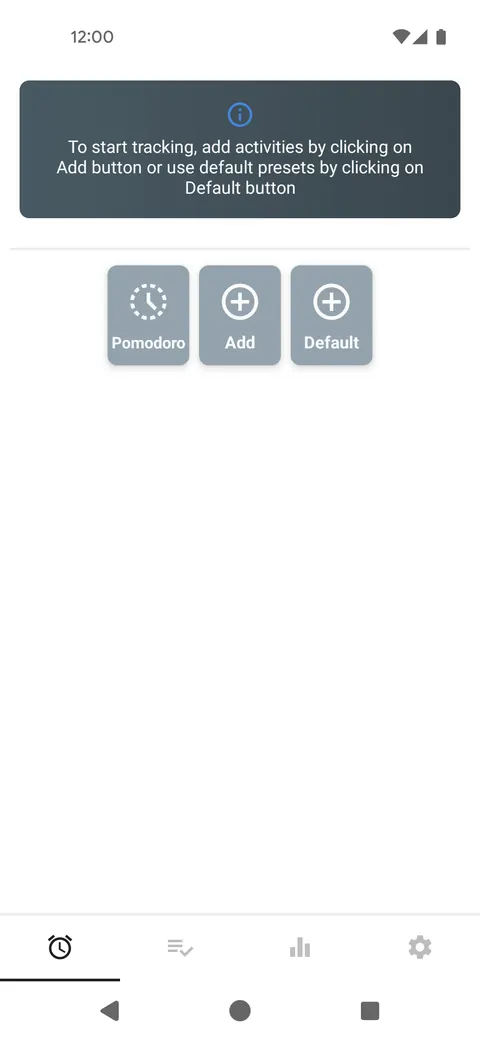
Screenshots: © Антон Разиньков, shown for commentary.
See all 55 screens — create a free accountSee every screen
The full map has all 55 screens, every feature and where each one lives. It is free with an account.
What could be better
Our read of the map, the store listing and recent reviews.
Offer start and stop tracking with manual end-of-shift entrymedium
Users must keep a timer running all day or retroactively assign unassigned time. Instead, let users start and stop an activity and also enter start and end times in one step after the fact.
Add automatic backup with a restore check and visible last-backup statusmedium
Users lost all records with no warning. Instead, run scheduled backups, show the last successful backup time, and verify the backup file before the user relies on it.
Add multi-device sync for activities and recordslarge
Data lives only on one device and there is no cloud sync, so a user tracking on two devices cannot share one timeline. Add an account-free sync option between devices the user owns.
Simplify the record editor and lock the start-time mode togglesmall fix
The Duration vs Time toggle is easy to flip by accident and editing feels cumbersome. Keep one clear time mode in the editor and stop controls from moving when the keyboard hides.
Make Pomodoro alert with sound and notifications at phase changesmall fix
The Pomodoro timer only shows an on-screen countdown and gives no audible or notification cue at break or focus time. Play a sound and post a notification when each phase ends.
Let users assign existing activities to categories from the category screensmall fix
Categories can be created but not attached to activities that already exist, and activity forms bundle many fields. Let users pick a category on either side, from the activity or from the category.
Add a short first-run guide explaining activities, tags and categoriessmall fix
New users find no instructions for how tags and activities relate. Add a brief first-run walkthrough and a help line on the tag screen.
Ask for notification permission in-app with a runtime promptsmall fix
Notifications need a manual trip to system settings. Show an in-app explanation and runtime prompt at the first timer or reminder setup, and link to settings only if the user declines.
Want an app like this, but better?
Tell us the idea. We research it, and build it for you.
Submit your idea