How MyRadar Weather Radar works
ACME Atronomatic, LLC · Weather
Android
What it does
MyRadar is a weather app that opens to an animated live radar map centred on the user's location. Users can layer weather data, watch short radar loops, and view forecasts, videos and storm content.
Who it is for: People who want a live weather radar map centred on their location, with forecasts, radar loops, and storm videos.
Key features
Weather layers
Toggle overlays such as clouds, hail, winds, alerts, temperatures and fronts, with opacity and palette settings.
Location permission
Requests precise or approximate device location and explains why it is needed.
Road weather
Shows major roads and weather in a 60-mile radius or full US view.
Premium upsell
Repeated prompts to subscribe to paid features.
Animated radar
Animated live weather radar loops around the current location, up to about two hours.
In-app advertising
Banner and skippable video ads shown across screens.
The main user flow
- Open app, accept location permission, view live radar at current location
- Change map type and toggle weather layers such as clouds and alerts
- Explore premium road weather, RouteCast and historical radar via upsell screens
- Watch weather videos and share links
- Navigation
- Single map home screen with a menu for map type, weather layers, dual pane, videos, photos and settings; deeper lists open from the layers menu.
- Onboarding
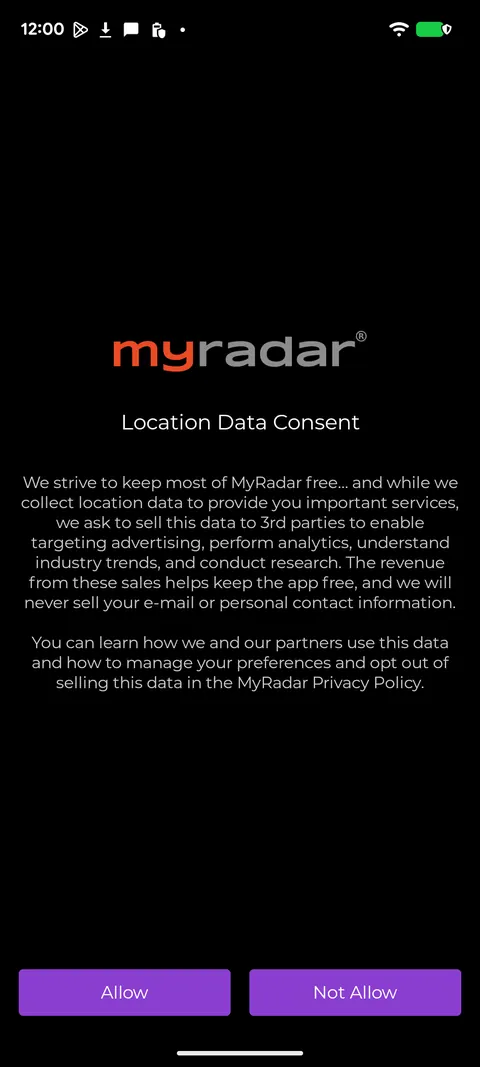
- Splash prompt to enable location, followed by the system permission dialog, then a consent screen and an optional precise-location prompt.
- How it makes money
- Visible: banner and skippable video ads, a paywall with a 3-day free trial then $4.79/month or $35.99/year, and several locked features (road weather full view, RouteCast, historical radar, hurricane tracker, per-station radar, webhooks, premium mosaics, ad-free).
Screenshots
10 of 32 screens, captured on a real phone with sample data.
Share sheet Home - live radar map Video player detail Road weather upsell Road weather options Onboarding - enable location Map type options Ad landing page Location permission dialog Location data consent - +22 more screensFree with an account
Screenshots: © ACME Atronomatic, LLC, shown for commentary.
See all 32 screens — create a free accountSee every screen
The full map has all 32 screens, every feature and where each one lives. It is free with an account.
What could be better
Our read of the map, the store listing and recent reviews.
Keep radar tiles rendering when the user zooms in or outmedium
Users report the map going black or not loading when zoomed, so the core radar fails. Keep the last good tiles on screen while new ones load, and show a clear retry state instead of a blank map.
Remove ads for users who bought ad-free or a one-time upgrademedium
Paying users say ads came back after reinstalling or a later update. Tie the ad-free entitlement to the account or purchase record, and suppress all ad placements for entitled users.
Ask for location consent without naming third-party data sharingsmall fix
Users say the app sells or shares location and driving data, and the consent wording mentions third parties. Ship a consent screen that lists only the data actually collected and offer an opt-out that still works.
Keep user settings, layers and widgets intact through app updatesmedium
Users say updates wipe their preferences and break the home-screen radar widget, so they lose setup and alerts. Store settings in a backed-up profile, migrate them on update, and test widget tap-through before release.
Merge the location permission steps into one clear requestsmall fix
The system dialog, consent prompt, precision prompt and explainer stack up and confuse users. Show one explainer that states the purpose, then a single system request, and ask for precise location only when a feature needs it.
Let users confirm or set their location manually when it is wrongmedium
Users say the app picks a distant place or cannot be set to their own location. Show the detected place with a confirm step and a search box to set or save a location.
Show upcoming radar frames alongside past frames in the loopmedium
Users say the live radar only shows past imagery and nothing forward. Add a short forecast radar segment after the current time, clearly labelled, to the animated loop.
Send weather alerts only for the user's area and confirm deliverymedium
Users get repeated alerts for no weather and report no alert before a big storm. Filter alerts by the user's location and severity, cap repeats, and show a history so users can see what was sent.
Want an app like this, but better?
Tell us the idea. We research it, and build it for you.
Submit your idea