
How Weather Forecast by WeatherBug works
Xad, Inc. · Weather
Android
What it does
WeatherBug is a weather app providing local current conditions, hourly and 10-day forecasts, live precipitation radar, lightning tracking via Spark, and severe weather alerts. It also includes weather-related news videos and customizable alerts.
Who it is for: People who want local weather forecasts, radar, lightning tracking, and severe weather alerts for their saved locations.
Key features
FAQs and support
Help articles by platform and topic, with support contact.
Ad-free subscription promotion
Promotes a paid Sparky subscription to remove ads, with a Try Free button.
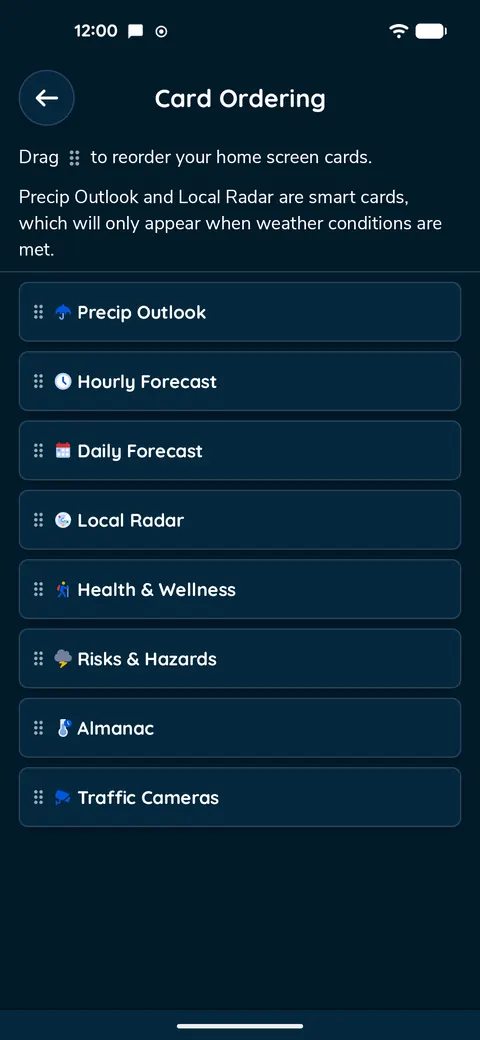
Home card ordering
Reorder home screen cards.
Lightning tracking (Spark)
Tracks nearby lightning strikes and shows alerts and safety tips.
Settings access
Open the settings screen from the navigation drawer.
Unit settings
Choose temperature, distance, precipitation, wind speed and pressure units.
The main user flow
- View current conditions and hourly or daily forecast on the home screen
- Open Maps to view live radar and lightning layers
- Track nearby lightning and weather alerts through Spark
- Configure units, notifications and card order in Settings
- Find help via FAQs and support contact
- Navigation
- Bottom tabs (Home, Hourly, Daily, Maps, Video) plus a side navigation drawer for Settings, Card Ordering, FAQs, About and legal links.
- Onboarding
- A notification prompt on the home screen asks users to enable alerts; the drawer also promotes an ad-free subscription. No multi-step onboarding was captured.
- How it makes money
- An ad-free Sparky subscription is promoted in the navigation drawer with a Try Free button. AdChoices is linked, implying ads are shown in the free tier. No prices were visible.
Screenshots
10 of 19 screens, captured on a real phone with sample data.
Spark - lightning strike map (web) Home - current conditions and forecast Hourly forecast details Video - news clips featured Customized alerts Navigation drawer menu Daily forecast - 10 day Video - news clip list Settings - units and alerts Card ordering - home layout - +9 more screensFree with an account
Screenshots: © Xad, Inc., shown for commentary.
See all 19 screens — create a free accountSee every screen
The full map has all 19 screens, every feature and where each one lives. It is free with an account.
What could be better
Our read of the map, the store listing and recent reviews.
Restore a map-first home screen with fewer cards by defaultmedium
Reviewers say the map was removed from the home screen and the page now shows too much information to scan. Put the local map and current conditions first, and collapse secondary cards behind a tap.
Limit ads to browse screens and never place them over full pagessmall fix
Reviewers report full-page ads, pop-ups and promotions in the free tier. Allow at most one banner on browse screens, no interstitials on data screens, and keep the ad-free option out of the first drawer view.
Show all ten forecast days with a date on every rowsmall fix
A 10-day view that shows 9 days and omits dates per row makes the forecast hard to read. Render all ten rows, each with weekday, date, high, low and precipitation chance.
Post one forecast notification per location that matches the Home temperaturemedium
Users see two persistent notifications for one location and temperatures that differ from the Home screen. Use one notification per location, read from the same data as Home, and refresh both together.
Cut background battery drain and fix freezes and launch crashesmedium
Reviewers report heavy background battery use, phone freezes and crashes. Limit background work, profile app startup, and make launch failures recover without a reinstall.
Let users save any map pin as a location, not only citiesmedium
Saved places are limited to cities, so a user ten miles from one cannot save their spot before a storm. Let a favourite be created by dropping a pin on the map and show alerts for that point.
Keep past radar frames and show the data age on every framemedium
Reviewers say past radar frames were removed and that radar lags or shows a blank map. Keep a playable history, label each frame with its time, and show a clear message when radar data is unavailable.
Show what location data is shared before it is shared and offer an opt-outsmall fix
Users say location is passed to third parties after an update and they uninstalled. Add a first-run consent screen and a settings toggle, and link the data-use page from both.
Want an app like this, but better?
Tell us the idea. We research it, and build it for you.
Submit your idea