
How AppSales (discovery/deals niche) works
ts-apps GmbH
Android
What it does
AppSales is a deals tracker for Google Play that surfaces apps and games currently on sale or temporarily free, lets users track prices in a watchlist and view price history, and browse popularity charts.
Who it is for: People who want to track app and game prices, sales, and free offers on Google Play.
Key features
About and licenses
About info and open source license listing.
Currency and country
Choose currency and country for prices and local ratings.
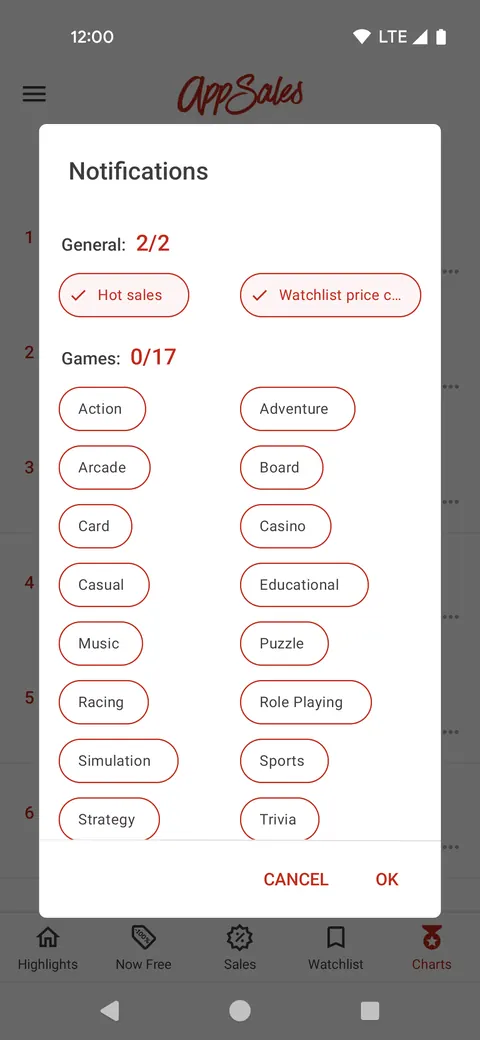
Push notifications
Permission prompt and per-topic alert preferences for deals and price drops.
Category alert toggles
Enable or disable deal alerts per game genre and app category.
Deal filters
Filter the deals list through a filter action.
Deals list
Browse discounted and free apps and games with prices, ratings and install counts.
The main user flow
- Browse deals on Home or Sales, filter, open an app's price sheet and view Google Play
- Add apps to the watchlist and receive price-drop notifications
- Browse Charts ranking over 48 hours, 30 days or 1 year
- Configure currency/country, theme and notification categories
- Unlock 365-day price history via Premium or a rewarded video ad
- Navigation
- Bottom navigation bar with Highlights, Now Free, Sales, Watchlist and Charts tabs; settings and filter reached from the top bar and overflow.
- Onboarding
- Notification permission prompt shown at launch; no separate onboarding seen.
- How it makes money
- Sponsored app ad cards in lists, a Premium paywall offering 365-day price history unlockable by watching a rewarded video ad for 24 hours, and a voucher redemption field.
Screenshots
10 of 30 screens, captured on a real phone with sample data.
Sales list with ad Redeem voucher - empty form Unlock Premium via video ad Settings main Item overflow menu App price sheet - 60 day history Share sheet - AppSales receive share About - analytics opt-out Watchlist - empty state Notification preferences - +20 more screensFree with an account
Screenshots: © ts-apps GmbH, shown for commentary.
See all 30 screens — create a free accountSee every screen
The full map has all 30 screens, every feature and where each one lives. It is free with an account.
What could be better
Our read of the map, the store listing and recent reviews.
Make watchlist search find apps reliably before adding alertsmedium
Users report search misses popular or exact-name apps, so watchlist alerts cannot be set up. Ship a catalogue-backed search that matches partial and misspelled names and offers a Google Play-linked add action for each result.
Send price-drop alerts only for watched apps and make delivery dependablemedium
Users miss sales on watched apps while receiving alerts for apps they never tracked. Route watchlist price cuts to a separate, reliable channel and show users a delivery check in settings.
Visually separate sponsored cards from deal listingssmall fix
Sponsored app cards sit in deal lists with no clear separation, and users tap them believing they are sale items. Label ads with a fixed tag and keep them out of the discount-badge ordering.
Verify displayed prices against the Play Store and flag mismatchesmedium
Users see prices in the app that differ from Play Store, and report wrong ratings. Re-check listed prices on a schedule and show a last-checked time and a report action on each deal.
Offer a one-tap reject-all consent screen on first launchsmall fix
Users find cookie and vendor consent hard to reject, with dozens of interest toggles to uncheck, and uninstall as a result. Show a single reject-all choice with equal weight to accept, before any data collection starts.
Make the Premium unlock reliable and state its terms before the admedium
Users report the rewarded video unlock reporting no ads available, and that Premium is gated behind one-day ad access. Show the unlock option only when an ad is ready, and show the paid one-time or subscription price alongside it.
Add a full backup and restore covering watchlist, settings and dismissed appsmedium
Export covers only dismissed apps and the saved CSV cannot be imported, and watchlists are lost after sign-in. Back up all user data to one file and restore it, with a check that restored items appear.
Want an app like this, but better?
Tell us the idea. We research it, and build it for you.
Submit your idea