
How Screen Recorder - XRecorder works
Five Stars Apps Inc. · Video Players & Editors
Android
What it does
XRecorder records device screen video with audio, takes screenshots, and offers facecam, drawing, region and timed recording. It includes a built-in video editor and a trash for deleted recordings.
Who it is for: People who want to record their device screen with audio, take screenshots, and edit the recordings on their phone.
Key features
Tutorial
Step-by-step guides for recording features.
Floating ball
Persistent on-screen control to start, stop and access tools.
Facecam
Overlays the front camera feed on the recording, with adjustable effects.
Screen recording
Records device screen video in HD, with audio, from a floating ball or notification controls.
Trash
Keeps deleted recordings for 24 hours; can be disabled.
Drawing brush
Annotates the screen while recording.
The main user flow
- Grant notification, floating ball and usage permissions
- Start a screen recording via floating ball or notification panel
- Configure audio source, quality, orientation, facecam
- Take a screenshot or edit a recording
- Browse tutorials and FAQ for help
- Navigation
- Home screen with tile shortcuts and bottom tabs (Record, Photo, Edit, Settings); tools overflow menu offers Trash, Timed Recording, Tutorial and FAQ.
- Onboarding
- Permission requests for notifications and floating ball/usage access, a battery optimization prompt, short how-to-start tip sheets, and a tutorial index.
- How it makes money
- Pro paywall with Weekly ($3.59) and Lifetime ($24.99) plans, a Pro feature list, and an in-app promotion for another app with an INSTALL button. Ads and watermarks are removed only with Pro.
Screenshots
10 of 28 screens, captured on a real phone with sample data.
Home with app promo overlay FAQ list Tutorial - audio source (scrolled) Tools more menu How to start hint (floating icon) Trash - empty state Pro subscription paywall Avoid abnormal stop dialog Notification permission prompt Home - tools grid - +18 more screensFree with an account
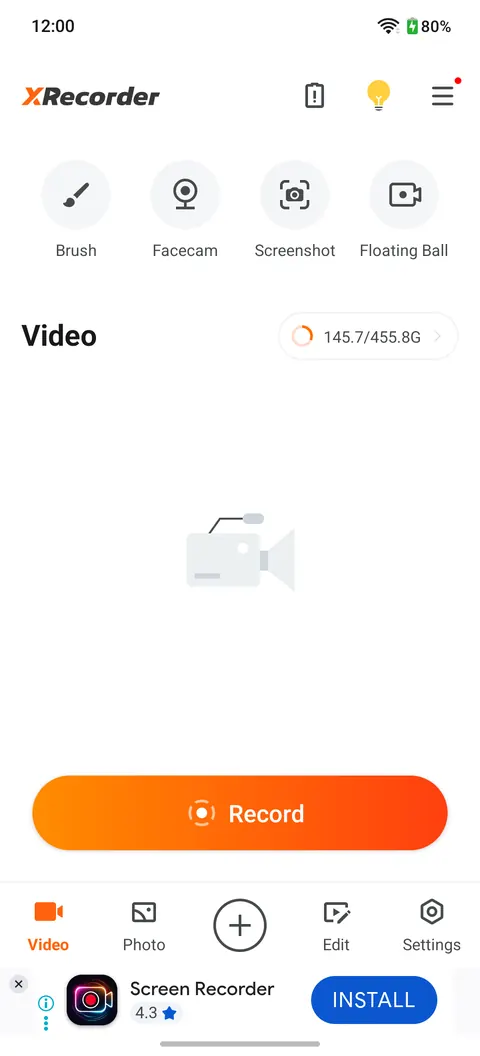
Screenshots: © Five Stars Apps Inc., shown for commentary.
See all 28 screens — create a free accountSee every screen
The full map has all 28 screens, every feature and where each one lives. It is free with an account.
What could be better
Our read of the map, the store listing and recent reviews.
Keep recordings running until the user stops them, and show why when they endlarge
Reviews report recordings stopping mid-session with no message, so users lose footage. Ship a recorder that holds its state through long sessions and shows a clear reason, with saved partial files, whenever it halts.
Verify audio capture at start and warn when no sound is being capturedmedium
Many reviews say recordings have no sound at all, even with settings correct. Check the chosen audio source before recording starts and show a warning in the recording screen when no audio is detected.
Fix audio sync so recorded sound matches the picturemedium
Reviews describe audio that is delayed, glitching or out of sync with video, and editing makes it worse. Align audio timestamps during capture and keep them aligned through the built-in editor.
Make the floating control stay visible and reliable over other appsmedium
Reviews say the floating ball disappears or pops up unprompted, and in one case the stop button cannot be tapped. Keep the control pinned on top, hide it only on user request, and keep stop reachable in every state.
Limit ads and promos on first run and keep them out of the recording flowsmall fix
Users report ads on launch, ads that cannot be closed, and a cluttered home screen. Show permission requests in one sequence and no promo or ad before the first recording, with a visible close control on every ad.
Keep Pro entitlement stable across updates and make restore reflect the real purchasemedium
Reviews say Pro status is lost after an automatic update and restore reports success yet denies membership. Verify entitlement on each launch, restore from the store record, and show the plan status plainly when restore fails.
Explain what each tutorial link opens before leaving the appsmall fix
Tutorial links send users to external Reddit pages, so help is not in the app. Add in-app step guides for the recording flows and label any external link before opening it.
Want an app like this, but better?
Tell us the idea. We research it, and build it for you.
Submit your idea