How VLC for Android works
VIDEOLABS · Video Players & Editors
Android
What it does
VLC for Android is a media player that plays local video and audio, network shares and streams, and organises media into playlists. It includes an equalizer and filters.
Who it is for: People on Android who want to play local video and audio, network shares and streams, and organise their media into playlists.
Key features
Playlists
View, play, shuffle and organise playlists.
Create playlist
Create a new playlist or add items to an existing one, with replace option.
Media access permission
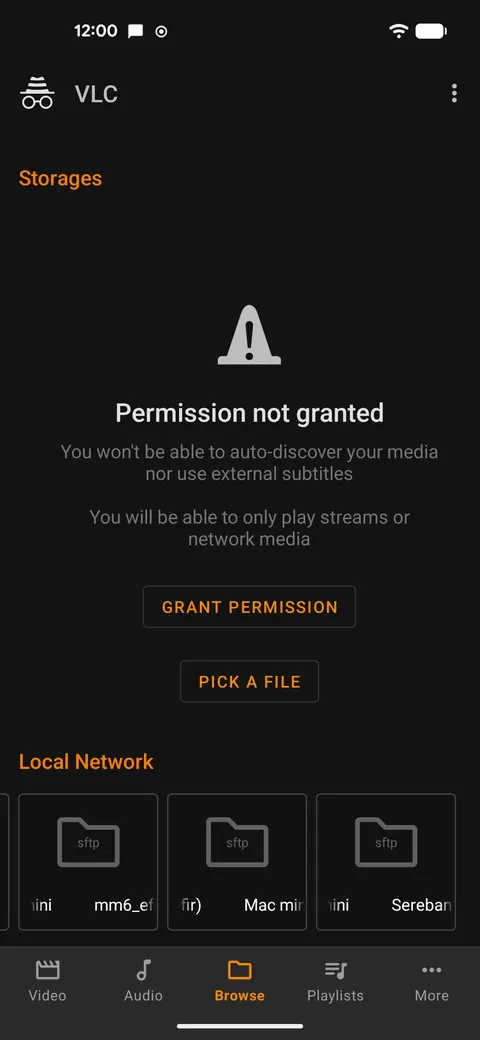
Prompts for file access; without it media cannot be auto-discovered.
Search
Search within libraries and playlists.
File browser
Navigate storage and network folders.
Network shares (SFTP)
Discover and browse SFTP shares on the local network.
The main user flow
- Browse and play videos from the Video tab
- Browse and play music from the Audio tab
- Browse storage and SFTP network shares and play files
- Create, rename, delete and play playlists from folders or existing lists
- Open a network stream from More
- Navigation
- Bottom navigation with Video, Audio, Browse, Playlists and More tabs; sheets and menus for display and sort options.
- Onboarding
- A notification permission prompt on launch, a 'What's new' sheet for version 3.7, and media access permission requests within the library screens.
- How it makes money
- none seen
Screenshots
10 of 36 screens, captured on a real phone with sample data.
Home - Videos list Audio library Playlist detail More tab Equalizer settings Playlist more actions menu What's new in 3.7 sheet Permissions sheet More options dialog (incognito) Browse - storages and local network - +26 more screensFree with an account
Screenshots: © VIDEOLABS, shown for commentary.
See all 36 screens — create a free accountSee every screen
The full map has all 36 screens, every feature and where each one lives. It is free with an account.
What could be better
Our read of the map, the store listing and recent reviews.
Keep word spacing intact in embedded and external subtitlesmedium
Many reviews report subtitles with words running together after updates. Render subtitle text with correct word spacing and test embedded .mkv and external subtitle files before each release.
Let users move subtitles away from the screen edge and player controlssmall fix
Subtitles can sit behind the controls or outside the visible picture, and there is no position option. Add a subtitle position setting and keep subtitles visible when controls show or hide.
Keep audio routed correctly after pause, resume, reopen and Bluetooth connectmedium
Users report silent playback after pausing, reopening, or connecting AirPods or Bluetooth hearing devices, with audio switching to the phone speaker. Re-acquire the audio output on resume and keep the chosen route.
Keep subtitles and playback working while casting, without freezinglarge
Casting drops subtitles and reports freezing mid-stream. Support subtitles on cast sessions and fix stream stalls so casting does not require reinstalling the app.
Stop unprompted playback when a device connects or wakessmall fix
Reviews say the app starts itself on a TV, waking it from standby, and plays a song when a car connects. Add a setting that prevents autoplay on connection or wake and make it off by default.
Ask for media access once, with one clear choice and no repeated bannerssmall fix
The map shows media-permission warnings with grant buttons on several library screens, plus a permissions sheet with three access levels and a separate notification prompt. Ask once, explain what each level allows, and stop repeating the banner.
Show every media file on storage and keep old and new downloads playablemedium
Some reviews say videos are treated as audio, files from other folders disappear, and older downloads cannot be played alongside new ones. Scan all media folders and classify files by their actual type.
Block duplicate tracks in playlists and let users delete a broken playlistsmall fix
One review reports duplicated songs creating over 6000 tracks and a playlist that could not be deleted. Reject duplicate entries on add and provide a delete path for playlists that fail to load.
Want an app like this, but better?
Tell us the idea. We research it, and build it for you.
Submit your idea