How SHEIN-Shopping Online works
ROADGET BUSINESS PTE. LTD. · Shopping
Android
What it does
SHEIN is an online fashion and lifestyle shopping app selling clothing, shoes, beauty, home, accessories and electronics at low prices. It offers browsing by category, trend stores, search and visual search, a wishlist, cart, and order tracking.
Who it is for: Online shoppers who want to browse, compare and buy fashion, beauty, home, accessories and electronics products.
Key features
Country and location selection
Choose shopping country or region, which affects sign-in and prices.
Sign in and register
Account login and registration via email or phone.
Account recovery
Recover access via email, phone, payment info or order number.
Product browsing
Scrollable product feeds with prices, discounts and categories.
Promotions and sales
Sale banners such as Black Friday and time-limited offers.
Social login
Sign in with Google or Facebook.
The main user flow
- Browse the home or shop feed and tap product tiles
- Browse categories or trend stores
- Sign in or register to view the cart, coupons and orders
- Claim the new-user gift by spending a threshold
- Recover an account via email or phone verification
- Navigation
- Bottom tab bar with Shop, Category, Trends, Cart and Me, plus a header with search, visual search and wishlist.
- Onboarding
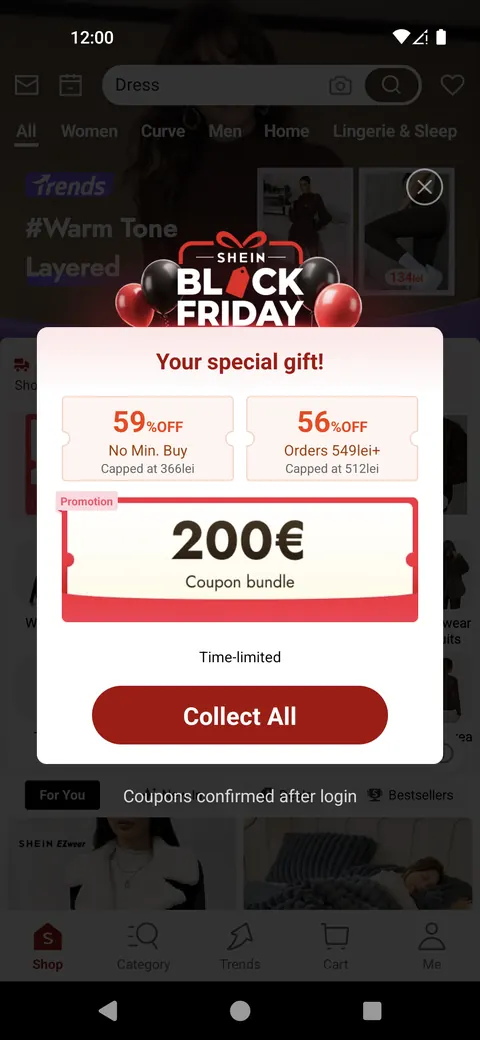
- Notification permission prompt on launch, a special-gift promo popup, and a sign-in prompt with email/phone, Google and Facebook options, plus a country/location picker.
- How it makes money
- Promotional popups with discount coupons (59% and 56% off with minimum order amounts), a New User Gifts coupon bundle, Black Friday sale banners, free shipping and returns, and loyalty points and wallet. No paywall or ads seen in the captured text.
Screenshots
10 of 32 screens, captured on a real phone with sample data.
Home - Black Friday sale feed Category - browse categories Location search Me - account menu Settings promotion sheet Cart - empty, logged out Verification screen (blank) New user gifts page Sign in - email or phone Special gift promotion popup - +22 more screensFree with an account
Screenshots: © ROADGET BUSINESS PTE. LTD., shown for commentary.
See all 32 screens — create a free accountSee every screen
The full map has all 32 screens, every feature and where each one lives. It is free with an account.
What could be better
Our read of the map, the store listing and recent reviews.
Show the final charged total in the cart and lock it until checkoutmedium
Reviews say the cart shows one price and checkout charges more after vouchers or fees. Show every line, voucher and shipping amount in the cart, and charge only the figure shown there.
Show per-item refund status for multi-item returnsmedium
Users say one refund covers only part of a return parcel and refunds never arrive. Track each returned item separately with its own refund state and a clear amount, so partial refunds are visible.
Add a missing-parcel flow with courier proof and escalationmedium
Users report paid orders that never arrive or arrive partly, with support replying that the parcel was received. Let users open a missing-item case that requests courier scan proof and escalates automatically after a set time.
Give each support case a visible ID, status and named reply timelinemedium
Users say contact is hard and replies are generic or closed without a fix. Show each case with an ID, current state, and a promised reply time, and let users attach files directly in the case.
Cap bot-check prompts to one pass per sessionsmall fix
Users say the human check repeats every few seconds after they pass it, and it blocks normal browsing. Verify once per session, retry in place, and never reopen the check during a shop visit.
Limit promo popups and alerts, and use real close buttonssmall fix
Users complain of constant coupon ads, notifications and ads with fake close buttons. Show one promo after the first useful action, cap alerts per day, and make every close button do what it shows.
Show size and fit detail on product pages before purchasemedium
Users say items arrive in sizes other than the one ordered and fit differently from listings. Show measurements per size and a fit note on each product, and make size guidance visible before adding to cart.
Want an app like this, but better?
Tell us the idea. We research it, and build it for you.
Submit your idea