
How Video Editor & Maker - InShot works
SHANTANU PTE. LIMITED · Photography
Android
What it does
InShot is a mobile video and photo editor and collage maker. It offers video editing with effects, music, text and transitions, plus AI tools such as AI speech, auto captions and AI effects.
Who it is for: For people who want to edit videos and photos, make collages, and add effects, music, text, and captions on their phones.
Key features
AI speech (text to speech)
Converts typed text to spoken audio with selectable language and voice.
Help center
Tutorials, FAQ and feature guides.
InShot Pro subscription
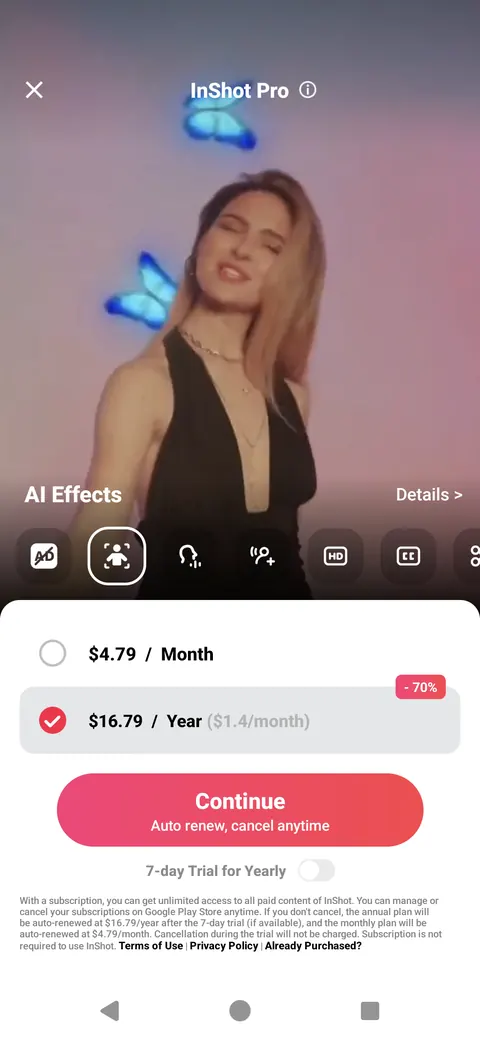
Monthly and yearly Pro plans with prices and a trial offer.
Voice selection
Filter and choose voices by accent, character and gender.
Auto captions
AI speech-to-text generating subtitles automatically.
Pro benefits
Lists Pro features such as no ads and premium tools versus the basic tier.
The main user flow
- Create a new video, photo or collage project from home
- Use AI Speech to convert typed text into voiceover
- Search help for features such as subtitle translation and auto captions
- Subscribe to Pro to unlock premium and AI features
- Navigation
- Home screen with CREATE NEW options, a side drawer with Help, Favorites and AI Tools, and a help search with recommendations; editing happens in a full-screen timeline editor with a bottom toolbar.
- Onboarding
- Asks for notification permission and photo/video access, and AI features require signing in.
- How it makes money
- Visible Pro subscription: $4.79/month or $16.79/year (70% off) with a 7-day yearly trial; Pro removes ads and unlocks AI features; ads are mentioned as removed in Pro, so free users see ads.
Screenshots
10 of 16 screens, captured on a real phone with sample data.
Home - create new Pro benefits comparison table AI Speech with video editor timeline AI Speech form with help overlay Help search results for subtitle translation Help menu with Pro-only benefits Side drawer - AI tools Photo and video access prompt AI Speech text-to-speech dialog (sign-in) Home with AI Effects and Pro offer - +6 more screensFree with an account
Screenshots: © SHANTANU PTE. LIMITED, shown for commentary.
See all 16 screens — create a free accountSee every screen
The full map has all 16 screens, every feature and where each one lives. It is free with an account.
What could be better
Our read of the map, the store listing and recent reviews.
Show export progress and let failed exports retry without losing the projectmedium
Exports can take hours, come out black, stall at a percentage and then fail. Show real progress and a clear error, keep the project intact, and let the user retry the export.
Autosave edits and restore the project after a crash or accidental deletemedium
Crashes and a single delete have wiped whole projects, including voiceover tracks. Autosave timeline snapshots on every change and let the user restore the last good version.
Add a visible skip control and cap ad length on every interstitialsmall fix
Ads can run about 3 minutes, have tiny close targets and block saving photos, and free users see them. Offer a clear skip after a few seconds and never make saving depend on tapping an ad.
Show trial end date and charge before checkout, and restore Pro through the accountmedium
Users were charged at trial signup or after cancelling, and paid Pro did not restore on a new device. Show the charge date and amount on the paywall, send a receipt, and tie entitlements to the sign-in account.
Pin audio clips to their video and show a waveform for split pointsmedium
Cutting video moves music out of sync, deleted audio keeps playing, and imported audio is trimmed. Lock each audio track to its clip and show a waveform so users can find cut points.
Build background preview proxies so the timeline stays smooth on importmedium
Editing stutters, frames jump and clips take long to load after selection. Generate low-resolution proxies in the background for smooth preview, and keep full-quality rendering for export only.
Let users type and preview AI speech before any sign-in promptsmall fix
The primary button asks for sign-in before the user can try AI Speech, and many AI tools sit behind Pro. Allow a free short preview and ask for sign-in only at export.
Want an app like this, but better?
Tell us the idea. We research it, and build it for you.
Submit your idea