
How Photo Editor - Collage Maker works
SHANTANU PTE. LIMITED · Photography
Android Android
What it does
A photo collage and editing app offering layout-based collages, carousel posts for social media, photo editing, and AI avatar styles. Most premium features are gated behind a subscription.
Who it is for: People who want to make photo collages, edit photos, and create social media carousel posts on their phone.
Key features
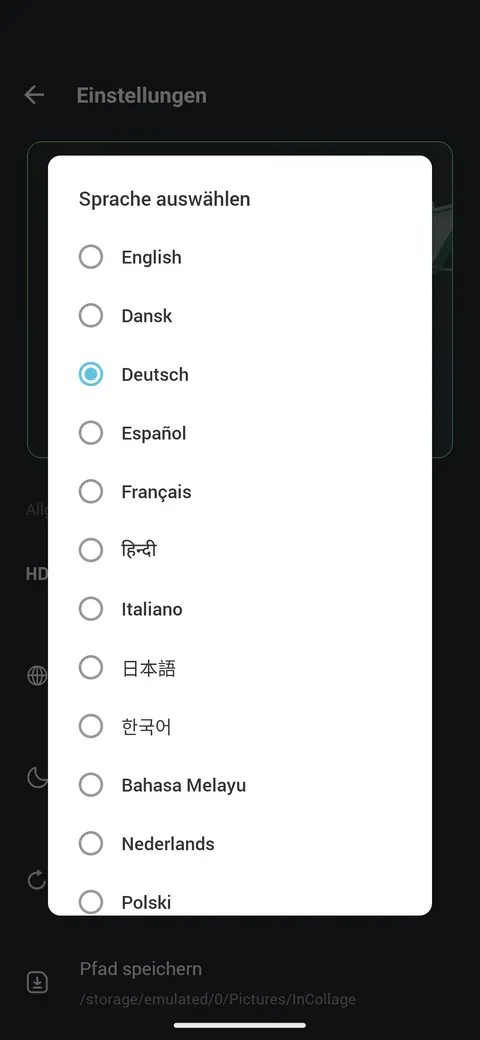
App language
Pick the app display language from about twelve options.
Export resolution
Choose high (4096px) or regular (1920px) export resolution.
Subscription paywall
Premium upsell offering all features, stickers and no ads for monthly or yearly plans.
App theme
Choose the app theme, defaulting to system.
Restore purchase
Restore a previous subscription purchase.
Save path
Set the folder where edited images are saved.
The main user flow
- Create a collage from Freestyle, Multi-fit, Stitch or Templates
- Edit or remove elements from a photo
- Generate AI avatar styles from a selfie
- Change settings such as language and export resolution
- Navigation
- A single home screen with tool tiles and a settings button; settings is a separate screen with dialogs for resolution and language.
- Onboarding
- No onboarding seen; the app opens straight to the home screen with a trial banner.
- How it makes money
- Subscription paywall with a 7-day free trial, monthly at $2.99 and yearly at $12.48, a 25% first-year offer at $9.36, and a settings upsell. Pro features and no ads are promised.
Screenshots
10 of 29 screens, captured on a real phone with sample data.
Home - collage tools and AI styles Limited-time 25% off offer Settings - general Purchase failed dialog Resolution choice dialog Home - Edit tab active Home - after closing offer Language picker dialog Language dialog (Danish selected) Language dialog (German selected) - +19 more screensFree with an account
Screenshots: © SHANTANU PTE. LIMITED, shown for commentary.
See all 29 screens — create a free accountSee every screen
The full map has all 29 screens, every feature and where each one lives. It is free with an account.
What could be better
Our read of the map, the store listing and recent reviews.
Let users dismiss every ad with a visible close control and no mis-tap redirectsmedium
Reviews describe ads that cannot be closed and hijack the screen, so users leave. Show a real close button on a timer, never place fake close icons, and never let an ad block the editor.
Remove fake virus, account-suspension and third-party install prompts from ad slotsmedium
Reviews report ads posing as virus scans or pushing other app installs, causing users to uninstall and distrust the app. Ban these ad formats in the ad policy and block install prompts from ad slots.
Make paid tiers ad-free and show clear billing status before and after cancellationmedium
Paying users report ads still appearing and being charged after cancelling. Make the ad-free entitlement tied to the purchase, confirm cancellation and renewal dates in-app, and offer a visible way to restore access.
Keep save and export free of forced ads and cap ad frequency on the free tiersmall fix
Ads triggered on every save or export block the final step of the task. Limit interstitials to a set number of saves per session and never gate the save action behind an ad.
Autosave in-progress collages as drafts that can be reopened and edited latermedium
Users cannot save a collage to return to later or keep an edit draft, forcing them to finish in one sitting. Add a project list that stores layers and layouts for reopening.
Replace the generic purchase-failed dialog with the reason and a next stepsmall fix
The purchase failure dialog gives no clear explanation and only offers cancel or retry. Show the cause, the store account state, and a restore or contact option instead.
Remove the premium upsell repeated on every settings screensmall fix
Settings repeats a Join Now upsell and locks tools behind Pro without labels, making settings feel like an ad. Keep one upsell on the home screen and label Pro tools clearly where they appear.
Add a manual brush fallback when auto background removal misses regionsmedium
Background removal fails on detailed images and sometimes stops responding, forcing hours of manual erasing. Show a refine brush and a clear failure state when the cutout is incomplete.
Want an app like this, but better?
Tell us the idea. We research it, and build it for you.
Submit your idea