How Open Camera works
Mark David William Harman · Photography
Android
What it does
Open Camera is an open-source camera app for photos and videos with manual controls, timers, repeat capture, noise and Bluetooth LE remote triggers, and customisable volume keys and layout.
Who it is for: Open Camera is for people who want an open-source camera app for photos and videos with manual controls, timers and remote triggers.
Key features
Bluetooth LE remote
Control capture with a supported Bluetooth LE remote housing.
Filename settings
Set photo and video prefixes and timestamp format.
Gallery access
Open captured media and share it via the system share sheet.
Noise-triggered capture
Take a photo or video when a loud noise is detected, with adjustable sensitivity.
Orientation lock
Lock photo and video orientation to landscape or portrait.
Repeat mode
Auto-repeat capture a set number of times with a configurable interval.
The main user flow
- Grant camera permission, then take a photo or switch to video mode
- Configure timer or repeat capture in settings and shoot
- Open the gallery and share captured media
- Adjust capture triggers such as touch, volume keys, noise or Bluetooth remote
- Navigation
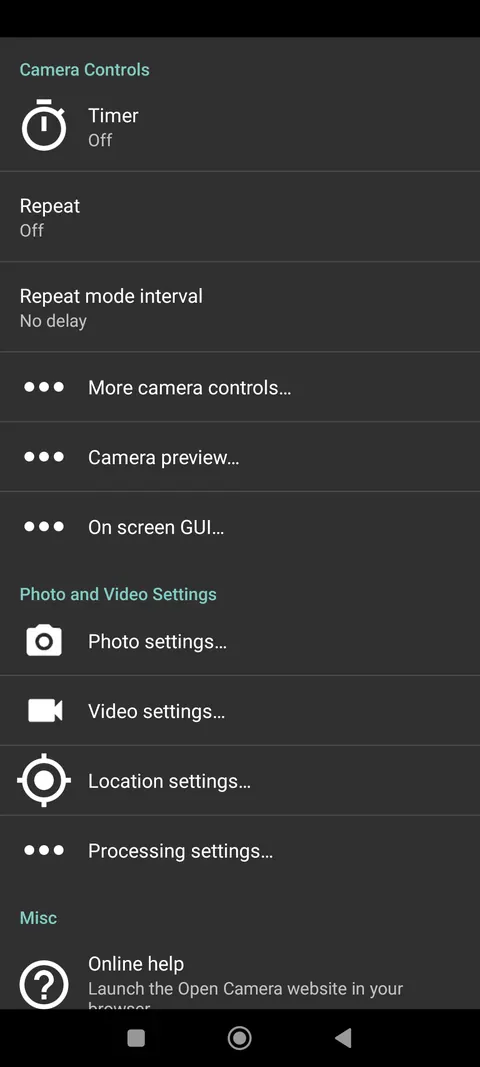
- Single main camera screen with a settings button leading to a long categorised settings list and popup dialogs; gallery and front-camera toggles sit on the camera screen.
- Onboarding
- Only a permission request for camera and microphone, with a reminder dialog if denied; no tutorial seen.
- How it makes money
- none seen
Screenshots
10 of 25 screens, captured on a real phone with sample data.
Home - photo mode camera Repeat count picker Camera screen in video mode More camera controls settings Open with app chooser Remote action during video picker Camera and microphone permission sheet Repeat mode interval picker Settings - misc section Settings - main menu - +15 more screensFree with an account
Screenshots: © Mark David William Harman, shown for commentary.
See all 25 screens — create a free accountSee every screen
The full map has all 25 screens, every feature and where each one lives. It is free with an account.
What could be better
Our read of the map, the store listing and recent reviews.
Let users pick an external microphone and confirm which input is recordingmedium
Reviews say the app ignores external mics and keeps using the phone mic. Add a visible input selector that lists connected Bluetooth and wired mics, and show the active one on the camera screen.
Add a focus lock and a way to stop continuous autofocus huntingmedium
Users report focus hunting, no focus lock, and no way to disable autofocus. Add an AF lock button on the preview and a setting to switch autofocus off for video.
Recover from failed or stalled recordings without a restartlarge
Reviews describe recordings stopping on their own, crashes when starting video, and a black camera screen after reopening. Add a recovery path that resets the camera and keeps the last working mode.
Make image processing optional and show what it changeslarge
Reviews complain of grainy low-light photos, lost detail when zoomed, and no option to turn post-processing off. Add a processing toggle, a processing level setting, and a preview of the output.
Group the settings menu by task and show that long lists scrollmedium
Reviews call the menu clunky, say parts scroll with no indication, and ask for better categorisation. Map shows a dense, long settings list with many nested pickers. Use task-based groups and a scroll cue.
Remember the last camera mode and reopen in it, with a clear mode switchsmall fix
Reviews say the app opens in video mode without prompting and cannot be switched back to photo. Restore the last-used mode on launch and show a clear photo/video toggle on the main screen.
Cap repeat capture with a visible stop and a shot count before it startssmall fix
A user reports that a single shot kept firing until the app was closed. Show the total shot count before capture starts, add an on-screen stop button, and default to a finite count.
Offer an ad-free paid tier with the ad policy stated before purchasemedium
The app is free and contains ads, with no in-app purchase. A reviewer complains about ads. Offer a one-time ad-free purchase and state the ad policy on the store listing.
Want an app like this, but better?
Tell us the idea. We research it, and build it for you.
Submit your idea