
How Video Maker works
SHANTANU PTE. LIMITED · Video Players & Editors
Android
What it does
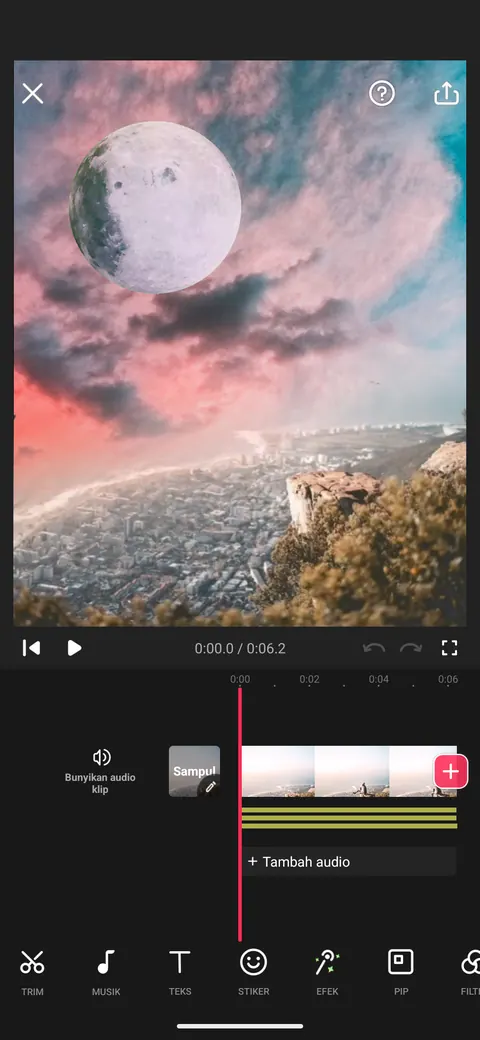
Video.Guru is a mobile video editor for Android that lets users trim, cut, add music, text, stickers, effects, filters and picture-in-picture, then export video at up to 2k/4k with selectable frame rate and quality. It also offers AI art, captions, screen recording and camera capture.
Who it is for: Android users who want to edit videos with trimming, music, text, effects, filters, and adjustable export settings.
Key features
FAQ help
Searchable help articles on common tasks.
Draft projects
Saved unfinished video projects listed on the home screen to reopen.
New project
Start a fresh video project from the home screen.
AI art
Generate AI-styled art and effects from media.
Background music
Add, edit and trim music tracks on the timeline.
Camera capture
Record video directly with the in-app camera.
The main user flow
- Create a new project or open a draft, edit on the timeline, then export with chosen resolution and frame rate
- Browse the in-app FAQ, search for help, and read category answers
- Switch interface language and manage Pro via paywall, trial and restore purchases
- Navigation
- Bottom-style home with draft list and shortcut tiles; editor uses a bottom toolbar of tools; settings and FAQ reached via top-bar icons.
- Onboarding
- No dedicated onboarding seen; media permission is requested on first use and a paywall with a 7-day trial appears early.
- How it makes money
- Visible Pro paywall with yearly at $14.39 per year, monthly at $5.99 and lifetime at $51.59, a 7-day free trial, and a Pro banner on home and settings. Ads are not seen in these screens, though the feature list mentions an ad-free experience.
Screenshots
10 of 23 screens, captured on a real phone with sample data.
Home - drafts and paywall banner FAQ - payment category Video editor - timeline with quick tools FAQ - search results for run Unlock All Features - feature list and plans Settings - main list Export settings - resolution, frame rate, quality Exit prompt - 7-day trial offer Media access permission request Editor - resolution selection - +13 more screensFree with an account
Screenshots: © SHANTANU PTE. LIMITED, shown for commentary.
See all 23 screens — create a free accountSee every screen
The full map has all 23 screens, every feature and where each one lives. It is free with an account.
What could be better
Our read of the map, the store listing and recent reviews.
Show one clear Pro status and make restore purchases reliablemedium
Reviews report Pro access vanishing after payment, including yearly and lifetime buyers, and restore failing. Instead, verify entitlement on each launch, show plan and expiry in settings, and offer a visible restore path with a support contact.
Remove ads and paywall prompts from active editingsmall fix
Users say ads appear every time they edit, even after paying, and that the paywall keeps returning. Instead, keep ads and upsells off the editing path and show the paywall only from explicit Pro entry points, not on exit.
Make export presets plain-language with a quality checkmedium
Users report 4K exports come out distorted and frame rate looks unsharp, and the export panel mixes resolution, frame rate and quality without guidance. Instead, offer named presets with the expected result and render a short test before a full 4K export.
Autosave every edit and keep drafts recoverablemedium
Users lose whole projects after hours of work, and progress autosaves oddly. Instead, save each change to the draft, keep a recoverable version history, and show a clear draft list so a failed session never erases the project.
Stabilise import and timeline playback on long clipslarge
Users report crashes on import, laggy playback and glitchy skipping on the timeline. Instead, transcode a proxy for timeline preview, show import progress, and fall back to a lower-resolution preview on weaker devices.
Keep audio intact after cutting and save voice recordingsmedium
Cutting an audio track silences the remaining clip, and voice recordings do not save. Instead, keep the audio stream linked after each cut and confirm each voice recording is written to the project before the user leaves the recorder.
Show a storage estimate before export and warn on low spacesmall fix
Long videos consume large amounts of device storage and users see errors about saving. Instead, show the estimated file size next to the chosen preset and warn before export if free space is too low.
Want an app like this, but better?
Tell us the idea. We research it, and build it for you.
Submit your idea