
How Filmora: AI Video Editor&Maker works
VBROADCAST LIMITED · Video Players & Editors
Android
What it does
Filmora is a mobile video editor that bundles AI video generation (turning photos and text prompts into short clips), template-based editing, and project management. Its headline AI features include Image to Video, Text to Video and AI Story.
Who it is for: People who want to create and edit short videos on their phone, using templates, AI video generation from photos and text, and project management.
Key features
Free showcase demo
Interactive one-click demo animating a photo before signing up to create.
Image to video
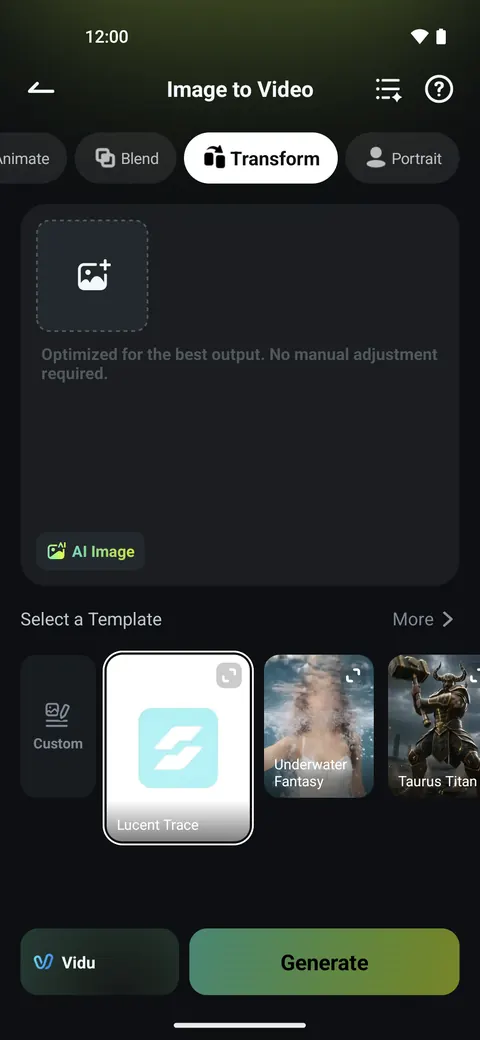
Turn an uploaded photo and prompt into an AI-generated video clip using modes such as Animate, Blend, Transform and Portrait.
Template selection
Pick a preset visual template to apply to the generated video.
Generative AI terms
Notices asking users to read and accept terms for AI generation features.
Prompt input
Text prompt describing the desired video, with example prompt suggestions.
AI tools menu
Drawer listing AI video tools such as image-to-video, text-to-video, auto cut, captions and remover.
The main user flow
- Open a template or AI tool from Home, fill in a prompt and photo, pick a model, and generate a video
- Browse trending templates on the Templates tab and apply one to a new project
- Review drafts, AI tasks and history in the Drafts tab
- Upgrade from the free plan via the Mine tab
- Navigation
- Bottom tab bar with Home, Templates, Drafts and Mine, plus a side drawer on Home listing AI tools and categories.
- Onboarding
- Permission prompts for notifications and photo access, a Free Showcase demo offering a one-click photo animation, and terms-of-service notices for generative AI features.
- How it makes money
- Free plan with a visible Upgrade button, Pro benefits (no watermarks, extra features), AI credits with a balance display, a Task Center, and a Creator Monetization Program entry; Seedance 2.5 is marked as a limited trial for Pro users.
Screenshots
10 of 21 screens, captured on a real phone with sample data.
Free Showcase result preview Image to Video - create form Mine - account and upgrade Home drawer with AI tools Select AI model sheet Drafts - empty state Notification permission prompt Image to Video FAQ and terms dialog Image to Video - Transform prompt filled Image to Video - Transform templates - +11 more screensFree with an account
Screenshots: © VBROADCAST LIMITED, shown for commentary.
See all 21 screens — create a free accountSee every screen
The full map has all 21 screens, every feature and where each one lives. It is free with an account.
What could be better
Our read of the map, the store listing and recent reviews.
Show refund and cancel options in-app before and after every chargemedium
Reviewers report charges with no working refund path and cancellations that are hard to complete. Ship a cancel-and-refund flow with request status tracking and a refund policy shown before purchase.
Keep features a buyer already paid for and label locked tools before purchasemedium
Users report tools moved behind a paywall after they bought a plan. Mark each tool's tier on its card and do not remove features from an existing paid tier without notice.
Show AI credit cost per model and per task before generation startssmall fix
Model names and credit costs are not explained in-line, and users run out of credits after one job. Show the cost and remaining balance on the model sheet and on the generate button.
Offer a free trial window before any paywall appearsmedium
Users say they are asked to pay right after sign-in and before they can make a video. Give a free generation or export window, then ask for payment at the point of export.
Make export reliable with progress, retry and format support checkslarge
Reviews report crashes partway through rendering, lag that adds hours of editing, and blank output. Test common formats, show render progress, keep partial work, and give a clear error with retry.
Let users set the on-screen text language and regenerate with editsmedium
Multilingual prompts produce mixed-language text and users have no way to correct it. Add a language field and a regenerate-with-edits step to the Image to Video form.
Merge terms notices into one first-use consent stepsmall fix
Separate terms dialogs interrupt each AI mode. Show one consent step on first use, then show mode-specific notes inline on the form instead of as blocking dialogs.
Want an app like this, but better?
Tell us the idea. We research it, and build it for you.
Submit your idea