
How MobiOffice: Word, Sheets, PDF works
Mobisystems, Inc. · Productivity
Android
What it does
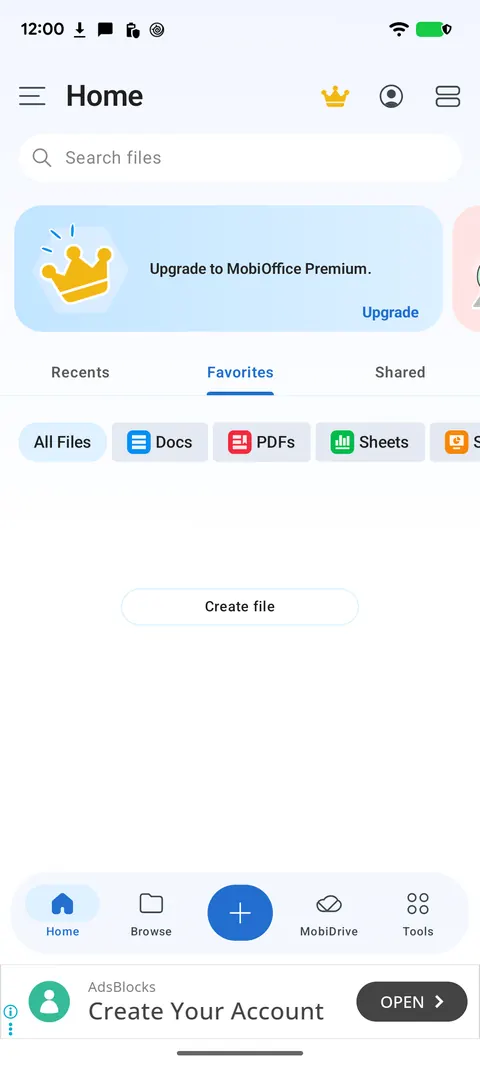
MobiOffice is a mobile office suite for viewing, editing and creating Word, Excel, PowerPoint and PDF files, with cloud storage and document scanning. The main screen is a file browser with recent and favourite files.
Who it is for: People who want to view, edit, create and scan Word, Excel, PowerPoint and PDF files on their mobile devices.
Key features
File browser
Lists recent and all documents with a Recents, Favorites, Shared and All Files tabs.
Third-party ad overlays
Full-screen ads from other apps placed over the file list, with buttons that open external content.
File type filters
Filter tabs for Icon, Docs, PDFs, Sheets and Slides.
Create document
Start a new document, spreadsheet, presentation or PDF, from blank or templates.
File search
Search bar that filters files by name and type.
Scan document
Scan paper into a PDF, Word or Excel file, which may require a separate scanner app.
The main user flow
- Browse, search and filter files by type
- Create a new document, spreadsheet, presentation or PDF from a template
- Scan paper into PDF, Word or Excel
- Upgrade to Premium via a weekly subscription paywall
- Enter an email address to receive a download link
- Navigation
- A side menu with Create document, Scan, Settings, Our Apps, Messages and Help; a bottom bar with Create, Browse, MobiDrive and Tools; and tabs for Recents, Favorites, Shared and All Files.
- Onboarding
- Asks for notification permission on launch, then shows a welcome message in Messages; account creation is prompted later via ads.
- How it makes money
- Premium paywall offering a 7-day trial for USD 0.59, then USD 11.99 per week with auto-renewal; frequent third-party ad overlays on the file list; cross-promotion of other apps such as MobiPDF.
Screenshots
10 of 23 screens, captured on a real phone with sample data.
File browser - Recents File browser - Recents (revisit) Messages - what's new File search with results Premium paywall - 7-day trial Side menu Install MobiPDF scanner offer File browser with third-party ad overlay Notification permission dialog Favorites with create-account ad - +13 more screensFree with an account
Screenshots: © Mobisystems, Inc., shown for commentary.
See all 23 screens — create a free accountSee every screen
The full map has all 23 screens, every feature and where each one lives. It is free with an account.
What could be better
Our read of the map, the store listing and recent reviews.
Let users save and export edited files on the free tier, or state the limit before editingmedium
Users edit a document and only learn at save time that saving, sharing or printing needs Premium. Show the free limits before editing starts and keep basic save and export free.
Cap full-screen ad frequency and make every ad skippable after a short delaymedium
Full-screen third-party ads appear on opening, on each file open and over the file list, sometimes unskippable for minutes. Set a per-session frequency cap and a skip button that appears within seconds.
Keep ad buttons visually separate from document actions and label them as adssmall fix
Ad overlays use buttons such as Continue Download and Activate Your Account that look like app actions. Mark ad content clearly, and never let an ad change app settings or default file handlers.
Show one paywall after the first completed task, not repeated upsells during file usesmall fix
Users report being asked to upgrade again after paying and at every simple step. Show the Premium offer once at a clear point, suppress it for paying users, and stop repeating it during file browsing.
Show the weekly renewal price and a visible cancellation path before purchasesmall fix
Users say the weekly auto-renewing price was not shown clearly and cannot find how to cancel. Put the renewal amount, period and cancel steps on the purchase screen and in settings.
Let users choose a save folder and avoid the save-error loopmedium
Users cannot pick where documents are stored and get a folder prompt on every save with save errors. Offer a default folder, a persistent save location setting and a clear error message with retry.
Make the account optional and ask for sign-up only when cloud sync is usedsmall fix
Users are asked to register before they can save or open a file. Keep local editing and saving free without an account, and prompt for sign-up only from the MobiDrive or sharing flow.
Remove unrelated product thumbnails from file lists and search resultssmall fix
File lists and search results show grids of unrelated product images, which makes the browser look broken. Show only the user's own files, with real document previews, and no unrelated image grid.
Want an app like this, but better?
Tell us the idea. We research it, and build it for you.
Submit your idea