
How Yandex Browser with Alice AI works
DIRECT CURSUS COMPUTER SYSTEMS TRADING L.L.C · Personalization
Android
What it does
Chromium-based browser from Yandex with an AI assistant (Alice), page summarisation and translation, a Tableau tile home page, ad blocking and sync with a Yandex ID.
Who it is for: People who want a Chromium-based browser with an AI assistant, page summaries, translation, ad blocking, and Yandex ID sync.
Key features
Settings
Theme, zoom, tab display, language, search, privacy, home-screen cards.
AI tools
Editor, Translation, Summary page tools (Alice AI).
History, bookmarks, downloads
Library pages reachable from the menu.
Web browsing
Smart address bar, page toolbar, tab grid.
Default browser prompts
Role chooser and menu promo.
The main user flow
- Open a site from tiles or the omnibox
- Summarise or translate a page
- Tune settings and theme
- Review history, bookmarks, downloads
- Navigation
- Bottom omnibox plus toolbar (share, new tab, tab count, menu); main menu is a full-width grid sheet.
- Onboarding
- Notification permission and default-browser role chooser, no account needed.
- How it makes money
- Free; promotes Yandex services (Mail, Alice, Zen feed); no ads seen on first run.
Screenshots
10 of 19 screens, captured on a real phone with sample data.
Home (Tableau) Web page Settings (home screen and AI tools) Main menu History Tab switcher Bookmarks (empty) Set as default browser Notification permission Settings - +9 more screensFree with an account
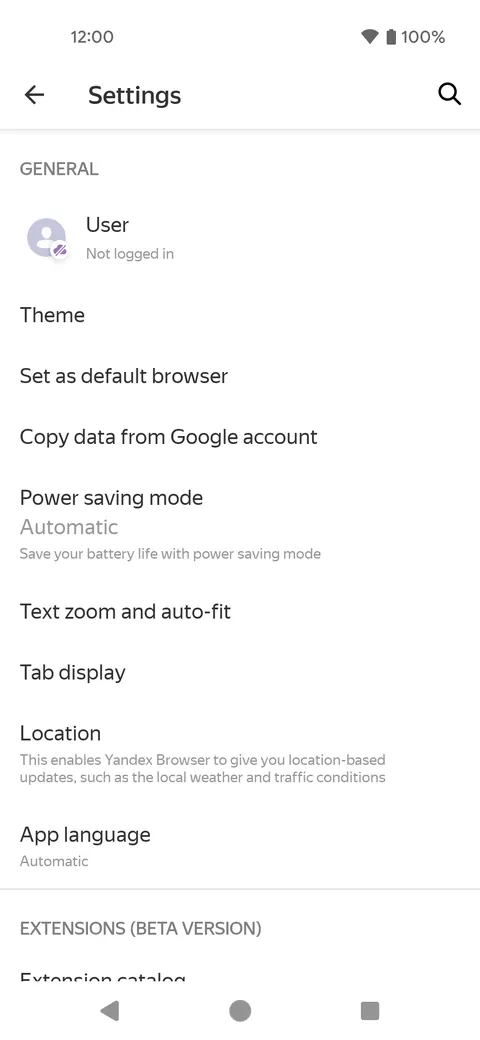
Screenshots: © DIRECT CURSUS COMPUTER SYSTEMS TRADING L.L.C, shown for commentary.
See all 19 screens — create a free accountSee every screen
The full map has all 19 screens, every feature and where each one lives. It is free with an account.
What could be better
Our read of the map, the store listing and recent reviews.
Fix startup delay, freezes and crashes before adding featureslarge
Reviews describe slow loads, freezes that stop taps, and repeated crashes after updates. A new app should measure cold start and hang rates per release and block releases that regress them.
Reduce repeated bot-check challenges during normal searchmedium
Users are repeatedly shown a 'not a robot' challenge, sometimes every two searches, which blocks search and answers. Use fewer challenges, pass trusted sessions through, and show a clear retry path instead.
Ship a real content blocker with user-editable filter listsmedium
Built-in blocking is called subpar, YouTube ads still show, and users cannot add third-party tracker filters. Let users add filter lists and show a per-site block count instead of a single weak toggle.
Let users turn off AI promos and AI features in one placesmall fix
AI promo popups show on first page load and AI tools appear on the home page, and users call the feature intrusive and unwanted. Offer one switch that hides AI buttons, popups and AI summaries, with the choice kept after updates.
Make privacy and location toggles stick and show what is trackedmedium
A user reports that location tracking continued after turning it off and the page refreshed. Make each privacy toggle take effect immediately, verify it in tests, and show a plain log of what data the app still sends.
Put installed extensions one tap away from the main menumedium
Users find installed extensions hard to reach and some Chrome extensions do not run. Add an extensions entry to the main menu and publish a clear list of supported extension APIs.
Support Android autofill so third-party password managers workmedium
Users say the browser does not support Android autofill and push their own password manager, so their password manager cannot fill logins. Implement the Android autofill service and test with common managers.
Fix tab management: undo close, drag reorder and list/grid switchsmall fix
Users report no way to undo closing tabs, drag-and-drop reordering stopped working, and the list/grid switch fails. Add undo for closed tabs and make reordering and view switching work reliably in the tab switcher.
Want an app like this, but better?
Tell us the idea. We research it, and build it for you.
Submit your idea